
Free CD Ripper is a Windows-based application designed to extract audio tracks from CDs and convert them into various digital formats. While no longer actively updated, it remains a functional tool for those seeking a simple solution to digitize their CD collections. This review will delve into its features, pros, cons, and alternatives, providing a comprehensive assessment of its capabilities and limitations in today’s digital landscape.
Ease of Use and Interface
Free CD Ripper boasts a user-friendly interface, making it accessible even to users with minimal technical expertise. Upon installation and CD insertion, the program automatically detects and displays the tracks present on the disc. Each track’s information, including title, artist, and duration, is clearly presented. The process of selecting tracks for ripping is straightforward: simply click on the desired track and select the “Rip” button. While the interface is functional, its design is noticeably outdated compared to modern software. The visual elements feel somewhat dated, lacking the polish and streamlined aesthetics of more recent applications. This is a significant drawback, particularly for users accustomed to more visually appealing and intuitive software interfaces.
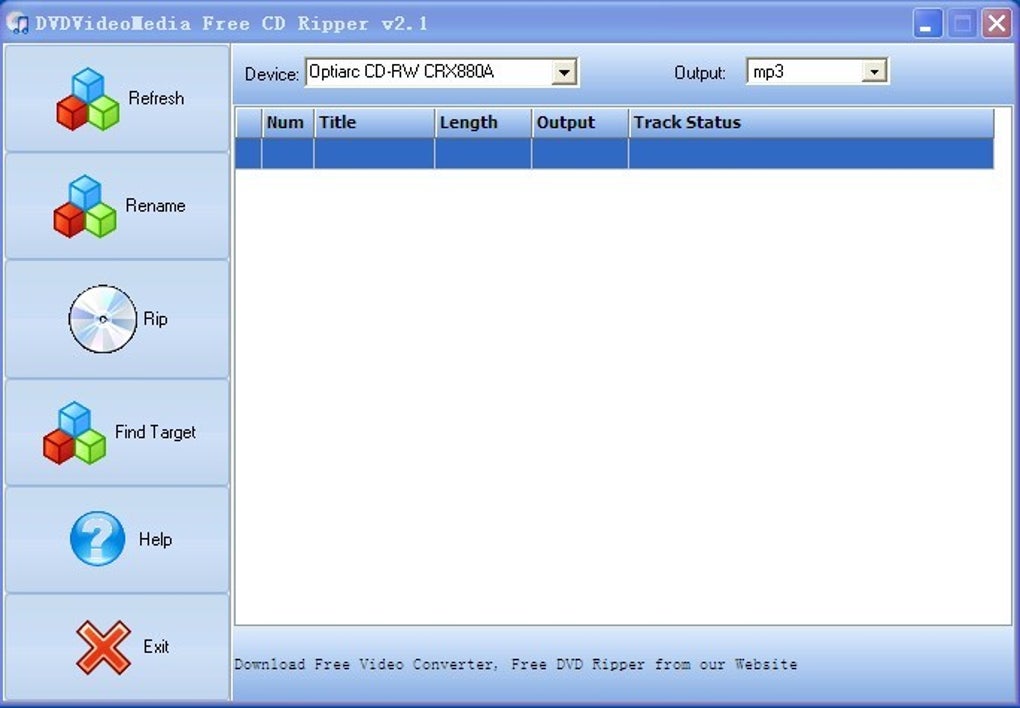
The simplicity of the program is a double-edged sword. While it caters to novice users, it also lacks advanced features found in more sophisticated CD ripping software. The absence of batch processing, for instance, can be a significant inconvenience for users wanting to rip multiple CDs or large numbers of tracks without individual selection. Advanced options for audio quality settings or metadata editing are also missing, limiting customization options for experienced users.
Functionality and Features
Free CD Ripper’s primary function is converting audio CDs into digital formats. The program supports the creation of MP3 files, a standard format well-suited for portability and compatibility across devices. This limited format support is a critical limitation for users seeking greater flexibility in their audio file choices. While MP3 remains popular, other formats like FLAC (lossless compression) or WAV (uncompressed) offer superior audio quality for archiving or high-fidelity playback. The absence of these options restricts Free CD Ripper’s appeal to users who require pristine audio reproduction.
A notable feature is Free CD Ripper’s ability to automatically retrieve track information from online databases. This is particularly helpful for CDs lacking proper tagging, ensuring that your digital music library is accurately organized with artist and song titles. However, the reliability of this feature can vary, and users may occasionally need to manually correct inaccurate information. This automatic metadata retrieval feature significantly enhances the user experience, reducing the need for manual data entry and improving overall organization.
Performance and Speed
The speed of ripping with Free CD Ripper varies depending on the computer’s hardware and the size of the CD. While the process generally runs smoothly, users have reported that it can be relatively slow compared to other CD ripping software. This slower processing speed could be frustrating for those with large CD collections or limited time. The absence of any multi-threading or optimization techniques could be responsible for the slower performance.
Pros and Cons
Pros:
- Ease of use: The straightforward interface makes it easy for beginners to use.
- Automatic track information retrieval: This feature simplifies the organization of digital music files.
- Free software: The program is available at no cost.
- MP3 format support: It caters to the widespread popularity of the MP3 format.
Cons:
- Outdated interface: The visual design is dated and lacks modern aesthetics.
- Limited format support: The program only supports MP3 conversion, excluding other formats like FLAC or WAV.
- Slow ripping speed: The process can be relatively slower than competing software.
- Lack of advanced features: Features like batch processing and advanced audio settings are absent.
Alternatives to Free CD Ripper
The software market offers several alternatives to Free CD Ripper, each with its own set of advantages and disadvantages. Several popular options are mentioned below:
- Express Rip CD Ripper: This program offers high-quality ripping and supports various output formats beyond MP3, improving versatility for users.
- Free MP3 CD Ripper: Another free option, this tool provides conversion to MP3 and is often cited for its ease of use and consistent performance.
- Free CD to MP3 Converter: Another straightforward converter, focusing primarily on MP3 conversion.
- AudioGrabber: A powerful audio extractor with broader format support, which provides more versatility compared to Free CD Ripper’s single-format output.
- MC Audio CD Ripper: This option stands out with excellent ratings, implying a solid user experience, though more detailed specifics on feature sets aren’t readily available.
- Easy CD-DA Extractor: A feature-rich tool, often cited for its versatility, including handling of complex audio formats, as well as offering support for numerous output formats.
These alternatives provide a spectrum of options, ranging from simple MP3 converters to sophisticated tools with advanced features and multiple format support. The choice of an appropriate alternative should depend on the user’s specific needs and technical expertise. The best choice will be determined by the priorities of individual users.
Conclusion
Free CD Ripper remains a functional tool for basic CD ripping tasks. However, its outdated interface, limited format support, and slow ripping speed present significant drawbacks. While its simplicity makes it accessible to beginners, users seeking advanced features, faster performance, and broader format support should explore the alternatives discussed above. The software, while functional, is better suited for those with basic requirements and a limited budget. For users seeking a more robust and versatile CD ripping solution, investing in a more modern and feature-rich application would be a worthwhile decision.
File Information
- License: “Free”
- Latest update: “October 15, 2018”
- Platform: “Windows”
- OS: “Windows 98”
- Language: “English”
- Downloads: “40K”
- Size: “1.77 MB”


