
FreeCell FREE is a classic solitaire card game available for Windows 10. This free version provides a streamlined and enjoyable experience, perfect for casual players looking for a relaxing and engaging pastime. While offering a taste of the game’s potential, the free version strategically limits some features, encouraging users to consider the paid full version for an enhanced gameplay experience. This review delves into the features, pros and cons, and alternatives to help you decide if FreeCell FREE is the right solitaire game for you.
Gameplay and Features
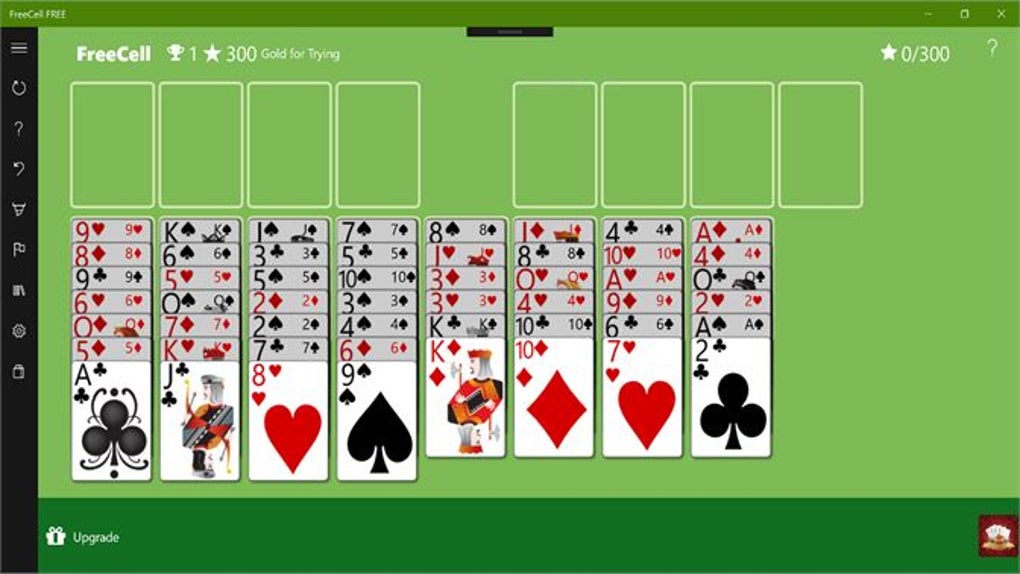
FreeCell FREE presents a traditional FreeCell solitaire layout. Cards are dealt face-up, allowing for strategic planning from the outset. The objective, as with most versions of FreeCell, is to arrange all cards in suit and ascending order from Ace to King onto the four foundation piles at the top of the screen. The game utilizes the standard FreeCell rules, allowing players to move cards one at a time, building on alternating colors in the cascade piles, and making use of the four free cells for temporary card storage. This strategic element, the core of FreeCell’s appeal, is seamlessly replicated in FreeCell FREE.
The free version of the game offers a beginner-friendly experience, providing access to a selectable level of difficulty that’s perfect for those new to the game or looking for a less challenging round of solitaire. The resizable game board is another helpful feature, allowing players to adjust the size of the playing area to suit their screen preferences and comfort. The intuitive interface makes navigating the game simple, even for those unfamiliar with digital versions of solitaire. However, it is important to note that while the visuals are clean and uncluttered, they are not particularly elaborate or customizable in this version.
Pros and Cons of FreeCell FREE
Pros:
- Free to Play: The most significant advantage is its accessibility. FreeCell FREE is completely free to download and play, offering a no-risk entry point for those curious about the game. This allows users to experience the core gameplay without any financial commitment.
- Simple and Intuitive Interface: The game boasts a user-friendly interface. The controls are straightforward, making it easy to learn and play, regardless of prior experience with solitaire games. The layout is clean and uncluttered, focusing on gameplay rather than overwhelming the player with unnecessary visual elements.
- Beginner-Friendly: The free version is perfect for beginners. The inclusion of a beginner’s level allows players to gradually learn the game mechanics without being immediately challenged by complex configurations. This makes it accessible to a wide range of players, regardless of their skill level.
- Resizable Game Board: The ability to resize the game board is a valuable feature, enhancing usability and comfort. This allows players to adapt the game to different screen sizes and resolutions, optimizing the visual experience for their specific setup. This adaptability caters to a larger audience and improves user experience.
Cons:
- Limited Features: The biggest drawback of the free version is its limitations. Features such as advanced difficulty levels, the auto-play mode, and diverse background themes are locked behind a paywall. This restricts the replayability and customizability of the game.
- Point System (potentially Useless): The inclusion of a point system is mentioned, but its usefulness is questioned, suggesting it may not be a motivating or engaging element of the game. A poorly implemented or irrelevant scoring system can detract from the overall enjoyment.
- Paid Upgrades: The necessity to purchase the full version to unlock additional content is a major limitation for players who might be drawn to FreeCell FREE’s initial appeal but then find themselves unable to further progress or customize the game unless they pay. The inherent limitations may lead to frustration for users who enjoy personalized gameplay experiences.
- Outdated Update: The last update mentioned was in August 2021. A lack of recent updates may indicate limited ongoing support, leaving users vulnerable to potential bugs or compatibility issues with newer versions of Windows 10.
Alternatives to FreeCell FREE
The Windows app store offers a wide array of solitaire games, providing various alternatives to FreeCell FREE. Some popular choices include:
- FreeCell Collection Free for Windows 10: This alternative offers a wider variety of solitaire games within one application, providing more options beyond just FreeCell.
- Solitaire for Windows 10: This pre-installed option on many Windows 10 systems provides a classic solitaire experience with a more streamlined and potentially improved interface than the one offered by FreeCell FREE.
- Classic Solitaire (Free): A straightforward and simple FreeCell solitaire option, offering a more minimalistic gameplay experience with no unnecessary additions.
- Free Spider Solitaire: If you’re looking to explore different variations of solitaire, Spider Solitaire is a popular alternative, offering a unique challenge.
- Microsoft Solitaire Collection: This comprehensive game package integrates numerous solitaire variants within a single application, offering players a greater selection for a consistently enjoyable experience.
These alternatives often provide a broader range of features, including customizable themes, different difficulty levels, and additional game modes, which might appeal to users dissatisfied with the limitations of FreeCell FREE. Each of these alternatives offers unique qualities that could enhance the user experience based on individual preferences.
Conclusion
FreeCell FREE for Windows 10 serves as a solid introduction to the world of FreeCell solitaire. Its simplicity, intuitive interface, and free availability make it an excellent entry point for beginners. However, its limitations in terms of features and the necessity to purchase the full version for a richer experience should be considered. If you’re looking for a basic, free game to pass the time, FreeCell FREE adequately meets this need. However, if you desire a more comprehensive and customizable solitaire experience with extended features, exploring the alternatives mentioned above might be a more rewarding option. The decision ultimately rests on individual preferences and expectations regarding the features and level of gameplay engagement.
File Information
- License: “Free”
- Version: “1.9.6.0”
- Latest update: “August 9, 2021”
- Platform: “Windows”
- OS: “Windows 10”
- Language: “English”
- Downloads: “69K”


