
Free DOC Reader, developed by Media Freeware, is a lightweight application designed for viewing Microsoft Word documents. Its primary function is straightforward: to provide a simple and efficient way to open and view .doc and .docx files without requiring the full Microsoft Office suite. This makes it an ideal solution for users who only need to read Word documents and don’t require editing capabilities. While its functionality is limited, it excels in its core purpose, offering a clean and user-friendly experience.
Core Features and Functionality
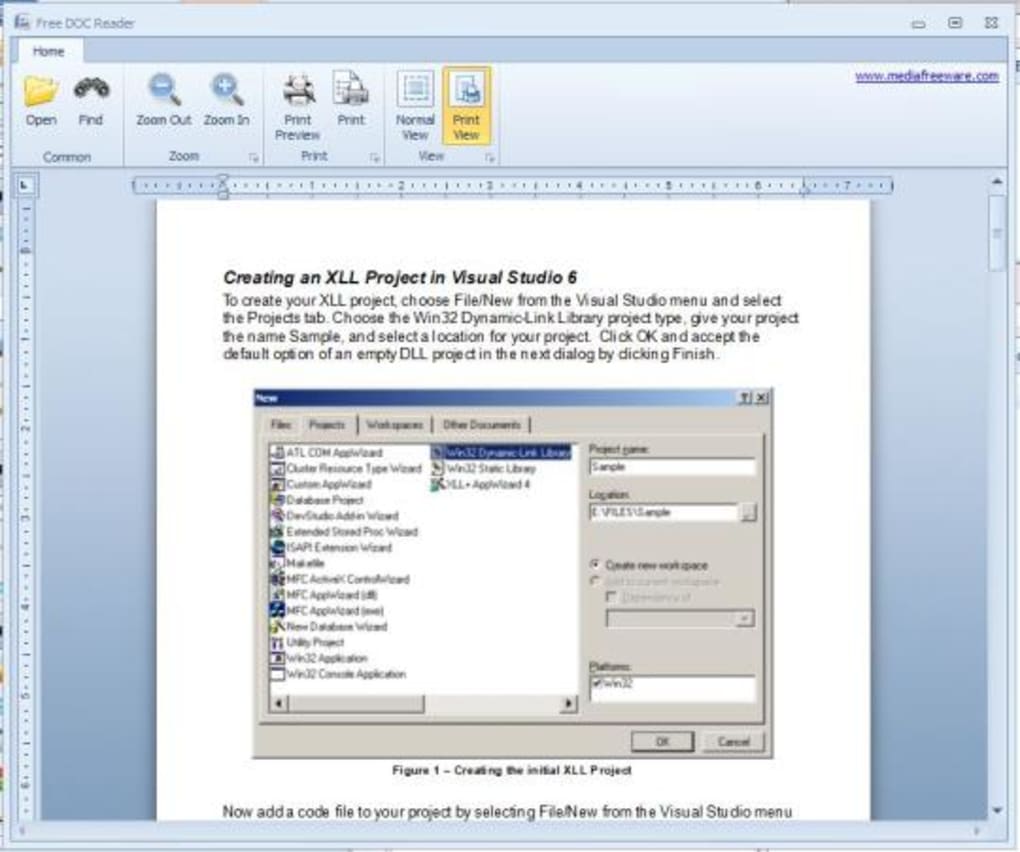
Free DOC Reader’s strength lies in its simplicity. It focuses solely on document viewing, eschewing more complex features found in full-fledged word processors. This streamlined approach ensures a fast and efficient user experience, minimizing resource consumption and maximizing ease of use.
The core functionality revolves around opening and displaying .doc and .docx files. Users can simply select a document, and the program will render it within its interface. This rendering mirrors the basic layout of a Microsoft Word document, ensuring familiarity and ease of navigation. The program does not support other common text file formats such as .rtf, .txt, or PDF files, limiting its versatility.
Beyond basic display, Free DOC Reader includes a few essential features to enhance the viewing experience:
-
Zooming Functionality: Users can adjust the zoom level to enlarge or reduce the displayed text, making it easier to read documents with smaller fonts or those requiring detailed examination. This is particularly useful for users with visual impairments or those working on smaller screens. The zoom functionality provides a seamless transition between magnification levels, allowing for easy adjustment as needed.
-
Find Function: A built-in search functionality allows users to quickly locate specific words or phrases within the document. This greatly assists in navigating lengthy documents and finding relevant information efficiently. The search is case-insensitive, simplifying the search process and preventing unnecessary searches due to capitalization discrepancies.
However, Free DOC Reader lacks several features commonly found in more comprehensive word processing software. Notably, it does not provide editing capabilities. Users cannot modify the text, formatting, or any other aspect of the document. Furthermore, there is no “replace” function, limiting its utility for tasks involving text manipulation. The program also lacks the ability to rename documents or perform other file management functions.
User Interface and Experience
Free DOC Reader boasts a clean and intuitive interface that prioritizes simplicity and ease of use. Its design mirrors the familiar look and feel of the Microsoft Word interface, facilitating a smooth transition for users accustomed to that environment. The straightforward layout and minimal clutter make it easy for even novice users to navigate the program without needing extensive training or prior experience.
While its simplicity is a major strength, it can also be perceived as a limitation. The interface is relatively basic, lacking the advanced customization options found in more sophisticated word processors. However, this minimalist approach ensures a fast and efficient experience, minimizing distractions and focusing on the core function of document viewing.
The program’s small file size contributes to its speed and efficiency. Installation and launch are rapid, minimizing waiting time for users. This responsiveness is particularly beneficial for users working with multiple applications or those with older hardware.
Comparison with Alternative Applications
Several alternative applications cater to similar needs, offering varying levels of functionality and features. Some notable alternatives include:
-
Free DocX Viewer: Similar to Free DOC Reader, this application focuses solely on viewing DOCX files. Its features may vary, potentially offering additional functionalities or better compatibility with different Word versions.
-
OpenOffice Writer: A much more comprehensive suite than Free DOC Reader, OpenOffice Writer provides extensive editing capabilities alongside viewing functionality. However, its increased functionality comes at the cost of a larger file size and more complex interface. This makes it a less suitable choice for users who only require document viewing.
-
Microsoft Word: The industry standard, Microsoft Word offers complete editing and formatting capabilities, but it’s a large application with a substantial price tag. Its extensive features are unnecessary for users whose primary goal is simply to view Word documents.
Free DOC Reader occupies a niche between these alternatives. It surpasses simple text viewers by specifically supporting .doc and .docx formats and offering basic viewing enhancements. However, its lack of editing and limited file format support makes it less versatile than comprehensive word processing software.
The optimal choice depends on the user’s specific needs. If viewing is the sole requirement, Free DOC Reader’s simplicity and efficiency are compelling advantages. For those needing editing capabilities or support for other file formats, a more comprehensive application such as OpenOffice Writer or Microsoft Word would be more appropriate.
System Requirements and Availability
Free DOC Reader is designed for the Windows operating system, providing compatibility with a wide range of Windows versions. The precise system requirements are not explicitly stated, but given its lightweight nature, it should function efficiently on even older hardware with limited resources.
The application is freely available for download, requiring no purchase or subscription. This makes it an accessible solution for users on a budget or those needing a temporary document viewer. Its small file size minimizes download time and storage requirements.
Conclusion
Free DOC Reader provides a simple and efficient solution for viewing Microsoft Word documents without the need for a full word processing suite. Its strengths lie in its ease of use, small file size, and fast loading times. However, its limitations—namely, the lack of editing capabilities and support for only .doc and .docx files—make it unsuitable for users requiring more advanced features. For users solely focused on viewing Word documents, Free DOC Reader remains a highly practical and convenient choice. Its streamlined design and focus on core functionality ensure a quick and user-friendly experience, making it an ideal solution for those seeking a straightforward document viewer. The absence of unnecessary features contributes to its efficiency, making it suitable for users with limited system resources or those prioritizing speed and ease of use over extensive functionality.
File Information
- License: “Free”
- Version: “1.0”
- Latest update: “September 1, 2021”
- Platform: “Windows”
- OS: “Windows 8”
- Language: “English”
- Downloads: “84.1K”
- Size: “16.90 MB”


