
FreeStar Free DVD Ripper is a discontinued DVD ripping software application designed for Windows XP. While no longer actively supported, its historical presence in the software landscape provides a valuable case study in the evolution of DVD ripping technology and the changing demands of media consumption. This review examines its capabilities, limitations, and place within the broader context of DVD ripping software.
Functionality and Features
FreeStar Free DVD Ripper boasted a straightforward approach to DVD ripping, aiming to provide a user-friendly experience for both novice and experienced users. Its core functionality centered on converting DVD content into various video and audio formats. The software supported a range of output formats including MPEG-1, MPEG-2, MPEG-4, AVI, DivX, and XviD for video, and likely MP3 for audio (though specific audio formats aren’t explicitly listed in all sources). This versatility allowed users to adapt their DVD content to various devices and playback systems.
A key selling point was its advertised “high speed,” achieved through multithreading. Multithreading is a technique where a program divides its tasks among multiple processor cores, thus speeding up the processing. The claim of achieving " >300% ripping speed" should be considered in the context of the hardware capabilities available at the time of its release (around 2013). While impressive for its era, modern processors and optimized software have significantly surpassed these speeds.
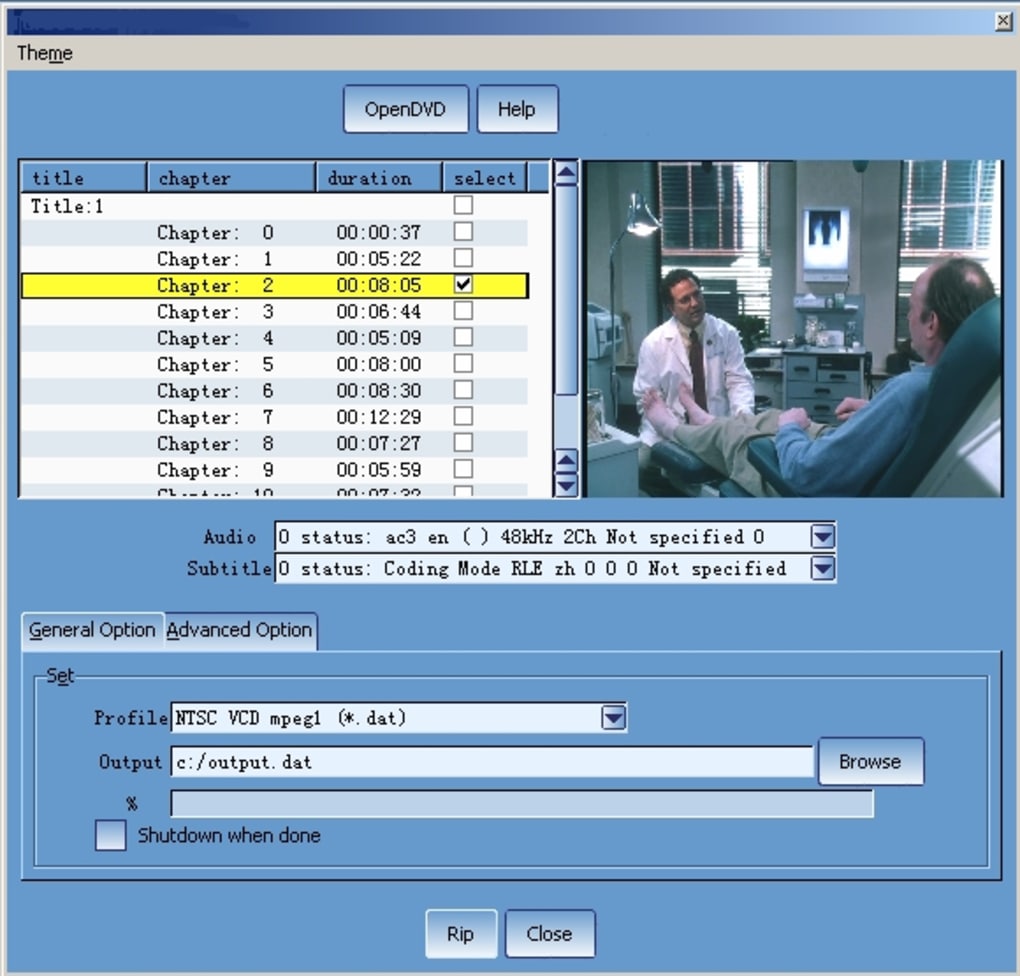
The software also included an automatic shutdown feature after the ripping process completed, a convenient addition for users who initiated long rips overnight or while away from their computer. Its ease of use was highlighted, suggesting a user interface designed for simplicity. The “two-click” claim suggests an intuitive workflow, minimizing the need for extensive technical knowledge.
Limitations and Obstacles
Despite its advertised features, FreeStar Free DVD Ripper faced several inherent limitations and challenges:
-
Discontinuation: The most significant limitation is the software’s discontinuation. No longer receiving updates, it lacks compatibility with modern operating systems and is likely vulnerable to security threats. Any user attempting to utilize this software today should exercise extreme caution and consider the security risks involved. Outdated software often lacks the security patches and updates necessary to protect against modern malware and vulnerabilities.
-
Limited Format Support (by modern standards): While the supported formats were reasonably comprehensive in 2013, modern video and audio codecs offer superior compression, quality, and compatibility. The lack of support for more recent and efficient formats such as H.265 (HEVC) or newer audio codecs limits its relevance in contemporary use.
-
Potential Copyright Infringement: DVD ripping can raise legal concerns regarding copyright infringement. Ripping copyrighted DVDs for distribution or sharing without permission is illegal in many jurisdictions. This software, like many other DVD ripping tools, did not inherently prevent users from engaging in illegal activities. It’s crucial to understand and respect copyright laws before using any DVD ripping software.
-
Hardware Requirements: While the software may have been relatively lightweight for its time, it likely required a minimum level of hardware performance to achieve its advertised speed. Older computers might have struggled with the ripping process, resulting in slower-than-expected speeds or even crashes.
-
Lack of Technical Support: With the software being discontinued, there is no official technical support available. Users encountering issues cannot rely on the developer for assistance or troubleshooting. This lack of support makes problem-solving significantly more difficult.
-
Potential for Bugs and Glitches: Outdated software is more prone to bugs and glitches, due to the lack of ongoing maintenance and updates. These could manifest in various ways, from minor inconveniences to serious data loss or system instability.
Alternatives and Modern Solutions
The discontinuation of FreeStar Free DVD Ripper necessitates exploring alternative solutions. Many robust and actively maintained DVD ripping applications are available today. These newer alternatives often offer:
-
Wider Format Support: Support for a much wider range of both video and audio formats, including modern, high-efficiency codecs.
-
Enhanced Speed and Efficiency: Significantly faster ripping speeds thanks to advancements in both hardware and software optimization.
-
Improved User Interface: More intuitive and user-friendly interfaces that simplify the process of ripping DVDs.
-
Regular Updates and Support: Continuous updates providing security patches, bug fixes, and new features.
-
Legal Compliance: Often include features or guidelines to help users avoid copyright infringement.
Examples of modern alternatives include HandBrake (open-source), MakeMKV (commercial, but free for personal use), and various commercial DVD rippers available online. Users should research and select a program that best meets their needs and preferences.
User Reviews and Reception
While detailed user reviews of FreeStar Free DVD Ripper are scarce, the limited available information suggests a generally positive reception, particularly regarding its ease of use and speed. However, these reviews are likely outdated and do not reflect the limitations imposed by the software’s discontinuation. Modern users should be wary of relying on reviews and experiences from several years ago. The software landscape has evolved significantly, and tools from 2013 are unlikely to meet today’s standards for speed, security, and compatibility.
Conclusion
FreeStar Free DVD Ripper represented a functional DVD ripping solution in its time. Its advertised ease of use, multithreading for speed, and variety of output formats appealed to many users. However, its discontinuation significantly diminishes its practicality and relevance in the modern computing environment. Users seeking to rip DVDs today should explore the many modern alternatives available, prioritizing security, compatibility, and compliance with copyright laws. Outdated software, even if it once functioned well, should generally be avoided due to security vulnerabilities and the lack of ongoing support. Modern DVD ripping software offers significantly improved performance, functionality, and security compared to its predecessors. The need to consider security, compatibility, and copyright restrictions makes choosing a currently supported and reputable application essential for any user looking to rip their DVDs.
File Information
- License: “Free”
- Version: “4.0.2”
- Latest update: “February 5, 2013”
- Platform: “Windows”
- OS: “Windows XP”
- Language: “English”
- Downloads: “8.3K”
- Size: “9.37 MB”


