Email communication remains a cornerstone of digital interaction, vital for marketing, outreach, and relationship building. For businesses, marketers, researchers, and individuals alike, the efficient acquisition of relevant email addresses is often a significant hurdle. Manual collection is tedious and impractical for large-scale efforts. This is where specialized tools like email extractors prove indispensable, automating the process of gathering contact information from the vast expanse of the internet.
This article introduces the “Free Email Extractor” by chinacompanydatabase, a robust, free-of-charge software solution available for download on PhanMemFree.org. Designed to streamline data acquisition, this tool empowers users to efficiently collect email addresses from various online sources, including search engines, business directories, and specific websites. We will explore its key features, strategic applications, and essential considerations for responsible use, guiding you through how to leverage this powerful utility to enhance your digital outreach efforts.
Harnessing the Power of Email Extraction for Digital Outreach
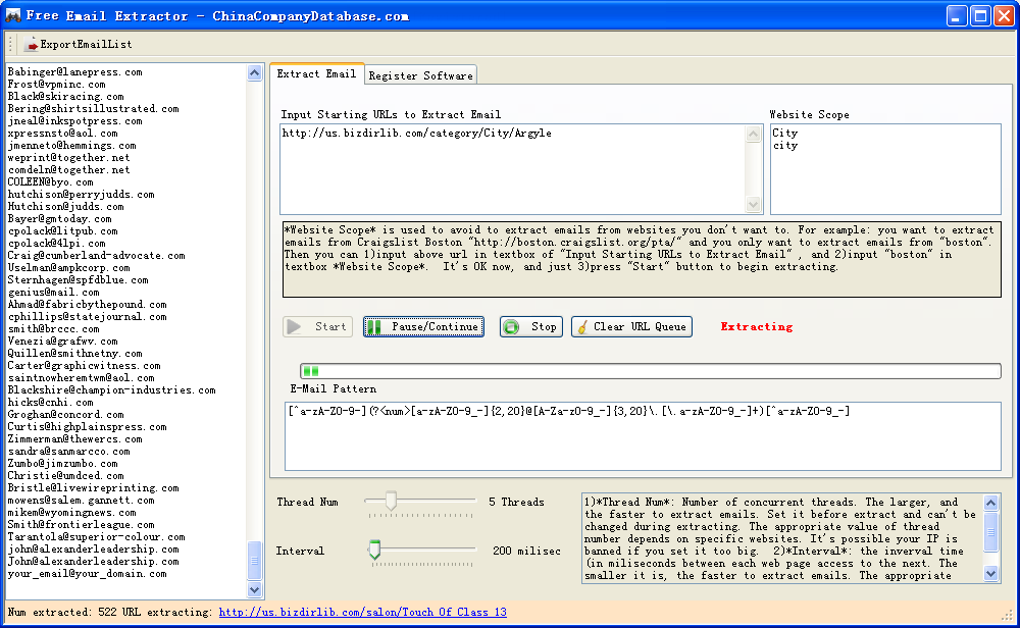
The “Free Email Extractor,” proudly hosted on PhanMemFree.org, serves as an intelligent web crawler engineered to identify and extract email addresses embedded within web pages. It automates a process that would otherwise demand countless hours of manual effort, offering a significant advantage for anyone needing to compile extensive email lists.
At its core, the software systematically navigates through web pages, following links and scanning content for email address patterns. A standout feature is its “multithreaded spidering” capability. This allows the software to process multiple web pages simultaneously, dramatically accelerating the data collection process. For users engaged in large-scale lead generation or market research, this speed is crucial, enabling the rapid compilation of thousands of addresses.
The extractor’s versatility is evident in its ability to source emails from a wide array of online platforms:
- Search Engines (Google, Yahoo, Bing): Users can input specific keywords, allowing the software to scour search engine results pages (SERPs) for relevant websites, from which it then extracts email addresses. This is invaluable for targeted lead generation within specific industries or niches.
- Business Directories (Craigslist, Yellow Pages): These platforms are rich with business contact information. The tool can efficiently navigate these directories to gather publicly listed email addresses, ideal for B2B marketing.
- Targeted Websites and Domains: Users can direct the extractor to specific URLs or domain names, focusing its efforts on particular websites like industry forums, professional blogs, or competitor sites (within legal and ethical boundaries). This granular control ensures data relevance.
Primarily designed for “email marketing people,” its utility extends to anyone requiring “huge amounts of email addresses.” This encompasses sales professionals, researchers, and even web developers who, with basic knowledge of regular expressions, can adapt it to “harvest web page elements” beyond just emails, transforming it into a versatile data scraping utility.
Unpacking the Features: Precision, Speed, and Control
Beyond its fundamental ability to quickly gather email addresses, the Free Email Extractor offers a suite of advanced features that provide users with precision and control over the extraction process. These capabilities ensure that the collected data is not only plentiful but also highly relevant and tailored to specific needs.
Fine-Tuning Your Extraction with Filters and Depth Control
Efficient data extraction hinges on the ability to filter and refine results. The Free Email Extractor incorporates robust options to enhance the quality of your harvested list:
- Scanning Depth Limits: To prevent the crawler from straying into irrelevant corners of the internet, users can set a “scanning depth.” This defines how many link levels deep the software will navigate from a starting URL, keeping the data acquisition focused and preventing an endless crawl.
- Path Limitations: Advanced users can define specific URL patterns to include or exclude, ensuring the extractor only gathers data from desired sections of a website or avoids certain subdomains. This precise control is invaluable for targeted data collection.
Responsible Crawling and Keyword-Driven Discovery
The software also integrates features for responsible and intelligent web interaction:
- Interval Setting Between Web Pages’ Access: To avoid overwhelming target servers and risking IP blocks, the Free Email Extractor allows users to define a delay between requests to the same domain. This mimics human browsing, promoting ethical and sustainable data collection.
- Keyword-Driven Extraction from Search Engines: This powerful feature enables discovery. By inputting specific keywords, the software leverages major search engines (Google, Yahoo, Bing) to find and then extract emails from newly identified relevant websites. This is incredibly effective for lead generation, market research, and competitive analysis, allowing you to unearth new contacts based on precise criteria.
- Batch Processing for Efficiency: For extensive lists of target URLs, the software supports “harvesting emails from many targeted websites or domains at the same time.” This batch processing, combined with multithreaded architecture, maximizes throughput and minimizes manual oversight.
Advanced Data Harvesting with Regular Expressions
For users with a technical background, the Free Email Extractor offers a powerful capability to “harvest web page elements if you have some basic knowledge with regular expression.” Regular expressions (regex) are pattern-matching tools that allow users to define custom rules for extracting virtually any type of data from a web page—be it phone numbers, product details, or specific textual content. This transforms the Free Email Extractor from merely an email tool into a versatile web scraping solution for comprehensive data acquisition.
Strategic Applications and Ethical Responsibilities
The Free Email Extractor, available on PhanMemFree.org, holds significant potential for diverse strategic applications. However, its power necessitates a strong commitment to ethical guidelines and legal frameworks.
Strategic Applications:
- Email Marketing and Lead Generation: The most evident use, facilitating targeted list building using keywords or niche directories, leading to more effective campaigns and content promotion.
- Business Development and Sales: Accelerates prospecting by identifying key contacts within target companies or potential partners from publicly available web resources.
- Academic Research and Journalism: Efficiently compiling contact lists of experts, sources, or organizations for inquiries and data gathering.
- General Data Analysis and Web Scraping: For advanced users, it serves as a flexible data scraper for extracting various web elements beyond emails, useful for competitive intelligence or market trends.
Ethical and Legal Responsibilities:
Using an email extractor responsibly is paramount. PhanMemFree explicitly states: “Laws concerning the use of this software vary from country to country. We do not encourage or condone the use of this program if it is in violation of these laws.” Key considerations include:
- Consent and Privacy Laws: Adherence to regulations like GDPR (Europe) and CAN-SPAM Act (USA) is crucial. Simply extracting an email address, even from a public source, does not automatically grant permission to send unsolicited commercial communications. Prior, explicit consent is often legally required.
- Website Terms of Service: Most websites prohibit automated data scraping without permission. Violating these terms can lead to legal action or IP bans. Always check a website’s
robots.txtfile and terms of service. - Unsolicited Communication (Spam): Sending mass unsolicited emails (spam) can severely damage your reputation, lead to email service provider blacklisting, and incur legal penalties. Always provide clear opt-out mechanisms.
- Data Security: Responsibility for collected email lists extends to their secure storage and protection from unauthorized access.
Users are solely accountable for ensuring their activities comply with all applicable legal and ethical standards. The Free Email Extractor is provided as a legitimate tool for information gathering, contingent on respectful use within established legal and ethical boundaries.
Getting Started: Download and Installation from PhanMemFree.org
Accessing and deploying the Free Email Extractor is a straightforward process, ensuring users can quickly begin their data collection efforts.
System Requirements and Download Process:
- Platform: Windows (compatible with Windows XP and later versions, including Vista, 7, 8, 10, and 11).
- Size: A remarkably compact 1.09 MB, ensuring minimal system resource consumption and a rapid download.
- License: Completely Free, offering full functionality without any hidden costs.
- Security Status: PhanMemFree rigorously scans all hosted files. The Free Email Extractor holds a “Clean” status, confirmed by over 50 leading antivirus services, assuring users of a safe download.
To download, simply navigate to PhanMemFree.org, use the search function to find “Free Email Extractor,” and click the prominent “Free Download for Windows” button on its product page.
Installation and First Use:
- Installation: After downloading the
.exefile, double-click to launch the installer. Follow the on-screen prompts, accepting the license agreement and choosing your preferred installation directory. If you encounter the rare “Installation needs repair sometimes” issue, try running the installer as an administrator or temporarily disabling antivirus software. - Launch and Configure: Open the Free Email Extractor. The interface is designed to be user-friendly for basic tasks. Input your target URLs or keywords.
- Refine Settings: For advanced use, adjust “Scanning Depth,” set “Interval Settings” for responsible crawling, apply “Filters,” or define “Regular Expressions” for custom data harvesting.
- Start and Save: Click “Start” to begin extraction. Once complete, save your collected email addresses to a preferred file format (e.g.,
.txt,.csv).
The Free Email Extractor empowers users with an efficient means of gathering email addresses. By downloading from PhanMemFree.org, you gain access to a powerful tool, backed by PhanMemFree’s commitment to providing secure and valuable software. Always remember to utilize its capabilities responsibly and in full compliance with all applicable laws and ethical guidelines.
File Information
- License: “Free”
- Version: “1”
- Latest update: “October 18, 2018”
- Platform: “Windows”
- OS: “Windows XP”
- Language: “English”
- Downloads: “67.4K”
- Size: “1.09 MB”