
In an increasingly interconnected digital landscape, where threats lurk around every corner of the internet, safeguarding your personal and professional data is no longer an option but a critical necessity. The digital realm is a double-edged sword, offering unprecedented convenience and access to information, yet simultaneously exposing users to a barrage of sophisticated cyberattacks, data breaches, and privacy invasions. From insidious malware and ransomware to stealthy spyware and phishing attempts, the methods employed by malicious actors are constantly evolving, making robust security measures paramount for every internet user.
At the forefront of these essential security tools stands the firewall. Often conceptualized as the digital gatekeeper of your computer or network, a firewall acts as a barrier, meticulously monitoring and filtering incoming and outgoing network traffic based on a predefined set of security rules. Its primary role is to establish a secure perimeter between your trusted internal network (your computer) and untrusted external networks (the internet), preventing unauthorized access and mitigating the risk of cyber threats. While modern operating systems often come equipped with built-in firewall capabilities, many users seek enhanced, more specialized, or simply alternative solutions to bolster their defenses. This is where dedicated firewall software, particularly free options like Evorim’s Free Firewall, comes into play, offering a compelling blend of protection and accessibility.
Evorim’s Free Firewall emerges as a noteworthy contender in the crowded cybersecurity market, presenting itself as a professional-level security and privacy software designed for Windows users. In an era where premium security suites can command significant costs, a free yet powerful firewall solution like this holds considerable appeal, especially for individuals and small businesses operating on a budget, or those simply seeking to augment their existing security layers without additional financial outlay. The promise of professional-grade protection without the price tag is a significant draw, making it a topic worthy of a comprehensive exploration.
This article delves into the intricacies of Evorim’s Free Firewall, exploring its core functionalities, unique selling propositions, and the practical benefits it offers to users. We will dissect its ability to control program access, monitor network activity, and prevent various forms of online threats, all while operating within the confines of a user-friendly interface. Furthermore, we will examine the broader context of firewalls, discussing why they are indispensable in today’s digital environment, their different types, and how a solution like Free Firewall fits into the overall cybersecurity strategy. By the end, readers will have a clearer understanding of how this free tool can contribute to a safer, more private, and more controlled online experience.
The Imperative of Digital Security: Understanding Firewalls
Before diving deeper into the specific features of Evorim’s Free Firewall, it’s crucial to first understand the fundamental role and importance of firewalls in the overarching landscape of digital security. A firewall, in essence, is a network security system that monitors and controls incoming and outgoing network traffic based on predetermined security rules. It acts as a gatekeeper, determining which data packets are allowed to pass through and which are blocked. This preventative measure is vital for both individual users and large organizations, forming a critical first line of defense against a myriad of cyber threats.
The internet, while a vast repository of information and connectivity, is also a breeding ground for malicious activity. Without a firewall, your computer is directly exposed to the unfiltered chaos of the public internet. This exposure can lead to various vulnerabilities, including:
- Malware Infections: Viruses, worms, Trojans, and ransomware can exploit open ports or unpatched vulnerabilities to infiltrate your system, leading to data corruption, theft, or even complete system lockout.
- Unauthorized Access: Hackers can attempt to gain unauthorized access to your computer, stealing personal information, financial data, or using your machine as part of a botnet for further malicious activities.
- Data Theft: Sensitive information, such as passwords, banking details, and personal documents, can be intercepted or exfiltrated from your system without your knowledge.
- Denial-of-Service (DoS) Attacks: While more common against servers, individual computers can also be targeted, overwhelming them with traffic and rendering them unusable.
- Spyware and Adware: These programs can track your online activities, display unwanted advertisements, and consume system resources, often without explicit consent.
A firewall mitigates these risks by establishing a set of rules that dictate what traffic is permissible. These rules can be based on various criteria, including IP addresses, port numbers, protocols, and even the applications attempting to access the network. By rigorously enforcing these rules, the firewall ensures that only legitimate and authorized traffic can enter or leave your system, effectively creating a fortified barrier against digital intrusions.
There are primarily two types of firewalls: hardware firewalls and software firewalls. Hardware firewalls are physical devices, often integrated into routers, providing protection for an entire network. They are typically found in corporate environments or advanced home networks. Software firewalls, on the other hand, are applications installed directly on individual computers, providing protection specifically for that machine. Evorim’s Free Firewall falls into this latter category, offering a dedicated software solution for Windows users. While hardware firewalls provide network-wide protection, individual software firewalls are still crucial, as they can enforce granular rules for specific applications and provide an additional layer of security even within a network protected by a hardware firewall. The importance of a robust software firewall cannot be overstated, as it acts as the final gatekeeper for your operating system and its applications.
Evorim’s Free Firewall: A Closer Look at its Core Functionality
Evorim’s Free Firewall positions itself as a robust solution for enhancing digital security and privacy, going beyond the basic protection offered by standard operating system firewalls. Its design philosophy centers around providing users with granular control over their online interactions, ensuring that no application can connect to the internet without explicit authorization. This level of oversight is crucial in identifying and neutralizing threats that often bypass conventional antivirus software, which may focus more on known malware signatures rather than network connection behaviors.
Comprehensive Program Control and Monitoring
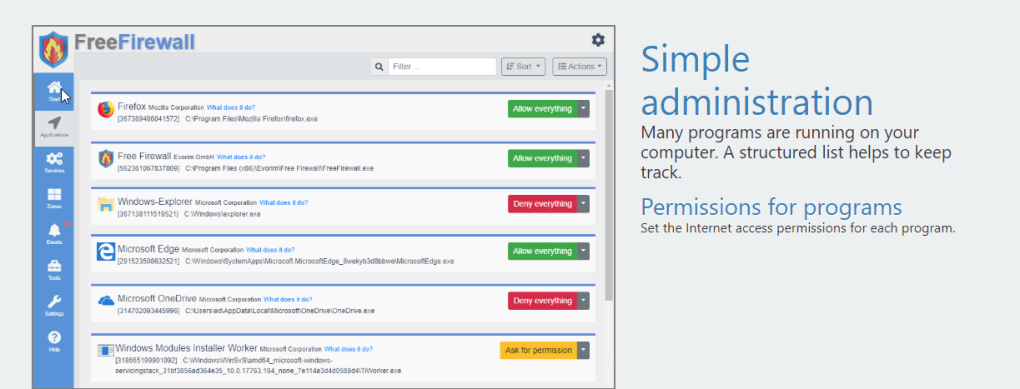
At the heart of Free Firewall’s utility is its ability to meticulously control every program installed on a user’s system. This isn’t just about blocking malicious executables; it extends to legitimate software that might, for various reasons, attempt to establish network connections. The software empowers users to actively permit or deny internet access for any running program. This feature is particularly vital because many malicious files, even after bypassing initial detection, rely on an online connection to download further components, exfiltrate data, or receive commands from a remote server. By cutting off this crucial connection point, Free Firewall effectively renders many advanced threats inert.
A standout feature is its intelligent notification system. Free Firewall provides immediate alerts whenever a program attempts to connect online, especially those running in the background. This proactive notification is invaluable. Users are often unaware of the myriad background processes and applications that constantly ping the internet for updates, telemetry data, or other operations. Some of these connections might be benign, while others could signal suspicious activity. The firewall’s real-time alerts bring these hidden connections to light, prompting users to investigate and make informed decisions about their permissions.
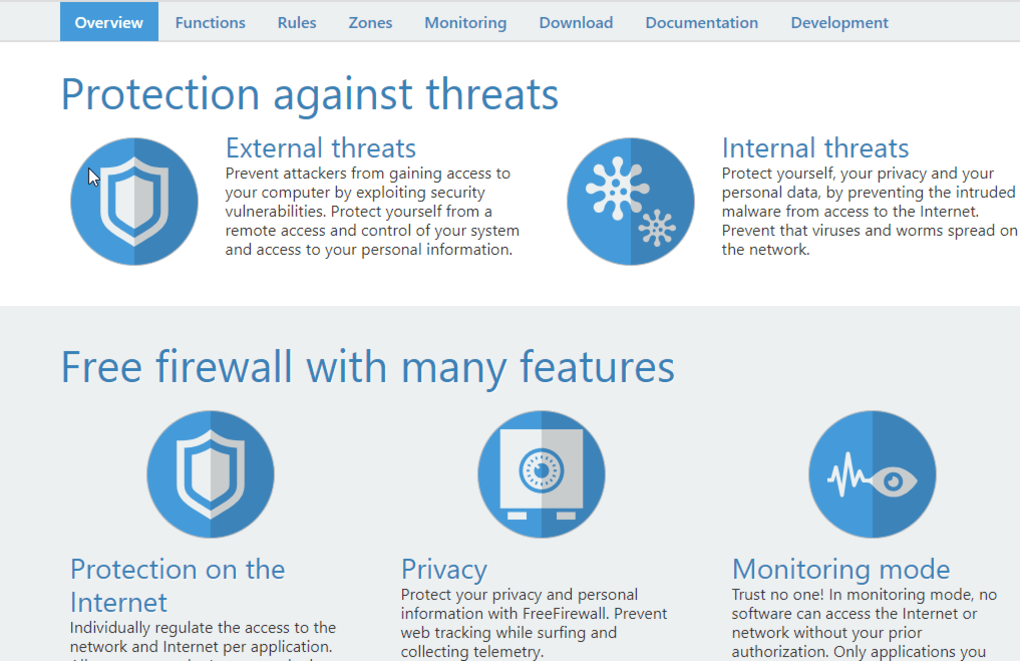
Complementing the notification system is the built-in monitoring mode. This mode prevents programs from automatically establishing connections unless the user has previously granted explicit authorization. This “default deny” posture is a cornerstone of robust security. Instead of trying to identify and block bad connections, Free Firewall operates on the principle that all connections are suspect until proven otherwise by the user. This approach ensures that local data flow is meticulously regulated and permitted solely by the user, thereby enhancing privacy and security by preventing unauthorized data transmission and communication with potentially malicious servers. It’s a powerful tool for users who want to know exactly what’s happening on their network interfaces.

Advanced Features for Enhanced Protection
Beyond its core program control, Evorim’s Free Firewall integrates several advanced features that contribute to a holistic security posture:
- Threat Prevention: While not an antivirus in itself, the firewall’s ability to control network access forms a crucial layer of threat prevention. By blocking unauthorized outbound connections, it can stop malware from “phoning home” or downloading additional payloads, effectively containing an infection before it spreads or causes significant damage. This proactive containment is a significant advantage.
- Internet Traffic Regulation: This feature goes beyond simple allow/deny. It allows users to manage and prioritize internet traffic, potentially ensuring that critical applications receive bandwidth while less important ones are throttled or blocked. This capability is not just for security but also for optimizing network performance and user experience.
- Telemetry Prevention: In an age where software applications, operating systems included, frequently collect and transmit user data (telemetry) back to developers, Free Firewall offers a critical privacy tool. By allowing users to block specific applications or services from sending data over the internet, it helps prevent unwanted data collection, safeguarding personal privacy. This feature addresses a growing concern among privacy-conscious users who wish to minimize their digital footprint.
- Bottleneck Blocking: This feature likely refers to the firewall’s capability to identify and manage connections that might be consuming excessive bandwidth or system resources. By intelligently blocking or throttling such connections, the firewall can prevent network bottlenecks, ensuring smoother overall internet performance for critical tasks.
- Cooperative Mode with Other Firewalls: A particularly innovative feature, the cooperative mode acknowledges that users might already have other security software, including other firewalls (like the Windows built-in firewall), running on their system. Instead of creating conflicts or redundancy, Free Firewall is designed to work cooperatively, acting as an additional, complementary layer of defense. This ensures compatibility and allows users to leverage multiple security solutions without performance degradation or functionality issues.
- Rules and Zones Management: For more advanced users, Free Firewall provides sophisticated tools for managing custom rules and defining network zones. This allows for highly granular control, where specific types of traffic can be allowed or denied based on complex criteria, and different security policies can be applied to different network environments (e.g., home, public Wi-Fi). This flexibility caters to users with specific security requirements or network configurations.
- Event Notification: Beyond real-time alerts, the firewall maintains a log of all connection attempts and actions taken. This event notification system provides a comprehensive audit trail, allowing users to review past network activity, identify patterns, and troubleshoot any connectivity issues that might arise from firewall rules. It’s an essential tool for understanding the digital environment of the computer.
In essence, Evorim’s Free Firewall offers a robust, feature-rich solution that empowers users with unprecedented control over their digital environment. By focusing on explicit permission, detailed monitoring, and a comprehensive suite of advanced features, it provides a powerful yet accessible tool for enhancing cybersecurity and protecting personal privacy on Windows platforms.
Navigating the Landscape: Pros, Cons, and User Considerations
Every software solution, regardless of its design or intent, comes with a specific set of advantages and disadvantages that users must consider before integration. Evorim’s Free Firewall is no exception, offering compelling benefits while also presenting certain limitations. A balanced perspective is crucial for understanding its suitability for different user profiles and digital environments.
The Advantages of Free Firewall
The appeal of Evorim’s Free Firewall largely stems from its core strengths, which make it a valuable addition to a user’s security arsenal:
- Secure Computers from Viruses and Malware (Indirectly): While Free Firewall is not an antivirus program that scans for and removes malicious code, its fundamental role in controlling network access serves as a potent deterrent against malware. By preventing infected applications from “phoning home” to command-and-control servers, downloading additional components, or exfiltrating sensitive data, it effectively contains and neutralizes the operational capabilities of many types of malware. This proactive containment prevents further damage and data loss, complementing traditional antivirus solutions.
- Compatible with Windows 7 and Above: A broad compatibility range ensures that a significant portion of Windows users, including those on older but still supported operating systems like Windows 7, can benefit from this solution. This wide reach makes it accessible to a larger user base, not just those on the latest Windows versions. Support for current Windows operating systems like Windows 8.1, Windows 10, and Windows 11 (implied) ensures its relevance and continued utility.
- Manage Software Access with Precision: This is arguably Free Firewall’s most significant advantage. The granular control over which programs can connect to the internet gives users unprecedented power. It allows them to sanction legitimate applications while swiftly blocking any suspicious activity. This level of control is often missing or less intuitive in standard operating system firewalls, providing a clear benefit for security-conscious users.
- Comprehensive Monitoring Mode with Tools: The real-time notification system and the explicit authorization requirement for network connections (monitoring mode) provide transparency into the typically opaque world of background internet activity. This feature, combined with event logging and traffic regulation tools, equips users with the necessary insights to understand and manage their digital environment effectively, identifying potential threats or bandwidth hogs.
Potential Challenges and Considerations
While its advantages are significant, potential users should also be aware of the limitations and considerations associated with Free Firewall:
- May Not Work with Other Operating Systems: As a dedicated Windows application, Free Firewall is not compatible with other operating systems such as macOS, Linux, or mobile platforms (Android, iOS). This platform-specific nature means users with mixed-OS environments will need alternative firewall solutions for their non-Windows devices. This is a common limitation for many software solutions but still important to note for diverse users.
- May Block Important Software Processes: The “default deny” philosophy, while excellent for security, carries a risk of accidentally blocking legitimate and critical software processes. If a user is not careful or knowledgeable about which applications require internet access, they might inadvertently cut off essential functionalities, leading to software malfunctions or system instability. This necessitates a learning curve and careful management from the user.
- Lacks Extensive Software Documentation: The absence of comprehensive software documentation can be a significant hurdle for users, especially those less familiar with firewall configurations. Without clear guides, FAQs, or troubleshooting steps, users might struggle to understand advanced features, resolve conflicts, or optimize the firewall’s settings for their specific needs. This can lead to frustration and underutilization of the software’s full potential.
- Other More Powerful Firewalls Available: While Free Firewall offers professional-level protection, it operates within the context of a highly competitive market. More powerful or feature-rich firewalls, often commercial ones, exist that might offer additional capabilities such as intrusion prevention systems (IPS), web filtering, application sandboxing, or more sophisticated AI-driven threat detection. For users with extremely high-security requirements or complex network infrastructures, these alternatives might be more suitable, albeit often at a cost. The “free” aspect is a trade-off for potentially fewer advanced features found in premium, enterprise-grade solutions.
In conclusion, Evorim’s Free Firewall presents a compelling value proposition, especially for Windows users seeking enhanced security and privacy control without incurring costs. Its strengths lie in its granular program control and robust monitoring capabilities. However, users must be mindful of its platform limitations, the potential for accidental blocking of legitimate processes, and the possible need for more comprehensive documentation or advanced features available in other solutions. Understanding these pros and cons allows users to make an informed decision about whether Free Firewall aligns with their specific cybersecurity needs and technical comfort level.
Beyond the Basics: Comparing Free Firewall with Other Solutions
The landscape of firewall solutions is diverse, ranging from basic built-in operating system tools to sophisticated enterprise-grade security suites. While Evorim’s Free Firewall offers a compelling set of features for a free product, it’s beneficial to understand how it stacks up against some of its contemporaries, particularly other free options, and where it fits within the broader spectrum of digital security. This comparison helps users contextualize Free Firewall’s capabilities and make informed decisions about their security architecture.
The Role of the Built-in Windows Firewall
Every modern Windows operating system comes equipped with its own built-in firewall, typically referred to as Windows Defender Firewall (or Windows Firewall in older versions). This native solution provides fundamental protection by filtering incoming and outgoing traffic, allowing users to create basic rules for applications and ports. For many casual users, the Windows Firewall offers sufficient basic protection against common threats. It’s tightly integrated with the OS, requires no additional installation, and generally operates without much user intervention once configured.
However, the Windows Firewall often lacks the granular control, detailed monitoring, and advanced features that a dedicated third-party firewall provides. Its interface can be less intuitive for complex rule creation, and its notification system might not be as proactive or informative as specialized solutions. Evorim’s Free Firewall fills this gap by offering a more user-friendly interface for managing application access, real-time connection notifications, and a “default deny” philosophy that many find more secure. Its cooperative mode also suggests it can work alongside the Windows Firewall, providing an additional layer of intelligent control rather than replacing it entirely, which can be a significant advantage.
Competing Free Firewall Alternatives
The market for free firewall software is competitive, with several established players offering robust alternatives. Some notable examples mentioned in the original context include:
- Comodo Firewall: Often cited as one of the most powerful free firewalls, Comodo Firewall offers a comprehensive suite of security features, including a sophisticated packet filtering firewall, host intrusion prevention system (HIPS), sandbox technology for running untrusted applications, and an antivirus (in its complete security suite). It provides a high degree of control over applications and network traffic. Comodo’s strength lies in its depth of features, but this can also make it more complex for novice users to configure and manage. It’s known for being highly effective but requires a learning curve.
- ZoneAlarm Free Firewall: ZoneAlarm has been a long-standing name in personal firewalls. Its free version offers essential firewall protection, including identity protection features and application control. ZoneAlarm is generally regarded for its ease of use compared to some more complex solutions while still providing robust inbound and outbound traffic control. Its interface is typically more straightforward, making it accessible for users who want reliable protection without extensive configuration headaches.
- PC Tools Firewall Plus: While perhaps less prominent in recent years, PC Tools Firewall Plus was known for being a simple yet effective firewall. It focused on protecting PCs from intruders and malicious network traffic with a relatively straightforward approach. Its strengths were often in its simplicity and effectiveness for basic protection.
How does Evorim’s Free Firewall compare to these?
- Control and Monitoring: Evorim’s Free Firewall excels in its explicit program control and active monitoring, providing real-time notifications for all connection attempts. This level of transparency is comparable to or potentially even more user-friendly than some aspects of Comodo, which, while powerful, can feel overwhelming. ZoneAlarm also offers good application control, but Free Firewall’s dedicated monitoring mode for background processes stands out.
- Ease of Use: Evorim’s Free Firewall aims for a “simple level of protection” while still being professional-grade. This suggests an effort to balance powerful features with an accessible interface. While Comodo can be complex, and ZoneAlarm is simpler, Free Firewall’s strength lies in making granular control more digestible for the average user, even with the reported lack of extensive documentation.
- Specialized Features: Features like telemetry prevention and bottleneck blocking in Free Firewall are noteworthy. Telemetry prevention is a strong privacy feature that resonates with current user concerns. Its cooperative mode is also unique, allowing it to integrate seamlessly rather than conflict with existing security measures.
- Community and Support: Established alternatives like Comodo and ZoneAlarm often have larger communities and more extensive documentation or support forums, which can be a significant factor when users encounter issues or need advanced guidance. This is an area where Free Firewall, with its reported lack of documentation, might lag.
Why Choose a Free Firewall?
The decision to opt for a free firewall solution, whether it’s Evorim’s Free Firewall or one of its alternatives, often boils down to several factors:
- Cost-Effectiveness: For individuals or small businesses with limited budgets, a free firewall provides essential security without additional financial burden. It’s an accessible entry point into stronger cybersecurity practices.
- Augmenting Existing Security: Many users employ free firewalls to supplement their existing antivirus software or even their operating system’s built-in firewall. It provides an additional layer of defense, focusing specifically on network traffic control.
- Learning and Control: Free firewalls often offer a higher degree of control and transparency than default options, allowing users to learn about their network traffic and develop better security habits. Evorim’s Free Firewall, with its detailed notifications and program control, is particularly good for this.
- Specific Needs: For users primarily concerned with controlling application internet access, preventing telemetry, or understanding background network activity, a focused free firewall can often outperform a bundled, more general security suite.
In summary, Evorim’s Free Firewall holds a strong position within the free firewall segment, particularly for Windows users seeking explicit control over application internet access and proactive monitoring. While alternatives like Comodo offer broader feature sets and ZoneAlarm emphasizes simplicity, Free Firewall provides a compelling balance, carving out a niche with its dedicated focus on privacy-enhancing features and cooperative functionality. The choice ultimately depends on the user’s technical proficiency, specific security requirements, and willingness to manage its granular controls.
Conclusion: Fortifying Your Digital Frontier with Free Firewall
In an age defined by pervasive digital connectivity, the security of our personal and professional digital assets has become an uncompromisable priority. The internet, while an invaluable resource, is also a fertile ground for an ever-growing array of cyber threats, ranging from data-stealing malware to privacy-eroding spyware. Against this backdrop, the role of a robust firewall as the first line of defense cannot be overstated. It acts as a vigilant sentinel, meticulously guarding the gateway between your trusted system and the unpredictable expanse of the global network.
Evorim’s Free Firewall emerges as a significant player in this critical domain, offering Windows users a compelling and accessible solution to bolster their cybersecurity posture. Far from being a mere replacement for the operating system’s built-in firewall, it presents itself as a powerful enhancement, providing professional-level protection that focuses on granular control and proactive vigilance. Its core strength lies in empowering users with the ability to precisely manage every program’s internet access, ensuring that no application can connect or transmit data without explicit authorization. This “default deny” approach, coupled with its intelligent notification system for background processes, transforms what is often a passive security layer into an active, user-driven defense mechanism.
The appeal of Free Firewall extends beyond its fundamental access control. Its suite of advanced features, including comprehensive threat prevention, intelligent internet traffic regulation, and particularly noteworthy telemetry prevention, addresses contemporary concerns regarding privacy and data autonomy. The ability to minimize unwanted data collection is a significant advantage in today’s data-hungry digital environment. Furthermore, its cooperative mode ensures compatibility and synergy with other security solutions, allowing users to build a multi-layered defense without encountering conflicts. While it boasts considerable strengths, it is important for users to approach Free Firewall with an understanding of its limitations, such as its Windows-only compatibility and the potential for a learning curve in managing its powerful controls. The reported lack of extensive documentation suggests that users might need to rely on experimentation or community resources for advanced configurations.
Comparing Evorim’s Free Firewall to other prominent free solutions like Comodo Firewall or ZoneAlarm Free Firewall reveals its unique position. While Comodo offers a broader array of deep-seated security features that can be complex to master, and ZoneAlarm provides a user-friendly experience for core firewall functions, Free Firewall carves out a niche by offering detailed program control and an emphasis on real-time transparency for background processes. It strikes a balance between power and accessibility, making it an excellent choice for users who desire explicit control over their network connections and a clear understanding of their applications’ online behavior.
Ultimately, choosing Evorim’s Free Firewall is a strategic decision for those who prioritize a hands-on approach to their digital security. It’s an invaluable tool for individuals and small businesses seeking to secure their Windows systems, prevent unauthorized data flow, and enhance privacy, all without the financial investment typically associated with premium security software. By integrating Free Firewall into your cybersecurity strategy, you are not just installing a piece of software; you are actively fortifying your digital frontier, taking command of your online interactions, and ensuring a safer, more private, and more controlled digital experience. In a world where digital threats are constantly evolving, empowering yourself with tools like Evorim’s Free Firewall is not just advisable—it’s essential for navigating the complex digital landscape with confidence and peace of mind. For more information and to download this vital security tool, visit PhanMemFree.org today.
File Information
- License: “Free”
- Version: “2.6”
- Latest update: “December 29, 2023”
- Platform: “Windows”
- OS: “Windows 8.1”
- Language: “English”
- Downloads: “8K”
- Size: “43.05 MB”


