
The digital landscape is constantly evolving, with technologies rising and falling in popularity. Adobe Flash, once a ubiquitous platform for interactive web content, exemplifies this cyclical nature. While its era has passed, the legacy of Flash games, animations, and applications remains for those who experienced them. Free Flash Downloader, a desktop application, emerged as a tool to preserve these digital artifacts before they vanished entirely with the official discontinuation of Adobe Flash Player in 2020. This review delves into the functionality, advantages, disadvantages, and overall relevance of Free Flash Downloader in the modern web environment.
Understanding the Need for a Flash Downloader
Before exploring the intricacies of Free Flash Downloader, it’s crucial to understand the context surrounding Adobe Flash’s demise and the resulting need for tools like this. Adobe Flash, introduced in 2005, quickly became a dominant force on the internet. Its ability to create rich interactive experiences, including animation, video playback, and games, made it an indispensable component for websites and web developers. Files created in Flash, typically with the .swf extension, offered a level of interactivity and multimedia integration not readily achieved with other technologies at the time. These .swf files could incorporate various elements:
- 3D and Vector Graphics: Flash enabled the creation of sophisticated vector graphics, ensuring scalability without loss of quality, alongside the integration of raster graphics for detailed visuals.
- Multimedia Integration: Audio and video could be seamlessly integrated within Flash applications, creating a comprehensive multimedia experience.
- ActionScript: This scripting language allowed for complex interactive elements and dynamic functionality within Flash applications, beyond simple animations.
- GUI Elements: Flash was extensively used to design user interfaces (GUIs) for websites and applications, adding visual appeal and interactive components.
However, despite its initial success, Adobe Flash faced considerable criticism and limitations:
- Performance Issues: Flash was notorious for its resource-intensive nature, often leading to slow loading times and high power consumption, especially on mobile devices.
- Security Vulnerabilities: The closed nature of the Flash platform and its complex architecture made it a frequent target for security exploits, posing a significant risk to users.
- Closed-Platform Nature: The proprietary nature of Flash limited its flexibility and interoperability with other technologies. This led to its incompatibility with certain operating systems and devices, notably Apple products which notably refused to support the technology.
- Rise of Open Web Standards: The emergence of HTML5, CSS3, and JavaScript provided open, efficient, and secure alternatives for creating interactive web content, effectively rendering many of Flash’s functionalities redundant.
The combination of these factors led Adobe to announce the end-of-life for Flash Player in 2020. This decision, while necessary for security and technological progress, left a vast library of Flash content at risk of becoming inaccessible. This is where tools like Free Flash Downloader step in, offering a means to preserve these digital relics.
Functionality of Free Flash Downloader
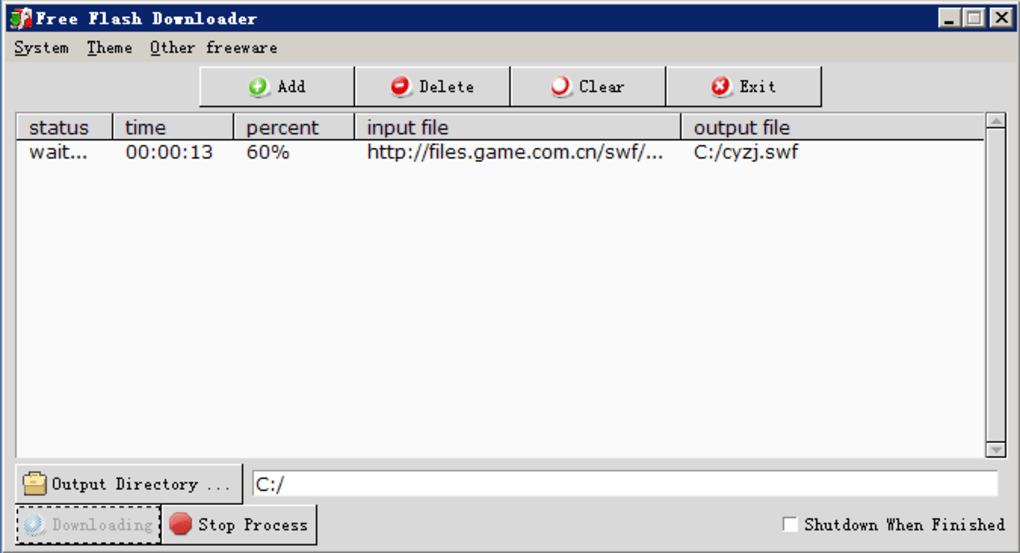
Free Flash Downloader is designed to streamline the process of saving Flash applications (.swf files) from websites. Its primary function is to capture the embedded Flash content and save it locally, allowing users to access and run these applications offline, even after the official discontinuation of the Flash Player. Key features include:
- URL-Based Downloading: The user simply needs to copy the URL of a webpage containing a Flash application and paste it into the Free Flash Downloader interface. The software will then automatically detect and download the embedded .swf file.
- Batch Downloading: For users needing to save multiple Flash files, the software supports batch downloads, saving considerable time and effort. This allows for the efficient preservation of multiple Flash applications or games from a single website or across several websites.
- Local Cache Searching: Free Flash Downloader can also scan the user’s local browser cache for already downloaded .swf files, preventing redundant downloads.
- Resume Functionality: In case of interrupted downloads, Free Flash Downloader allows users to resume the download process from where it left off, ensuring the complete retrieval of the .swf files.
- Automatic Shutdown: After completing a download, or a batch of downloads, users can configure the software to automatically shut down the computer, making it a convenient tool for overnight batch downloads.
- Clipboard Integration: The software efficiently integrates with the system clipboard, making the process of copying and pasting URLs seamless and user-friendly.
Advantages and Disadvantages of Free Flash Downloader
Like any software, Free Flash Downloader offers advantages and disadvantages.
Advantages:
- Ease of Use: The software boasts a user-friendly interface, requiring minimal technical expertise to operate effectively. The simple copy-paste workflow is accessible to a wide range of users, regardless of their technological proficiency.
- Speed and Efficiency: The software is designed for efficient downloading, offering a fast and reliable way to preserve Flash applications. The batch downloading feature further enhances efficiency for large-scale preservation projects.
- Offline Access: The ability to run downloaded Flash applications offline is a significant advantage, ensuring continued access even after Adobe Flash Player has been removed from the user’s system.
- Preservation of Digital Heritage: The software plays a significant role in preserving a part of internet history, offering a way to access and experience Flash content that might otherwise be lost forever.
Disadvantages:
- Compatibility with HTML5: Free Flash Downloader primarily focuses on .swf files associated with Flash, and its capabilities are limited when dealing with content using newer web standards such as HTML5.
- Outdated Interface: Some users may find the interface dated, reflecting the software’s age. The software might lack the modern aesthetic of newer applications.
- Limited Functionality: Compared to modern download managers with advanced features like download scheduling and integration with various cloud storage services, the functionality of Free Flash Downloader is relatively basic.
Alternatives and Conclusion
While Free Flash Downloader serves its purpose well, several alternative solutions exist for those seeking more comprehensive download management capabilities or support for other file types. Other software designed for similar functions or providing broader download management features might offer enhanced user experiences and advanced features.
Free Flash Downloader, despite its limitations, remains a valuable tool for preserving a fragment of internet history. For users seeking a simple and straightforward method to download and save Flash applications (.swf files), it provides a reliable and effective solution. Its ease of use and batch downloading capabilities make it a suitable option for both casual users and those looking to archive larger collections of Flash content. However, users should be aware of its limitations in terms of HTML5 compatibility and its somewhat dated interface. As with any software download, ensuring it’s obtained from a trusted source is crucial to avoid potential malware. Considering the unique historical context surrounding the need for such software, Free Flash Downloader stands as a testament to the desire to retain and access a vital part of the internet’s past.
File Information
- License: “Free”
- Latest update: “November 30, 2023”
- Platform: “Windows”
- OS: “Windows 8”
- Language: “English”
- Downloads: “30.4K”
- Size: “561.84 KB”


