
This in-depth review explores the Free Guitar Tuner software for Windows, examining its functionality, ease of use, strengths, weaknesses, and comparing it to alternative options. The software aims to provide a simple and accessible solution for guitarists needing to tune their instruments, eliminating the reliance on battery-powered electronic tuners. While its approach is unique, it also presents certain limitations that need consideration.
Ease of Use and Interface
The Free Guitar Tuner boasts a user-friendly interface. Its simplicity is a key selling point, making it accessible to beginners and experienced guitarists alike. The main screen displays a visual representation of a six-string guitar. To tune a string, the user simply clicks the corresponding string on the screen. This generates the correct tone for that string, allowing the user to compare it to their own guitar’s sound. The software includes three distinct guitar tone settings: acoustic, electric, and synthesized. This allows for a more accurate comparison, regardless of the type of guitar being tuned. The selection of the appropriate tone is straightforward, enhancing the overall user experience. The program’s clear visual layout and intuitive controls minimize the learning curve, ensuring a smooth tuning process even for users unfamiliar with similar software.
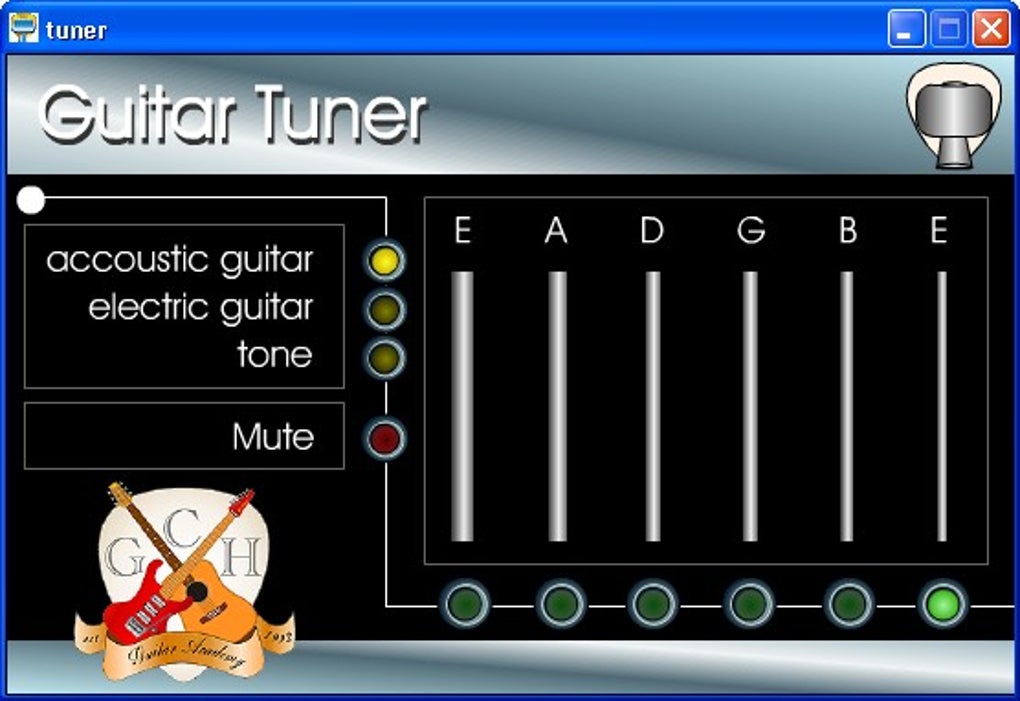
However, the program’s reliance on the user’s ability to match pitches by ear presents a significant limitation. Users who struggle with perfect pitch or have difficulty distinguishing subtle differences in tones may find it challenging to achieve accurate tuning. Unlike typical electronic tuners that analyze the sound input via a microphone, this software solely provides reference tones, leaving the precise tuning entirely dependent on the user’s auditory perception. This aspect is a substantial drawback, potentially rendering the software ineffective for some guitarists. The lack of a visual pitch indicator or a frequency readout further compounds this issue.
Sound Quality and Accuracy
The software produces accurate representations of the tones for each string, across the three available guitar settings. The sound quality is clear and reasonably realistic, ensuring a helpful reference point during the tuning process. The different settings – acoustic, electric, and synthesized – cater to diverse guitar types and allow for a degree of customization to better match the user’s instrument. This adaptability adds a layer of precision to the tuning process, improving the accuracy of the generated tones compared to a single generic sound.
However, the software’s accuracy is ultimately limited by the user’s ability to match the produced tone with the string’s actual pitch. Without a built-in microphone input for analyzing the string’s vibration frequency, the software acts primarily as a tone generator, rather than a fully automated tuning system. This dependence on the user’s hearing and discernment leads to a potentially subjective tuning experience, with accuracy varying depending on individual auditory acuity.
Features and Functionality
Beyond the core tuning function, Free Guitar Tuner offers minimal additional features. The three different guitar tone settings represent the software’s primary point of differentiation and enhance the usability for players of various guitar types. This focus on simplicity is a double-edged sword. While contributing to ease of use, it also results in a lack of sophisticated features found in more advanced tuning applications. There are no additional tools or aids such as a metronome, chord diagrams, or other educational resources. The absence of a chromatic tuner or an automatic tuning mode prevents the software from being fully comprehensive.
The program’s small size and lightweight nature are beneficial, ensuring minimal resource consumption on the user’s computer. This feature is particularly advantageous for users with older or less powerful systems, allowing for a smooth and responsive tuning experience without performance issues. The software’s quick installation and straightforward operation further contribute to its user-friendly nature.
Comparison to Alternative Guitar Tuning Software
Several alternative guitar tuning applications exist, both free and paid, that offer enhanced functionality and more sophisticated features. Some of these alternatives incorporate microphone input for automated tuning, providing a much more objective and accurate tuning experience. Many include additional tools, such as metronomes, chord libraries, and even tablature editors, creating a more comprehensive musical toolkit. Paid applications often offer features like advanced algorithms for improved accuracy, multiple instrument support, and customizable settings.
These alternative applications address the shortcomings of Free Guitar Tuner, such as the reliance on the user’s hearing and the lack of automated analysis. While Free Guitar Tuner’s simplicity is its strength, it’s also its weakness when compared to more feature-rich software. Choosing between Free Guitar Tuner and other options depends largely on individual priorities. Users prioritizing a simple, lightweight, and free solution might find Free Guitar Tuner adequate. However, those seeking higher accuracy and additional features should explore the alternative applications available.
System Requirements and Compatibility
Free Guitar Tuner is compatible with the Windows operating system. Its system requirements are generally low, making it accessible to a broad range of users. However, specific requirements might vary depending on the software version. It’s advisable to check the software’s description for the most up-to-date details on system compatibility to ensure seamless operation on a particular machine.
The absence of support for other operating systems like macOS or Linux is a drawback, limiting the software’s potential user base. This lack of cross-platform compatibility might dissuade users who prefer a consistent experience across multiple devices or operate on non-Windows systems.
Conclusion
Free Guitar Tuner offers a minimalist approach to guitar tuning, providing a straightforward and easily accessible tool. Its intuitive interface and clear sound quality are strengths, making it a viable option for guitarists comfortable with pitch matching by ear. However, its reliance on the user’s hearing and the absence of automated tuning, combined with the lack of additional features, significantly limit its functionality compared to more sophisticated alternatives. While suitable for certain users, it’s crucial to weigh the advantages of its simplicity against the limitations posed by its reliance on subjective pitch recognition. For guitarists seeking a more comprehensive and precise tuning experience, investing in an alternative application with automated analysis capabilities may be a more beneficial choice. Ultimately, the choice between Free Guitar Tuner and its competitors hinges on individual preferences, technical proficiency, and the specific requirements of the user.
File Information
- License: “Free”
- Version: “1.50”
- Latest update: “July 20, 2021”
- Platform: “Windows”
- OS: “Windows XP”
- Language: “English”
- Downloads: “472.9K”
- Size: “3.61 MB”


