
The digital landscape is awash with video formats, each with its own strengths and weaknesses. This proliferation, while offering versatility across devices, also presents a significant challenge: incompatibility. A video perfectly playable on one device might be utterly inaccessible on another. This is where video converter software steps in, and Free HD Video Converter, by Amazing-Share, is one such program aiming to bridge this gap. This review delves into its features, performance, and overall usability, offering a balanced perspective on its strengths and weaknesses.
Installation and Initial Impressions: A Quick Start with a Questionable Aesthetic
One area where Free HD Video Converter immediately distinguishes itself is its remarkably swift installation process. Unlike many programs that burden users with lengthy installations and numerous prompts, this software boasts a refreshingly quick and straightforward setup. The speed and ease of installation are undeniably positive aspects, leaving a favorable first impression.
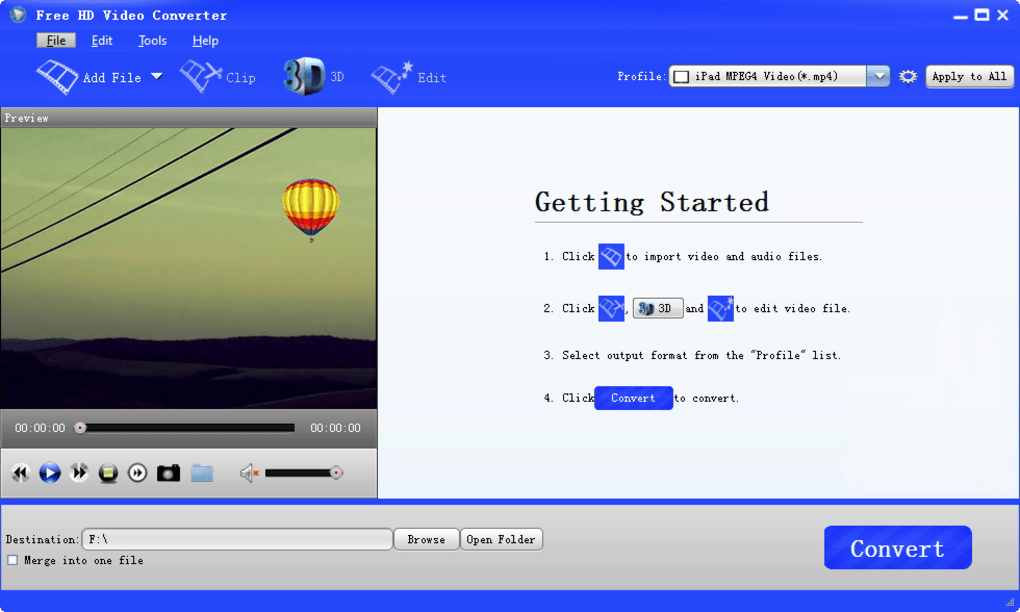
However, this positive first impression is somewhat tempered by the program’s visual design. The bright blue and white color scheme, while subjective, feels jarring and lacks the sleekness found in many contemporary applications. The abundance of icons in the preview window and supplementary text in the conversion file details contributes to a slightly cluttered appearance. While not debilitating, the interface’s aesthetic could benefit significantly from a redesign that prioritizes visual clarity and a more contemporary look and feel. A more muted color palette and a more streamlined arrangement of elements could greatly enhance the overall user experience.
Feature Set: Beyond Basic Conversion
Free HD Video Converter transcends the limitations of a simple conversion tool by offering a range of additional features that enhance its utility. Beyond its core function of converting videos between various formats, the program allows users to fine-tune the visual aspects of their videos. Users have the ability to adjust brightness, contrast, saturation, and hue, providing granular control over the final output. Furthermore, cropping functionality is included, allowing for the removal of unwanted portions of the video. Importantly, the program allows users to choose between maintaining the video’s aspect ratio or freely cropping it, offering flexibility to suit different needs. Finally, volume adjustment before conversion provides another level of control, allowing users to optimize audio levels before the conversion process begins. This comprehensive suite of editing features makes it a more versatile tool than many competitors that only focus on format conversion.
Performance and Limitations: Minor Bugs and Oversights
While Free HD Video Converter performs its primary function adequately, some minor issues detract from the overall experience. One notable drawback is the inconsistent behavior regarding the output folder. Despite selecting the option to specify an output location, the program sometimes fails to display the selected directory after conversion. This inconsistency can be frustrating, forcing users to manually locate the converted files. The limited post-conversion options are another area for improvement. The only choices presented are to take no action or to shut down the computer. A broader selection of options, such as opening the output folder or continuing with another conversion, would provide a more polished and user-friendly experience. These issues, while not critical, suggest areas where further development and refinement would significantly benefit the user experience.
Comparison with Alternative Software: A Competitive Landscape
Free HD Video Converter exists within a competitive market populated by other video conversion applications, both free and commercial. While it offers a range of features and generally performs its core function well, comparing it to other solutions reveals some areas where it could improve. Programs like HD Video Converter Factory Pro and AnyVideo Converter HD often boast more refined interfaces and a wider array of supported formats. Conversely, Free HD Video Converter’s advantage lies in its speed and ease of installation, making it an attractive option for users who prioritize a quick and hassle-free setup. However, the superior interface design and feature breadth of paid alternatives sometimes justify their cost for those who demand a smoother and more comprehensive user experience. The key is to weigh the needs of the user; the simplicity and speed of Free HD Video Converter might outweigh its aesthetic shortcomings for some users, while others will prioritize the sophisticated features and polished design offered by premium solutions.
User Reviews: A Mixed Bag of Opinions
User reviews offer a valuable insight into the real-world experiences of Free HD Video Converter users. While some praise its ease of use and powerful conversion capabilities, others express frustration with its interface, occasional bugs, and the presence of a watermark in the free version. The mixed reception highlights the need for ongoing development and refinement. Addressing user concerns regarding the interface, improving the reliability of features, and perhaps offering a watermark-free option (either through a paid version or alternative means) could significantly improve user satisfaction and bolster its overall rating.
Conclusion: A Functional Tool with Room for Growth
Free HD Video Converter offers a functional solution for basic video conversion needs. Its rapid installation and relatively straightforward interface make it accessible to users of all technical skill levels. The inclusion of video editing features such as brightness, contrast, and cropping adjustments adds to its overall value. However, the program’s visual design could be significantly improved, and minor issues such as inconsistent output folder behavior and limited post-conversion options suggest areas needing further refinement. While it serves its purpose, users seeking a more polished and feature-rich experience might find more satisfaction with alternative software, both free and paid. The choice ultimately depends on the individual user’s priorities and technical requirements. With some improvements in interface design, bug fixes, and potentially a more robust feature set, Free HD Video Converter could establish itself as a leading contender in the video conversion market. However, in its current state, it’s a solid, if somewhat unpolished, option for those with basic video conversion needs.
File Information
- License: “Free”
- Latest update: “May 23, 2023”
- Platform: “Windows”
- OS: “Windows 2003”
- Language: “English”
- Downloads: “65.8K”
- Size: “28.67 MB”


