
Free IP Scanner is a powerful and efficient network utility designed for both system administrators and home users. Its primary function is to quickly identify and scan IP addresses within a network, providing valuable information about connected devices. This comprehensive guide explores the features, capabilities, and applications of Free IP Scanner, highlighting its strengths and limitations.
Understanding the Functionality of Free IP Scanner
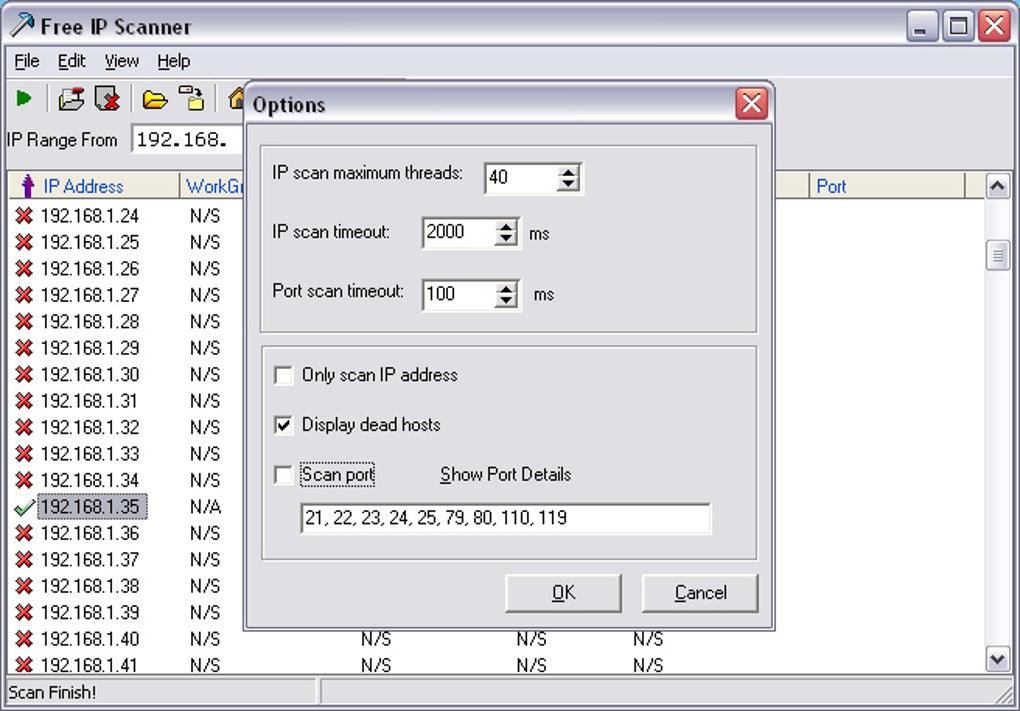
Free IP Scanner operates by employing multi-threaded scan technology, allowing it to ping numerous IP addresses simultaneously. This significantly accelerates the scanning process, making it ideal for large networks or situations where time is of the essence. The core function involves sending ICMP echo requests (pings) to each IP address within a specified range. A successful response indicates an active device on the network. Beyond simply identifying active devices, Free IP Scanner offers several advanced features to enhance its utility.
Upon detecting an active IP address, the scanner can perform additional actions, including:
-
Hostname Resolution: It attempts to resolve the IP address to its corresponding hostname (the device’s name on the network), providing a more user-friendly identification than a numerical IP address. This is particularly useful for identifying servers, workstations, or other networked devices based on their assigned names.
-
Port Scanning: This optional function allows the user to scan specific ports on the identified devices. Port scanning reveals which services or applications are running on each device. For example, identifying an open port 80 indicates a web server is likely operating on that machine. While this feature is powerful, it’s crucial to remember that unauthorized port scanning can be considered unethical or even illegal depending on local laws and network policies.
-
NetBIOS Information Retrieval: For devices running the NetBIOS protocol (common in Windows networks), Free IP Scanner can gather additional details, such as the host’s NetBIOS name, the workgroup it belongs to, the currently logged-in user, and the device’s MAC address. This information is valuable for network administration and troubleshooting.
-
Data Export: All gathered information can be exported to a plain text file. This functionality is invaluable for creating network inventories, documenting network configurations, or generating reports for troubleshooting purposes. The simple text format ensures compatibility with various applications and systems.
The speed and efficiency of Free IP Scanner are largely attributed to its multi-threaded architecture. This allows the program to concurrently process multiple requests, drastically reducing the overall scan time. This makes it a particularly valuable tool for network administrators responsible for managing large and complex networks, enabling them to quickly assess the status of numerous devices.
User Interface and Ease of Use
Free IP Scanner boasts a straightforward and intuitive interface. Its simplicity makes it accessible even to users with limited technical expertise. The core functionality is readily available without requiring users to navigate complex menus or options. This ease of use is a significant advantage, ensuring that network administrators can quickly utilize the tool without extensive training or prior experience. The program’s uncluttered design focuses on delivering the core functionality with minimal distractions.
The program’s primary window presents a clear and concise display of scanned devices. Each entry typically includes the IP address, hostname (if resolved), and other details depending on the chosen scan options. The ability to easily export this information further enhances usability, ensuring that administrators can readily utilize the data in other applications or systems.
Applications and Use Cases
Free IP Scanner finds applications across a range of scenarios, catering to both experienced network administrators and casual users. Some of its key uses include:
- Network Inventory Management: Maintaining an accurate inventory of network devices is essential for effective network administration. Free IP Scanner greatly simplifies this task by quickly identifying all active devices within a network. This helps to keep track of all connected devices and maintain an up-to-date inventory.
-
Troubleshooting Network Connectivity Issues: When network connectivity problems arise, identifying the source of the issue can be challenging. Free IP Scanner can help pinpoint devices experiencing issues by identifying unresponsive or unreachable hosts. The ability to see all active devices helps in determining if a specific device is causing problems on the network.
-
Security Auditing: Understanding which devices are connected to a network is a crucial aspect of network security. Free IP Scanner aids in identifying unauthorized devices that may have gained access to the network. This is especially helpful in larger networks where manual identification of all active devices is a time-consuming task.
-
Home Network Management: Even home users can benefit from Free IP Scanner. Identifying all devices on a home network can aid in troubleshooting internet connectivity problems or tracking down devices that are consuming excessive bandwidth. It provides an easy way to manage and understand the devices connected to your home internet.
-
IP Address Conflict Detection: Occasionally, IP address conflicts can occur on a network, leading to connectivity problems. Free IP Scanner can help identify these conflicts by revealing multiple devices using the same IP address. This helps to resolve network conflicts which can lead to outages.
While Free IP Scanner excels in its core functionality, it’s important to acknowledge its limitations. It’s primarily a basic IP scanner and port scanner, lacking advanced features found in more comprehensive network analysis tools. For instance, it may not be suitable for complex network diagnostics or deep packet inspection. However, its simplicity and efficiency are valuable assets for its target audience.
Alternatives to Free IP Scanner
Several alternative IP scanning tools are available, each with its strengths and weaknesses. These alternatives often provide a more comprehensive feature set or specialized capabilities but may also have steeper learning curves or be less user-friendly than Free IP Scanner. Some notable alternatives include:
- Advanced IP Scanner: This free utility offers similar core functionality with additional features like Wake-on-LAN support and the ability to manage remote computers.
-
Angry IP Scanner: Known for its speed and user-friendly interface, Angry IP Scanner provides a fast and efficient way to scan IP addresses.
-
SolarWinds Network Performance Monitor: This is a more advanced and comprehensive paid solution for network monitoring and management, going far beyond the simple scanning abilities of Free IP Scanner. It offers sophisticated network performance analysis and more in-depth reporting.
The choice between Free IP Scanner and alternative tools depends largely on the specific needs and technical expertise of the user. For simple IP address discovery and basic port scanning, Free IP Scanner provides a user-friendly and efficient solution. However, users requiring advanced network analysis, detailed reporting, or specialized features should explore more sophisticated tools.
Conclusion
Free IP Scanner provides a valuable tool for network administrators and home users alike, simplifying network management and troubleshooting. Its speed, ease of use, and straightforward interface make it an attractive option for various scenarios. While it lacks the advanced features found in more comprehensive tools, its simplicity and efficiency are key advantages for those needing a quick and effective IP scanner. Its ability to provide a quick overview of a network’s active devices makes it an indispensable tool for anyone involved in network management or troubleshooting. By understanding its capabilities and limitations, users can effectively leverage Free IP Scanner to optimize their network management tasks.
File Information
- License: “Free”
- Latest update: “March 19, 2025”
- Platform: “Windows”
- OS: “Windows XP”
- Language: “English”
- Downloads: “217.5K”


