
Free ISO Converter is a versatile and user-friendly software application designed for converting standard ISO (optical disk image) files into various other formats. Its ease of use makes it accessible to both novice and experienced users, while its free availability makes it a popular choice for managing and manipulating ISO files. This comprehensive guide explores the features, functionality, and usability of Free ISO Converter, along with a comparison to alternative software options.
Understanding ISO Files and Their Conversion
An ISO image file is a precise, byte-for-byte copy of a data disc, such as a CD or DVD. It contains all the data from the original disc, including its file system structure and boot information. ISO files are commonly used for software distribution, archiving, and backing up optical media. However, ISO files aren’t always the most convenient format for every purpose. Different applications or operating systems might require different formats for data storage or access. This is where ISO converters like Free ISO Converter become invaluable. They bridge the gap between the ISO format and other image file types, allowing for greater flexibility in how you use and manage your data.
The Free ISO Converter handles this task by interpreting the information embedded within the ISO file. It then processes this data, translating it into a compatible format specified by the user. The supported output formats vary, but generally include common image file types such as PDI, BIN, and NRG. The conversion process is designed to be lossless; the converted file will retain all of the original data present in the ISO file. The software’s strength lies in its ability to perform this complex conversion task in a simple and intuitive manner, even for users with limited technical expertise.
Key Features and Functionality of Free ISO Converter
Free ISO Converter’s primary function is, as its name suggests, the conversion of ISO files. However, beyond this core functionality, it also offers several additional features that enhance its usability and versatility.
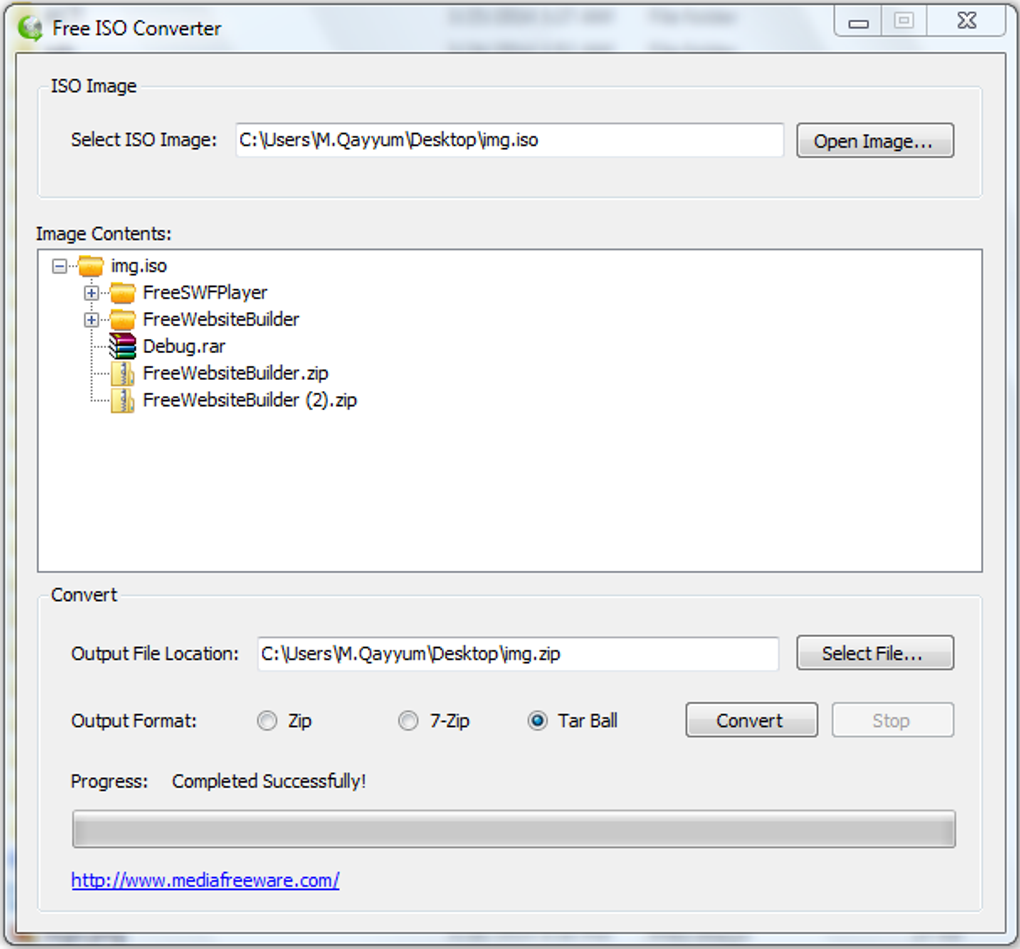
The software boasts a clean and user-friendly interface. Navigating the conversion process is straightforward, involving only a few simple steps: selecting the input ISO file, choosing the desired output format, and initiating the conversion. A progress bar is prominently displayed to keep users informed about the progress of the conversion. This real-time feedback greatly improves the user experience, preventing anxiety associated with uncertain processing times.
Customization options are also available, adding to the software’s flexibility. Users can extract specific portions of the ISO file instead of converting the entire image. This is helpful when only particular files or folders within the ISO are needed. Furthermore, users can rename the output file before the conversion starts, streamlining the organization of converted files.
The platform compatibility of Free ISO Converter is another significant advantage. Although primarily associated with Windows operating systems, the software is also compatible with Mac devices, offering cross-platform accessibility. This wide range of compatibility expands the software’s appeal to a broader audience, regardless of the operating system in use.
Finally, while the software’s development may have slowed, the core functionality remains robust and reliable. Although it has not seen recent updates, it continues to perform the ISO conversion process efficiently and without issues for many users.
Ease of Use and User Interface
Free ISO Converter’s success stems largely from its intuitive design and straightforward operation. The user interface is exceptionally clean and uncluttered, presenting the essential options without overwhelming the user with unnecessary complexities. Even users unfamiliar with ISO file manipulation will find the software easy to navigate and use.
The program’s workflow is linear and simple: users select the input ISO file, select the desired output format from a list of supported options, and then click the “Convert” button. The software handles the rest, keeping the user informed about the conversion’s progress via a visual progress bar. There are no intricate settings or advanced options to confuse beginners. This focus on simplicity is a significant asset, broadening the software’s appeal to a wider user base.
The absence of complex menus and options doesn’t, however, imply a lack of functionality. The key features are easily accessible and clearly labeled, making the user experience streamlined and efficient.
Comparison with Alternative ISO Conversion Software
While Free ISO Converter is a solid and free option, several alternative software packages provide similar functionality, each with its strengths and weaknesses. A comparison helps illustrate Free ISO Converter’s place within the broader landscape of ISO conversion tools.
Some alternative options might offer more features, such as built-in burning capabilities or support for a wider range of file formats. Others might boast a more visually appealing or modern user interface. However, Free ISO Converter’s strength lies in its simplicity and free accessibility. Many competing applications either require a paid license or offer a limited free version with restricted functionality. For users solely needing basic ISO conversion, Free ISO Converter offers a compelling value proposition.
Evaluating alternative software requires considering factors such as price, supported formats, user-friendliness, available features (like burning capabilities or command-line options), and the level of customer support offered. For instance, some commercial alternatives may provide more extensive technical support or more frequent updates, but these advantages come at a cost.
Limitations and Potential Drawbacks
Despite its advantages, Free ISO Converter does have some limitations. The most significant drawback is the lack of recent updates. While the software continues to function correctly for many users, the absence of updates might imply a lack of ongoing support or future development. This raises concerns about potential compatibility issues with newer operating systems or emerging file formats. It also leaves unanswered questions regarding the availability of support should issues arise.
Another potential limitation is the lack of detailed documentation or readily available customer support. While the software is intuitive, a comprehensive user manual or online help center could assist users who encounter unexpected problems or want to explore the software’s capabilities further. The absence of these resources could create frustration for some users, particularly those who are less tech-savvy.
Finally, the relatively limited set of supported output formats might be a constraint for users requiring specialized image file types. While the software handles common formats adequately, users working with less prevalent formats might need to look for alternative solutions.
Conclusion
Free ISO Converter provides a straightforward and effective solution for users needing a simple and free tool for converting ISO files. Its ease of use, clean interface, and cross-platform compatibility make it an attractive choice for many. While lacking some features found in more sophisticated or commercial alternatives, and with a notable absence of recent updates, its strengths in simplicity and free availability make it a valuable option for a wide range of users. The decision of whether to use Free ISO Converter ultimately depends on individual needs and priorities, with a careful consideration of its limitations in relation to other available alternatives.
File Information
- License: “Free”
- Version: “1”
- Latest update: “July 15, 2022”
- Platform: “Windows”
- OS: “Windows 8.1”
- Language: “English”
- Downloads: “111.6K”
- Size: “1.18 MB”


