
The digital music landscape is vast and varied, with numerous platforms offering a seemingly endless supply of songs. iTunes, once a dominant force, played a significant role in shaping this landscape. However, its proprietary M4A file format presented a challenge for users seeking broader compatibility with various media players and devices. This incompatibility spurred the development of numerous conversion tools, with Free M4A to MP3 Converter emerging as a popular choice. This review delves into its features, performance, and overall usability to determine its effectiveness as a solution for those seeking to convert M4A files to the more widely compatible MP3 format.
Understanding the Need for M4A to MP3 Conversion
The M4A (MPEG-4 Audio) format, favored by iTunes, boasts advantages in terms of file size efficiency compared to the ubiquitous MP3 (MPEG Audio Layer III) format. Smaller file sizes translate to less storage space consumed and faster download times. However, this efficiency comes at a cost: not all media players and devices support M4A files. This limitation restricts playback options for users, forcing them to rely solely on iTunes or compatible players, a restriction many find inconvenient.
The MP3 format, despite its larger file size, enjoys unparalleled compatibility. Almost all media players, portable devices, and operating systems support MP3 playback, making it the de facto standard for music distribution and sharing. Therefore, converting M4A files to MP3 becomes a necessary step for users to enhance the accessibility and portability of their music libraries. This conversion allows for seamless playback across a wide range of devices, eliminating the frustrating experience of encountering incompatible file formats.
Free M4A to MP3 Converter: Features and Functionality
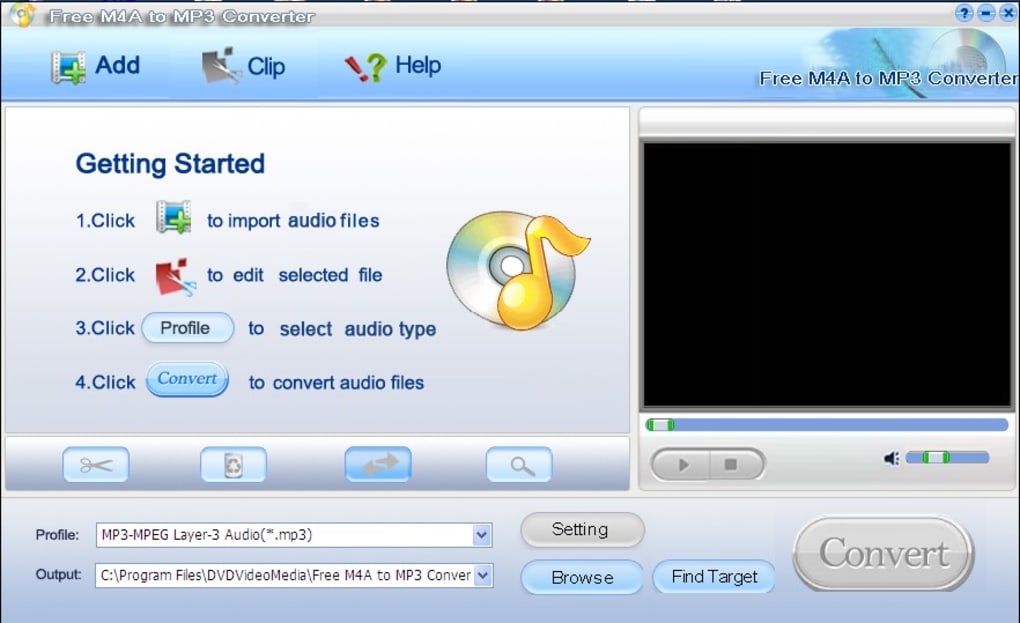
Free M4A to MP3 Converter directly addresses this compatibility issue. Its primary function is the straightforward conversion of M4A files to MP3. This seemingly simple task is executed with commendable efficiency. Users can select individual files or entire folders for batch conversion, streamlining the process significantly. The program’s intuitive interface presents a user-friendly experience, guiding even novice users through the conversion procedure effortlessly.
Beyond its core functionality, the converter offers some additional features:
-
Multiple Output Formats: While primarily focused on M4A to MP3 conversion, the software sometimes offers support for additional output formats, such as WAV (Waveform Audio File Format) and WMA (Windows Media Audio). This versatility caters to users who might require alternative formats for specific applications or devices. The availability of these extra formats enhances its usefulness beyond simply converting to MP3.
-
Batch Processing: The software’s ability to handle batch conversions is a noteworthy feature. Users can select multiple M4A files simultaneously, initiating a single conversion process that handles them all in sequence. This functionality is invaluable for users with large music collections needing conversion. Batch processing significantly reduces the time and effort required for conversion tasks.
-
Destination Folder Selection: Users retain full control over the location where converted files are saved. This allows for organized storage, preventing converted files from cluttering the original source folders. This control is crucial for maintaining a well-structured digital music library.
-
Simple and Intuitive User Interface: The program boasts a clean and straightforward interface, readily navigable even for those unfamiliar with audio conversion software. The layout prioritizes ease of use, minimizing the learning curve required to effectively use the program.
Performance and Usability
Free M4A to MP3 Converter distinguishes itself through its efficient conversion speeds. The software swiftly processes even large audio files, minimizing wait times for users. This responsiveness contributes significantly to the overall positive user experience. The efficient processing speed makes the program a practical solution for users with significant numbers of M4A files to convert.
The installation process is equally straightforward, free from complex configurations or unnecessary bundled software. The uninstallation process is equally simple, leaving no unwanted files or registry entries behind. This clean installation and removal process ensures a seamless user experience, both during setup and subsequent removal of the software.
While the interface is largely user-friendly, some users have noted the presence of advertisements for the publisher’s other applications within the program’s menu. Although not excessively intrusive, this advertising element might be perceived as a minor drawback by some users. However, given the software’s free nature, this is a reasonably acceptable tradeoff for many.
Comparing Free M4A to MP3 Converter with Alternatives
Several alternative M4A to MP3 converters exist, offering similar functionalities. Some offer additional features like integrated editing tools, advanced audio settings, or support for a wider array of input and output formats. However, Free M4A to MP3 Converter maintains a competitive edge due to its simplicity, speed, and reliability.
While advanced features are attractive, they often come at the cost of increased complexity. Free M4A to MP3 Converter prioritizes ease of use, making it an ideal choice for users primarily seeking a straightforward conversion tool without needing sophisticated audio manipulation capabilities.
Conclusion: Is Free M4A to MP3 Converter Worth It?
Free M4A to MP3 Converter provides a simple, efficient, and reliable solution for converting M4A files to the widely compatible MP3 format. Its straightforward interface, fast conversion speeds, and clean installation/uninstallation process make it an excellent choice for users seeking a no-frills conversion tool. While the presence of in-program advertisements might be a minor drawback for some, the program’s overall performance and free availability outweigh this minor inconvenience for many users. For those needing a quick and effective method of converting their iTunes music library for broader compatibility, Free M4A to MP3 Converter presents a highly viable and effective option. Its simplicity and speed make it an ideal solution for users who prioritize ease of use over advanced features. The program effectively bridges the gap between the iTunes-centric M4A format and the ubiquitous MP3 format, enhancing the accessibility and enjoyment of digital music for a wide range of users.
File Information
- License: “Free”
- Latest update: “July 11, 2023”
- Platform: “Windows”
- OS: “Windows 98”
- Language: “English”
- Downloads: “23.3K”
- Size: “5.54 MB”


