
Free Media Catcher is a download manager designed to simplify the process of capturing streamed media while browsing the web. This software, primarily for Windows, offers a straightforward approach to downloading various media formats, including FLV, MP3, and MP4 files, directly from websites. While it boasts simplicity and compatibility with popular platforms, it also presents certain limitations that warrant consideration. This review delves into the functionalities, strengths, weaknesses, and overall user experience of Free Media Catcher.
Ease of Use and Functionality
Free Media Catcher’s primary strength lies in its user-friendly interface and streamlined functionality. The installation process, which includes the necessary WinPcap component, is relatively simple and straightforward. Once installed, the program operates silently in the background, requiring minimal user intervention. Its primary function is the automated detection and download of streaming media files encountered during web browsing sessions.
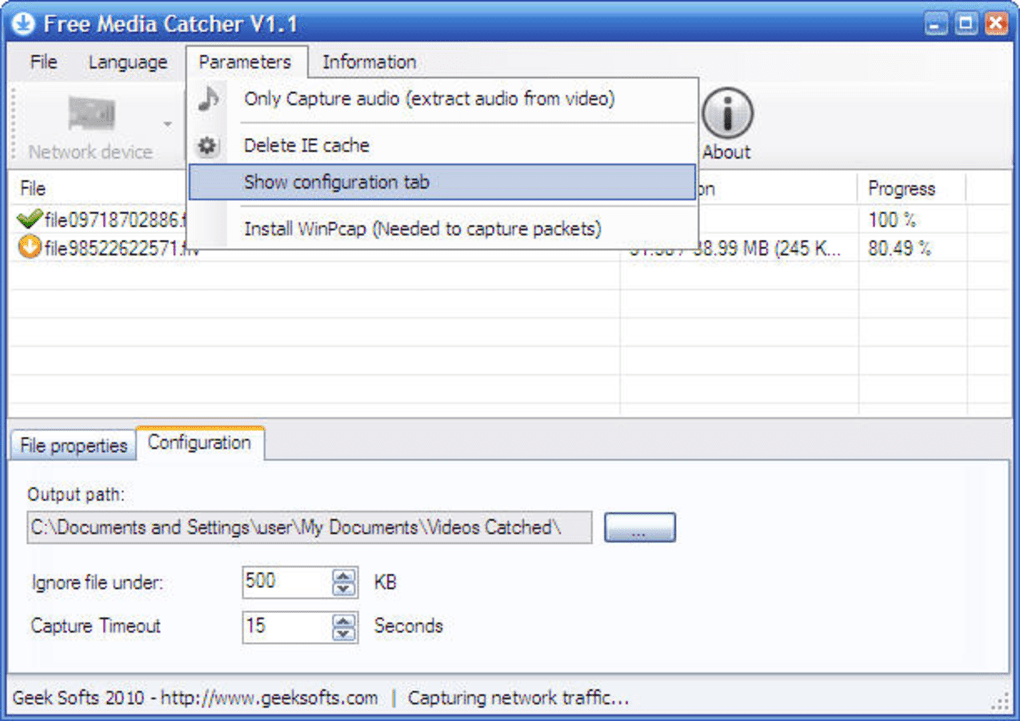
The program’s compatibility extends to numerous popular websites, encompassing platforms like YouTube, Dailymotion, Megavideo, Vimeo, MySpace, Songza, and Last.fm, among others. This broad compatibility caters to a wide range of user preferences and media consumption habits. The background operation ensures that the download process doesn’t disrupt ongoing browsing activities. The user is notified via a small desktop notification once new media files are identified and queued for download.
Configurability allows users to establish a minimum file size threshold. This feature prevents the download of insignificant or unwanted files, adding a layer of customization to the automated download process. This level of control is beneficial in managing storage space and preventing the unnecessary download of small, irrelevant files. While the automated functionality is convenient, the ability to set minimum file size parameters adds a degree of refinement to the download management capabilities.
Performance and Reliability
While generally functional, Free Media Catcher’s performance and reliability exhibit some inconsistencies. The software performs its primary function adequately, successfully identifying and downloading a variety of streamed media files. However, reports and user feedback suggest some instances of instability and occasional download failures. These inconsistencies highlight the need for potential improvements in the software’s core download mechanisms. The reliability of the download process isn’t consistently robust, and occasional hiccups might necessitate manual intervention or repeated download attempts.
Features and Limitations
Free Media Catcher’s simplicity is both a strength and a weakness. Its straightforward design ensures ease of use, particularly for less tech-savvy users. However, this simplicity comes at the cost of advanced features found in more comprehensive download managers. A notable omission is the lack of a built-in media converter. Users requiring conversion between different media formats will need to utilize separate converter software, adding an extra step to the workflow.
Furthermore, while the software incorporates a built-in media player, reports suggest that this player’s reliability and compatibility are less than optimal. The player’s occasional instability or failure to play certain downloaded files might lead users to seek alternative playback solutions. This limitation reduces the program’s standalone utility, requiring users to use external media players for consistent playback.
Another aspect to consider is the last update date, September 21, 2010. This significantly outdated release date implies a lack of recent maintenance and updates. The absence of regular updates could lead to compatibility issues with newer websites and streaming technologies. It also raises concerns about security vulnerabilities and the potential for compatibility problems with newer operating systems and web browsers.
Comparison with Alternative Software
Compared to alternative download managers, Free Media Catcher lacks the comprehensive feature set and advanced functionalities present in competing software. Programs like aTube Catcher, Fast Tube Catcher, and VDownloader offer a broader range of features, including integrated converters, advanced download options, and often more robust performance and reliability.
These alternatives typically provide more refined control over the download process, offering options for customizing download quality, format, and other parameters not available in Free Media Catcher. The absence of these features in Free Media Catcher limits its appeal to users seeking more comprehensive download management solutions. Its primary advantage is simplicity and ease of use, which may outweigh the limitations for certain users, but overall, the functionality pales in comparison to more modern competitors.
Security Considerations
The security of any software is a primary concern. While the software has been scanned by multiple antivirus services and marked as “Clean” in the provided context, this status should not be interpreted as an absolute guarantee of security. Software security is constantly evolving, and threats can emerge that weren’t detectable at the time of the scan.
Given the lack of recent updates, there’s an increased risk of potential vulnerabilities. This lack of continuous security updates leaves the software susceptible to known and unknown security exploits. Users should proceed with caution and maintain a vigilant security posture while using Free Media Catcher. Considering the age of the software, it’s strongly advised to use caution and ensure a comprehensive antivirus and security suite is employed alongside the application. Regular system scans are also crucial to mitigate potential risks.
Overall Assessment
Free Media Catcher provides a straightforward solution for downloading streamed media from websites. Its ease of use and compatibility with popular platforms are its main strengths. However, the lack of advanced features, the presence of a buggy built-in player, the absence of recent updates and resulting potential security concerns, and inconsistent reliability significantly diminish its overall value proposition.
Users seeking a simple, minimal-effort solution for downloading media might find Free Media Catcher acceptable, but those requiring advanced features, robust performance, reliable conversion capabilities, and a recent, secure application should consider more up-to-date and feature-rich alternatives. The age and lack of support severely limit its recommended usage, except for users with very specific and limited requirements. In an environment with many sophisticated and continuously updated download managers, Free Media Catcher’s limitations are significant enough to warrant exploring other solutions.
File Information
- License: “Free”
- Version: “1.2”
- Latest update: “September 21, 2010”
- Platform: “Windows”
- OS: “Windows 7”
- Language: “English”
- Downloads: “97.9K”
- Size: “4.44 MB”


