
In an increasingly digital world, where multimedia content reigns supreme, the ability to seamlessly manage, convert, and enjoy audio and video files across a multitude of devices is no longer a luxury, but a necessity. From personal archives of cherished memories to downloaded online content, the formats and platforms are diverse, often leading to compatibility headaches. This is where a robust and versatile tool like Free Media Converter steps in, offering a comprehensive solution that promises to liberate your digital media. Developed by freemediaconverter.org, this software is engineered to empower users to effortlessly navigate the complexities of digital formats, ensuring their audio and video media are accessible and enjoyable on virtually any device. And perhaps its most compelling feature? It’s entirely free to download and use.
The digital landscape is awash with various media formats – AVI, MP4, MOV, FLV, MP3, WAV, and countless others – each with its own set of specifications and device compatibilities. The challenge for many users lies in converting these files to a suitable format for playback on their smartphones, tablets, gaming consoles, or even different operating systems. Free Media Converter addresses this challenge head-on, providing a singular, powerful platform that acts as an all-in-one multimedia conversion hub. More than just a converter, it integrates an array of functionalities including downloading online videos, burning content to CDs and DVDs, and even recording audio and video directly from your webcam or computer screen. This extensive suite of tools positions Free Media Converter not just as a utility, but as an indispensable companion for anyone looking to achieve complete mastery over their digital media presence.
Unlocking Multimedia Potential: What Free Media Converter Offers
At its core, Free Media Converter is built on the promise of versatility and accessibility. It understands that modern users interact with media across a vast ecosystem of devices and platforms, each with its own preferred or required file type. This understanding has driven its developers to create a tool that is not only powerful in its conversion capabilities but also incredibly broad in its scope of functions, extending far beyond simple format changes.
Comprehensive Format and Device Support
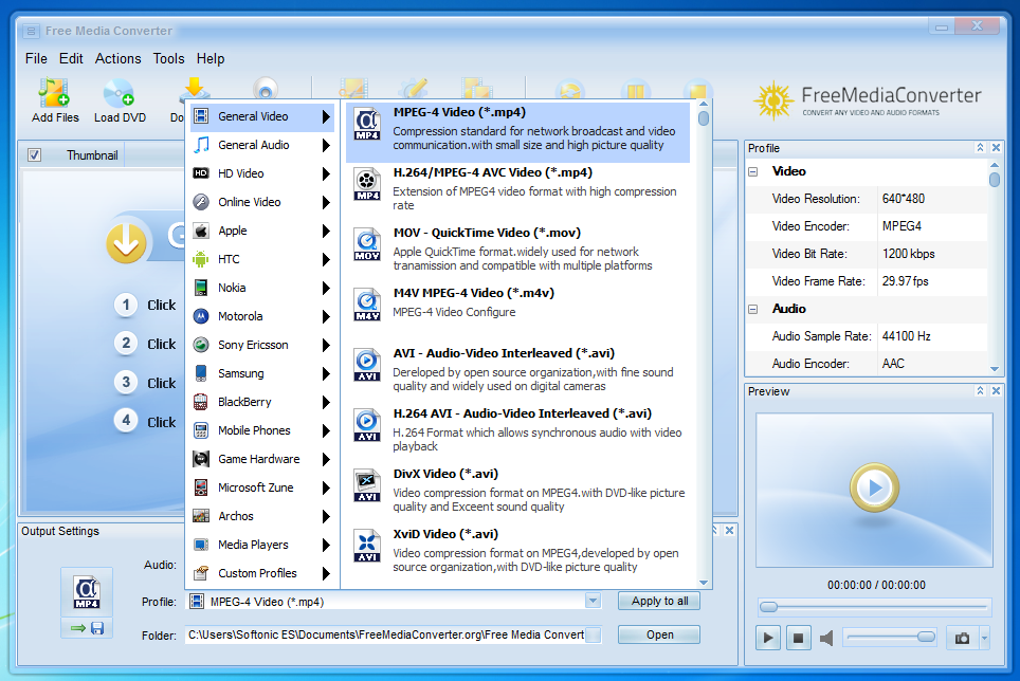
One of the most significant advantages of Free Media Converter is its unparalleled support for an exhaustive list of audio and video formats. Unlike many niche converters that specialize in a handful of formats, this program embraces almost every known multimedia file type. On the input side, users can bring in virtually any video or audio file they possess. This includes popular video formats such as MOV, SWF, FLV, MP2, MPG, VOB, ASF, MKV, AVI (supporting both xVid and DivX codecs), and MP4 (including MPEG-4 and H.264). For audio, it similarly handles a wide spectrum, ensuring that no matter the source, your media can be processed.
This broad input compatibility is matched by an equally impressive range of output options. Users can convert their media into formats compatible with a vast array of target devices. This level of adaptability is crucial in today’s multi-device environment. Whether you own an Apple iPhone or iPad, a Sony Xperia, or a device from the Samsung Galaxy range (be it a phone or tablet), Free Media Converter has specific presets and conversion profiles to ensure optimal playback. Furthermore, it caters to gaming enthusiasts, allowing conversion for platforms like the Xbox, PlayStation, and the Wii, ensuring that your media library is truly portable and universally accessible. Imagine being able to convert your entire collection of DVDs – even those that are protected – into digital files that you can watch on your tablet during a commute or stream to your gaming console from a home server. Free Media Converter makes this a quiet, easy, and speedy reality, streamlining your media for every aspect of your digital life.
Beyond Conversion: Downloading, Burning, and Recording
Free Media Converter’s utility extends far beyond mere format conversion. Recognizing the multifaceted needs of today’s digital consumers, it integrates several other powerful features that significantly enhance its value proposition.
For those who frequently encounter compelling video content online, the program offers a robust downloading capability. Users can effortlessly convert and download material from some of the internet’s top online sources, including popular platforms like Hulu, Daily Motion, YouTube, and various other well-known video-sharing sites. This means that if you discover an insightful documentary, an entertaining music video, or a captivating lecture, you are not confined to viewing it solely on its original platform. Instead, you can download it in your preferred format, ready for offline viewing on any of your devices, making your favorite online content truly your own.
In an age where digital distribution is dominant, the ability to create physical media might seem anachronistic, but it remains incredibly valuable for archival purposes, sharing with those less digitally savvy, or simply for creating a tangible backup. Free Media Converter thoughtfully includes functionalities for burning content to CDs and DVDs. This feature allows users to compile their converted videos, recorded clips, or favorite audio tracks onto discs, providing a reliable method for physical storage and distribution.
Moreover, the software empowers users to become content creators themselves. It allows for the creation of bespoke videos from differing sources directly on your computer. Users can capture videos from their desktop, or even specific parts of their screen, making it ideal for creating tutorials, gameplay recordings, or presentations. Beyond screen capture, the program also supports recording videos and audio clips directly using webcams. These captured audio and video clips are not merely stored; they can immediately be converted to any compatible multimedia format supported by the software, ensuring that your newly created content is just as versatile and shareable as any other media file in your collection. This comprehensive suite of tools transforms Free Media Converter from a simple utility into a veritable digital media workshop.
The Advantage of Choice: Why Free Media Converter Stands Out
The market is saturated with multimedia software, many of which promise similar functionalities. However, Free Media Converter distinguishes itself not just by the breadth of its features, but by its foundational ethos: providing powerful, accessible tools without a financial barrier. This commitment to being entirely free is a significant differentiator in a landscape dominated by commercial offerings and limited trial versions.
A Free and Multifunctional Powerhouse
While a veritable plethora of video and audio converters are available, the vast majority are commercial offerings, often burdened by subscription models, one-time purchase fees, or highly restrictive trial periods. These programs typically have a very limited scope, frequently specializing in either video or audio conversion, forcing users to invest in multiple software solutions if their needs extend beyond a single media type. Imagine needing to convert a video for your phone, then later wanting to download a song from an online source, and finally burning a custom compilation to a DVD – with most commercial offerings, this would necessitate purchasing or subscribing to three separate applications.
This fragmented and often costly approach is precisely the problem Free Media Converter was designed to solve. Its raison d’être is to be the single, unified solution for virtually all a user’s video and audio conversion needs, and importantly, to offer this solution at no cost. It is a truly multifunctional powerhouse that combines the capabilities of a premium converter with those of a downloader, burner, and recorder, all within one accessible package. The emphasis on being “entirely free to download” is not just a marketing slogan but a core principle that guides its utility, making advanced multimedia management accessible to everyone, regardless of their budget. This removes the financial barrier that often prevents users from exploring and utilizing the full spectrum of media tools available, democratizing the process of digital content management.
Ease of Use for Every Digital Enthusiast
Beyond its comprehensive feature set and zero-cost model, Free Media Converter is celebrated for its remarkable user-friendliness. In the often-complex world of digital media, where technical jargon and intricate settings can deter even seasoned users, the software offers a refreshing degree of simplicity and intuitiveness. The sheer ease of use is frequently highlighted as a major advantage, making the decision to download Free Media Converter a proverbial “no-brainer” for many.
The interface is designed to be straightforward, allowing users to quickly grasp its functionalities without a steep learning curve. Whether you’re a novice navigating your first media conversion or an experienced digital enthusiast looking for efficient tools, the program caters to all levels of expertise. This accessibility means less time spent wrestling with complicated menus and more time enjoying your transformed media. The versatility of formats and usage, combined with this commitment to ease of operation, allows users to regain mastery over their digital presence. In a digital world where individuals are constantly beset by a bombardment of audio and visual clips from various sources, Free Media Converter empowers them to convert files to a format that suits them, rather than being dictated by device limitations or proprietary formats. This user-centric design principle is a cornerstone of its appeal, ensuring that its powerful capabilities are genuinely usable by everyone.
Navigating the Digital Landscape: Practical Applications and Benefits
The utility of Free Media Converter extends into numerous practical scenarios, making it an invaluable tool for a wide range of users, from casual media consumers to budding content creators. Its integrated features facilitate various tasks, ultimately enhancing the way individuals interact with and utilize their digital media.
Streamlining Your Media Library
One of the most common challenges for anyone with a significant collection of digital media is managing the diverse array of formats. A video downloaded from one platform might not play on a specific device, or an audio track might be in a format incompatible with your preferred media player. Free Media Converter offers a powerful solution to streamline and standardize your media library. With its support for almost all audio and video formats known, you can easily and speedily convert your entire collection into a unified format that works across all your devices.
This includes the ability to convert physical media, such as DVDs, into digital files. Imagine having a vast collection of movies and home videos on DVD, but wanting the convenience of watching them on your tablet during travel or streaming them directly from your home network without needing a physical disc. Free Media Converter enables you to digitize these DVDs, even those that are copy-protected, into major video and audio formats. This not only preserves your media in a more accessible digital form but also future-proofs your collection, making it impervious to the physical degradation that discs can experience over time. By centralizing your media and making it universally compatible, the software helps you take control of your digital assets, ensuring that your cherished content is always at your fingertips, regardless of the playback device. This ultimately reduces frustration and significantly enhances the enjoyment of your personal media library.
Creating Personalized Content
Beyond simply consuming and converting existing media, Free Media Converter opens up avenues for personal content creation. In an era where user-generated content is increasingly prevalent, having tools that facilitate easy recording and editing can be incredibly empowering. The program allows users to craft their own bespoke videos from differing sources, turning their computer into a powerful recording studio.
For instance, users can capture videos directly from their desktops or any specific part of their screen. This feature is particularly useful for a variety of applications: creating detailed software tutorials, recording online meetings or webinars for later review, capturing gaming highlights, or even producing educational content. The flexibility to select only a portion of the screen ensures that only relevant information is recorded, making the output clean and professional.
Furthermore, the integration of webcam recording functionality means that users can easily create personal video messages, record vlogs, or conduct simple video interviews. This direct recording capability, combined with the immediate option to convert these clips into any compatible multimedia format, means that your newly created content is instantly ready for sharing, uploading, or further editing. Whether you’re sharing a quick video message with family, uploading a tutorial to a social platform, or compiling footage for a more complex project, Free Media Converter provides the foundational tools to capture, convert, and prepare your personalized content effortlessly. This fosters creativity and provides the means to share your unique perspective with the digital world.
User Experience and Technical Insights
Understanding a software’s technical specifications and how real users perceive its “free” nature is crucial for a complete picture. While Free Media Converter is promoted as a completely free solution, a deeper dive into user feedback reveals nuances that potential users should be aware of.
Installation, Performance, and System Requirements
Free Media Converter is designed for the Windows operating system, offering compatibility for various versions, including Windows XP and later. The current version, V4.43, indicates continuous development and refinement, ensuring it remains relevant and functional in the evolving software landscape. The software is available in English, making it accessible to a wide global audience.
In terms of performance, the program aims for speedy conversions, which is a critical factor for users dealing with large files or extensive media libraries. The developers highlight its efficiency in quickly converting DVDs and other media. With reported download figures reaching 165.3K overall and 121K in the last month alone, it suggests a significant user base and active interest, indicating a level of reliability and popularity. The installation process is typically straightforward, fitting within the standard Windows application model. Users seeking to install this software can expect a relatively easy setup, followed by an intuitive interface that facilitates immediate use without complex configurations.
Community Feedback and Addressing Common Concerns
While Free Media Converter is consistently marketed and positioned as “free,” it is important for prospective users to consider community feedback regarding this claim. User reviews on platforms like PhanMemFree.org indicate a discrepancy that new users should be aware of. Some users, such as Brett Keith and Olga Steps, have reported that while the software is initially downloadable, it functions more like a “trial version.” Specifically, reviews mention a limitation where the “free converter only converts 3 minutes of a track” or provides “3 minutes length output audio/video,” leading to the perception that it “isn’t free” in the full sense of the word.
Conversely, other users, like Hector Morales and an anonymous reviewer, have praised it for being “very easy to use with too many features and most important is free” and an “Excellent program and its free,” stating it “works good and is easy to use” for converting various files like .mkv, avi, and iso. This divergence in user experience suggests that while the core functionalities are highly regarded for their ease of use and wide format support, the interpretation of its “free” status may vary based on specific use cases or potentially, changes in its licensing model over time.
Therefore, while the developers proudly present Free Media Converter as a zero-cost solution, potential users are advised to verify the current terms and conditions upon download and installation to understand any potential limitations or “trial” aspects that may apply. This proactive approach will help manage expectations and ensure that the software aligns with individual needs, particularly if long-duration conversions are a primary requirement. Despite these mixed reports on its “free” status, the consensus regarding its ease of use, comprehensive format support, and broad utility remains overwhelmingly positive, affirming its value as a powerful multimedia tool.
In conclusion, Free Media Converter presents itself as a compelling and versatile solution for anyone grappling with the complexities of digital media. Its extensive format and device support, coupled with advanced functionalities like online downloading, CD/DVD burning, and screen/webcam recording, make it a truly multifunctional powerhouse. Its commitment to user-friendliness ensures that these powerful tools are accessible to all, irrespective of technical prowess. While the “free” aspect has drawn some nuanced feedback regarding potential trial limitations, the overall positive reception for its utility and ease of use solidifies its position as a valuable asset in the digital toolkit. By offering a comprehensive suite of media management tools, Free Media Converter empowers users to take full control of their audio and video content, transforming how they interact with their digital world at virtually zero cost.
File Information
- License: “Free”
- Latest update: “December 20, 2024”
- Platform: “Windows”
- OS: “Windows XP”
- Language: “English”
- Downloads: “165.4K”


