
In today’s multimedia-rich world, video content dominates how we consume information, entertain ourselves, and connect with others. From high-definition movies and TV shows to personal recordings and online tutorials, videos are everywhere. However, the vast array of video formats can often lead to compatibility issues, especially when trying to play content on different devices or edit files in specific software. Among these formats, MKV (Matroska Video File) stands out as a popular choice due to its ability to encapsulate multiple video, audio, and subtitle tracks into a single file, making it ideal for high-quality, feature-rich content. Yet, its advanced nature can sometimes make it less universally compatible than older, more established formats like AVI, MP4, or WMV. This is where a robust and reliable video converter becomes indispensable.
PhanMemFree is proud to present the Free MKV Video Converter by DVDVideoMedia – a powerful, user-friendly software designed to bridge this compatibility gap. This exceptional tool empowers users to effortlessly convert their MKV files into a wide range of popular video formats, ensuring their content is accessible and playable on virtually any device or platform. Whether you’re looking to watch your favorite MKV movies on your smartphone, edit them in a specific program, or simply reduce file size for easier sharing, this Free MKV Video Converter offers a comprehensive and efficient solution.
Understanding MKV and the Universal Need for Conversion
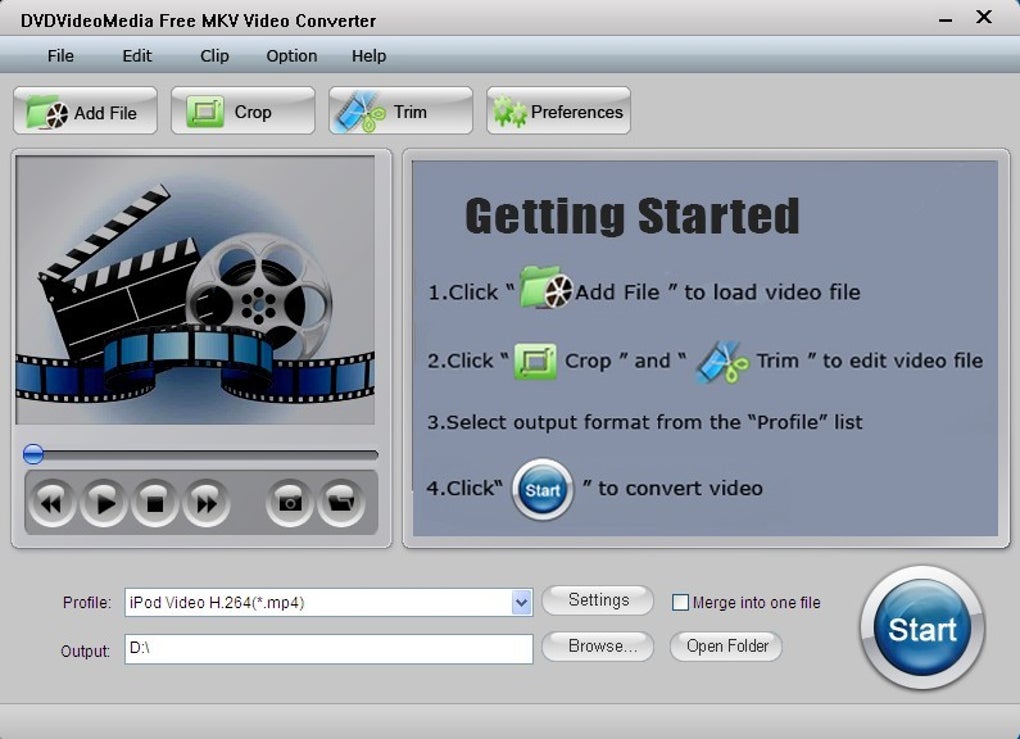
Before diving into the specifics of the Free MKV Video Converter, it’s crucial to understand what MKV files are and why conversion is often a necessary step for many users. The Matroska Multimedia Container, better known by its file extension MKV, is an open-standard, free container format that can hold an unlimited number of video, audio, picture, or subtitle tracks inside a single file. This flexibility makes it a favorite among enthusiasts for storing high-definition movies, TV series, and other complex media.
What is an MKV File?
Unlike formats like MP4 or AVI, which typically define a specific codec (e.g., H.264 for video, AAC for audio), MKV is purely a container format. This means it can encapsulate virtually any video codec (like H.264, H.265, MPEG-2), audio codec (like AC3, DTS, AAC, MP3), and multiple subtitle tracks (like SRT, SSA, VobSub) all within one “.mkv” file. This allows for unparalleled flexibility and quality retention, often resulting in larger file sizes but superior viewing experiences. Its open-source nature also contributes to its popularity, fostering widespread support among media players and encoders.
Why Convert MKV Files?
Despite its advantages, the very flexibility of MKV can sometimes lead to playback challenges. Here are the primary reasons why users frequently need to convert MKV files:
- Device Incompatibility: Many older devices, smart TVs, gaming consoles (like PSP or Zune mentioned in the reference), and even some modern smartphones or tablets do not natively support MKV playback. They might only recognize formats like MP4, AVI, or WMV. Converting MKV to these formats ensures seamless playback on your preferred gadgets.
- Software Compatibility: Video editing software, media servers, or even certain streaming platforms might have limitations on the input formats they accept. Converting MKV to a more common format like MP4 or AVI can make the files compatible with a broader range of applications.
- File Size and Storage: While MKV is excellent for quality, it can result in very large file sizes, especially for high-definition content. Converting to more compressed formats like MP4 (with efficient codecs) can significantly reduce file size without a drastic loss in perceived quality, making them easier to store and transfer.
- Sharing and Streaming: Sharing large MKV files over the internet can be slow and consume considerable bandwidth. Converting them to smaller, more universally supported formats facilitates quicker uploads, downloads, and smoother streaming experiences.
- Specific Codec Requirements: Even if a device or software claims to support MKV, it might not support the specific combination of video and audio codecs used within a particular MKV file. Conversion allows you to specify compatible codecs for the target platform.
- Accessibility of Audio/Video Tracks: Sometimes, users only need the audio from a video file. A converter that can extract audio streamlines this process, allowing you to save space and focus on what you need.
Given these challenges, a dedicated and efficient Free MKV Video Converter becomes an essential utility for anyone regularly dealing with video content.
Introducing PhanMemFree’s Free MKV Video Converter
At PhanMemFree, we understand the importance of having reliable tools at your disposal. That’s why we highlight the DVDVideoMedia Free MKV Video Converter – a standout solution for all your MKV conversion needs. This software is designed with both novices and experienced users in mind, offering a straightforward interface combined with powerful conversion capabilities.
Key Features and Capabilities
The DVDVideoMedia Free MKV Video Converter isn’t just a basic file transformer; it’s equipped with a suite of features that enhance its utility:
- Comprehensive Format Support: The primary function, and undoubtedly its most crucial, is its ability to convert MKV files into a wide array of popular video formats. This ensures maximum compatibility across various devices and software.
- High-Quality Output: Despite being a free tool, it emphasizes maintaining the quality of your video content during conversion. You won’t have to compromise on visual fidelity or audio clarity.
- Intuitive User Interface: The software boasts a clean, easy-to-navigate interface, making the conversion process simple and quick, even for users with minimal technical expertise.
- Batch Conversion: For those with multiple files to convert, the software often supports batch processing, allowing you to queue up several MKV files and convert them all at once, saving significant time and effort.
- Customization Options: Beyond simple conversion, the tool provides various settings for users to fine-tune their output. This includes options like video resolution, bitrate, aspect ratio, and audio settings, giving you control over the final video characteristics.
- File Splitting: A particularly useful feature mentioned in the reference is the ability to “split one MKV file.” This allows users to break down large video files into smaller, more manageable segments, which can be useful for sharing, storage, or targeting specific scenes.
Supported Output Formats
The versatility of the Free MKV Video Converter lies in its extensive support for various output formats. As highlighted in its description, it effectively converts MKV to:
- AVI (Audio Video Interleave): A widely recognized format, particularly on older Windows systems and various standalone media players. It’s known for its robust playback capabilities.
- MP4 (MPEG-4 Part 14): Perhaps the most ubiquitous video format today, MP4 is highly compatible across almost all devices, operating systems, and web platforms. It offers excellent compression while maintaining good quality.
- WMV (Windows Media Video): Microsoft’s proprietary video format, commonly used for streaming and playback on Windows-based systems and devices.
- H.264/AVC: A highly efficient video compression standard that is the foundation for many video formats, including MP4. Converting to H.264 ensures high quality with reasonable file sizes.
- DivX and XviD: These are video codecs based on MPEG-4 Part 2 compression, known for their ability to compress video significantly while retaining good visual quality, often used with AVI containers.
- MOV (QuickTime Movie): Apple’s proprietary format, primarily associated with macOS and QuickTime Player. It’s also supported by many professional video editing applications.
- HD video: The converter specifically mentions support for converting to “HD video,” implying it can maintain or even enhance the high-definition quality of your source MKV files, ensuring crisp and clear visuals in the target format.
This broad range of output options ensures that no matter your specific need – whether it’s for a legacy device, a modern smartphone, or a professional editing suite – the Free MKV Video Converter has you covered.
Extracting Audio from Video Files
Beyond converting video formats, the DVDVideoMedia Free MKV Video Converter also serves a dual purpose: extracting audio. There are numerous scenarios where you might only need the audio track from a video – perhaps to create a custom soundtrack, listen to a lecture, or simply save storage space by discarding the video component. This software facilitates the extraction of music and audio from various video files, including MKV, MPG, WMV, MP4, and AVI, allowing you to save them in audio-only formats. This feature adds another layer of utility, making it a comprehensive multimedia management tool.
Device Compatibility
A key differentiator for any video converter is its ability to prepare files for specific playback devices. The Free MKV Video Converter excels in this area, explicitly stating its capability to convert MKV, MPG, WMV, MP4, and AVI files into “proper formats playable on iPod, iPhone, Zune, PSP, and other MP4 Player etc.” This focus on common portable devices ensures that your media library is truly portable. Whether you’re commuting, traveling, or simply relaxing at home, your converted videos will be ready to play on your preferred gadget without any hiccups. This targeted compatibility is a significant advantage, eliminating the guesswork and frustrating trial-and-error often associated with preparing media for diverse hardware.
How to Use the Free MKV Video Converter: A Simple Guide
One of the greatest strengths of the DVDVideoMedia Free MKV Video Converter is its ease of use. You don’t need to be a tech expert to navigate its functions and achieve high-quality conversions. The process is designed to be intuitive and takes just a few steps.
Simple Conversion Process
Here’s a generalized step-by-step guide to using the converter:
- Download and Install: First, download the Free MKV Video Converter from PhanMemFree.org and follow the straightforward installation instructions. The software is designed for Windows operating systems (supporting versions from Windows 98 SE onwards), ensuring broad accessibility.
- Launch the Application: Once installed, open the DVDVideoMedia Free MKV Video Converter. You’ll be greeted by its user-friendly interface.
- Add Your MKV Files: Locate the “Add File” or “Add Video” button within the application. Click on it and browse your computer to select the MKV video files you wish to convert. You can typically add multiple files for batch processing.
- Choose Output Format: After adding your files, you’ll need to select your desired output format. The application usually has a dropdown menu or a section dedicated to “Output Format” or “Profile.” Here, you can choose from options like AVI, MP4, WMV, or even specific device profiles like “iPhone” or “PSP.”
- Select Output Destination: Specify where you want the converted files to be saved on your computer. There’s usually an “Output Folder” or “Browse” button for this purpose.
- Initiate Conversion: With your files loaded and settings configured, click the “Convert” or “Start” button. The software will begin processing your files. You’ll typically see a progress bar indicating the status of each conversion.
- Enjoy Your Converted Videos: Once the conversion is complete, navigate to your designated output folder. Your MKV files will now be in the chosen format, ready for playback on your device or use in your preferred software.
This streamlined process ensures that even beginners can quickly convert their video files without facing complex technical jargon or convoluted settings.
Advanced Settings for Customization
While the default settings are often sufficient for most users, the DVDVideoMedia Free MKV Video Converter provides a range of advanced options for those who want more control over their output. These settings allow for tailoring the conversion to very specific requirements:
- Video Settings: You can often adjust parameters like video resolution (e.g., 1920x1080, 1280x720), bitrate (which affects file size and quality), frame rate, and aspect ratio. This is particularly useful if you need to optimize video for a screen with a specific resolution or reduce file size for slow internet connections.
- Audio Settings: Similarly, audio parameters like bitrate, sample rate, and audio channels (stereo, mono) can be modified. This is important for ensuring audio quality or reducing the audio track’s footprint.
- Splitting Files: As mentioned, a powerful feature is the ability to split MKV files. This can be done by specifying a start and end time or by splitting the file into multiple segments of a certain duration. This is invaluable for extracting specific scenes or making large files more manageable.
- Cropping and Trimming: Some versions or related tools might offer basic editing functions like cropping unwanted black bars or trimming specific segments from the video, further enhancing the utility of the converter.
By offering these customizable options, the Free MKV Video Converter ensures that users can achieve precisely the output they need, whether it’s a simple format change or a more refined, device-optimized video.
Advantages of Choosing PhanMemFree’s Free MKV Video Converter
When faced with a myriad of video conversion tools, selecting the right one can be daunting. The DVDVideoMedia Free MKV Video Converter, as featured on PhanMemFree.org, stands out for several compelling reasons, making it a preferred choice for many users.
User-Friendly Interface
Perhaps the most significant advantage for the average user is the software’s intuitive design. The interface is clean, uncluttered, and logical, guiding users through the conversion process effortlessly. You won’t encounter confusing menus or obscure settings. The clear labeling of buttons and options minimizes the learning curve, allowing even complete beginners to start converting videos within minutes of installation. This focus on user experience ensures that the power of video conversion is accessible to everyone, not just tech-savvy individuals.
High-Quality Output
Despite being a free solution, the DVDVideoMedia Free MKV Video Converter is engineered to deliver high-quality conversions. The goal isn’t just to change the file format but to do so without sacrificing the visual and audio fidelity of your original MKV files. Whether you’re converting to MP4, AVI, or WMV, the software strives to preserve the crispness of HD video and the clarity of audio tracks. This commitment to quality means your converted videos will look and sound great on any compatible device.
Speed and Efficiency
Time is a valuable commodity, and waiting endlessly for video conversions can be frustrating. This Free MKV Video Converter is optimized for speed and efficiency. Utilizing modern encoding techniques, it processes your MKV files rapidly, significantly reducing the waiting time. While conversion speed can vary based on your computer’s hardware and the size/complexity of the video files, the software is designed to perform conversions as quickly as possible without compromising on output quality. Its lightweight design also means it won’t bog down your system during the conversion process.
Completely Free Solution
In a market saturated with premium and trial-ware video converters, the “Free” aspect of this MKV Video Converter is a major draw. Users can access its full suite of features and convert as many files as they need without any cost, hidden fees, or recurring subscriptions. This makes it an incredibly cost-effective solution for individuals who need a reliable converter but are on a budget or simply prefer not to pay for software. PhanMemFree.org’s commitment to offering such valuable free tools benefits a wide audience, promoting accessibility to essential digital utilities.
Beyond Basic Conversion: Maximizing Your Multimedia Experience
While the core function of the DVDVideoMedia Free MKV Video Converter is straightforward conversion, understanding some nuances and potential challenges can help users maximize their experience and overcome common hurdles.
Troubleshooting Common Issues
Even the most robust software can sometimes encounter specific user-side challenges. A user review on PhanMemFree.org mentioned an issue where the converter “does not convert MKV to any other video format as it doesn’t read it in the first place. Whatever output files I have tried it keeps converting it into AUDIO.” This highlights a potential (though likely isolated or version-specific) issue. Here are some general troubleshooting tips that might apply:
- Verify Source File Integrity: Ensure your original MKV file is not corrupted or incomplete. A damaged source file can lead to failed conversions or unexpected output.
- Check Software Version: Ensure you have the latest version of the Free MKV Video Converter. Software developers often release updates to fix bugs, improve compatibility, and enhance performance. An older version might have limitations that have since been addressed.
- Codec Packs: While the converter handles most common codecs, occasionally, specific or rare codecs within an MKV container might pose a challenge. Ensuring your system has a general codec pack installed (like K-Lite Codec Pack) can sometimes aid in better file recognition, though the converter should ideally have its own internal codecs.
- Output Settings Review: Double-check your chosen output format and profile settings. Ensure you haven’t accidentally selected an “Audio Only” output or a profile that prioritizes audio extraction. The user’s experience suggests that the output setting might have defaulted to an audio format, or there might have been a misconfiguration.
- System Compatibility: Ensure your operating system and hardware meet the minimum requirements for the software. While designed for Windows 98 SE and above, performance and stability can vary on very old or very new systems if not fully optimized.
- Firewall/Antivirus Interference: Occasionally, security software might interfere with how applications access or process files. Temporarily disabling them (with caution) during conversion can sometimes help diagnose such issues.
- Restart and Reinstall: The classic IT advice often holds true. Restarting your computer or reinstalling the software cleanly can resolve transient errors.
For persistent issues, checking the PhanMemFree.org support forums or similar community resources can often provide solutions or workarounds shared by other users.
Exploring Alternatives and Complementary Tools
While the DVDVideoMedia Free MKV Video Converter is an excellent tool, the multimedia landscape is vast, and sometimes a different tool might complement your workflow or offer features not present in this specific software. PhanMemFree.org, like many reputable software platforms, often lists alternatives and related tools, allowing users to find the best fit for their needs. From the provided reference, we can identify some notable alternatives and complementary applications:
- VLC Media Player: Often topping the charts for media players, VLC is a Swiss Army knife of multimedia. It can play almost any format (including MKV natively), and while not its primary function, it can also perform basic conversions. It’s an indispensable tool for anyone dealing with video.
- Format Factory: This is another highly-rated, versatile free file converter that handles a massive array of video, audio, and image formats. If you need a more all-encompassing converter for various file types beyond just MKV, Format Factory is a strong contender.
- DaVinci Resolve: For those looking into more professional video and audio editing, DaVinci Resolve offers powerful features for free. While not just a converter, it can import and export various formats, serving a broader creative purpose.
- CapCut / Adobe Premiere Pro / Adobe After Effects: These are professional-grade video editing and motion graphics tools. If your needs extend to creating and manipulating video rather than just converting, these represent the high end of creative software.
- Specialized MKV Tools: The reference also mentions tools like “Free MKV to AVI Converter,” “Free MKV to MP4 Converter,” “MKV Player,” and “Pazera Free MKV to MP4 Converter.” These highly specialized tools focus on specific MKV conversion pairs or playback, which can be useful if your needs are very niche.
- Video Downloaders (e.g., 4k Video Downloader, VidMate, TubeMate Video Music Downloader): While not converters themselves, these tools are often part of a broader multimedia workflow, allowing users to acquire video content that might then need conversion for specific uses.
By exploring these options, users can build a comprehensive toolkit for managing all their multimedia files, with the DVDVideoMedia Free MKV Video Converter serving as a reliable cornerstone for MKV format changes. PhanMemFree.org strives to provide a curated selection of such tools, making it easier for users to discover software that enhances their digital lives.
In conclusion, the DVDVideoMedia Free MKV Video Converter, as highlighted by PhanMemFree, offers a robust, free, and incredibly user-friendly solution for a common digital dilemma. Its ability to convert MKV files into universally compatible formats, extract audio, and prepare videos for specific devices makes it an invaluable utility for anyone navigating the complex world of multimedia. With its focus on quality, speed, and accessibility, it empowers users to enjoy their video content without limitations, solidifying its place as an essential tool in any digital arsenal.
File Information
- License: “Free”
- Latest update: “May 14, 2012”
- Platform: “Windows”
- OS: “Windows 98 SE”
- Language: “English”
- Downloads: “128.2K”
- Size: “4.62 MB”


