
The world of digital media is a vast landscape of file formats, each with its own strengths and weaknesses. Among these, the AVI (Audio Video Interleave) format holds a significant place, particularly in its compatibility with various media players and devices. However, not all videos are created equal. Many videos are saved in the MOV (QuickTime Movie) format, which, while popular, may not always be compatible with every playback system. This is where a free MOV to AVI converter becomes indispensable. This guide will explore the need for such converters, examine the features of a typical free MOV to AVI converter, and discuss the considerations you should make when selecting one.
The Importance of Video Format Conversion
The digital age has gifted us with an incredible variety of video formats. Each format serves a purpose, utilizing different compression codecs and container formats to optimize for factors like file size, quality, and compatibility. MOV, developed by Apple, is known for its high-quality video and audio compression, frequently used in professional video editing. AVI, on the other hand, is a more versatile and widely compatible format, often favored for its simplicity and broad support across operating systems and devices.
The need for a MOV to AVI converter arises when you encounter incompatibility issues. You might have a MOV file that refuses to play on a specific device or media player, or you might need to share a video with someone who doesn’t have QuickTime installed. Converting the MOV file to the more widely compatible AVI format solves this problem, ensuring that your video is accessible to a larger audience.
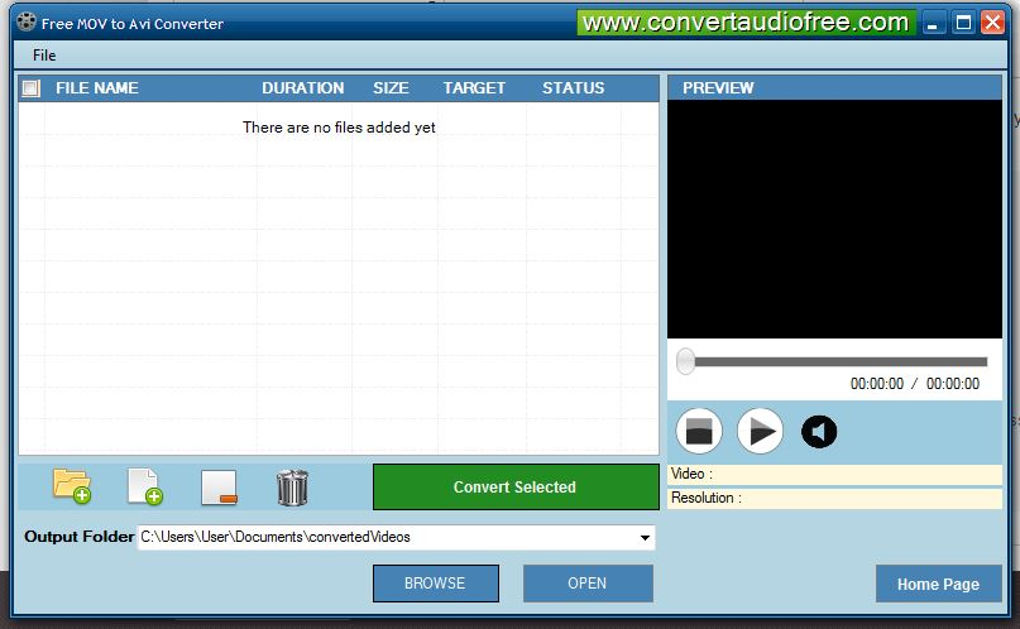
Features of a Free MOV to AVI Converter
A robust free MOV to AVI converter should offer several key features to ensure a smooth and efficient conversion process. While “free” might imply limitations, a high-quality converter should provide these essential functionalities without compromising quality or speed:
-
Ease of Use: A user-friendly interface is crucial. Ideally, the converter should be intuitive, even for those with limited technical expertise. A simple drag-and-drop feature, clear instructions, and a straightforward workflow are essential aspects of a good user experience. The software should guide users through each step without requiring extensive prior knowledge of video formats or codecs.
-
Batch Conversion: The ability to convert multiple MOV files simultaneously is a significant time-saver. Batch processing allows users to add a folder full of MOV files and convert them all at once, without having to process each file individually. This feature significantly boosts efficiency, especially when dealing with a large number of videos.
-
High-Quality Conversion: A good converter should prioritize maintaining the original video quality during the conversion process. Lossy compression, while necessary to reduce file size, should be optimized to minimize the loss of visual detail. Users should be able to choose between different output quality levels to balance file size and video clarity.
-
Multiple Output Options: While the primary focus is AVI conversion, a good converter might offer a range of other output formats. This added flexibility allows users to adapt the conversion to various needs, such as creating smaller files for mobile devices or specific formats for web uploads.
-
Customizable Settings: Advanced users may require fine-grained control over the conversion process. This might include adjusting parameters like video bitrate, frame rate, and audio quality to optimize the output for specific purposes. These settings allow for greater customization, enabling users to fine-tune the conversion process to their exact requirements.
-
Security: Downloading software from unreliable sources poses significant security risks. A trustworthy free MOV to AVI converter should be from a reputable source, free from malware, and should not include any potentially unwanted programs (PUPs). User privacy and data security should be paramount considerations.
-
Regular Updates: Software vulnerabilities can arise over time. A reputable developer regularly updates their software to address these issues and improve performance, ensuring the continued security and stability of the converter. Users should look for converters that are actively maintained and receive regular updates.
Choosing the Right Free MOV to AVI Converter: Key Considerations
The availability of numerous free MOV to AVI converters necessitates a careful evaluation process before selecting the right tool. Here’s a checklist of essential considerations:
-
Reputation and Reviews: Before downloading any software, check online reviews from other users. This provides valuable insights into the software’s usability, performance, and stability. Pay close attention to reviews regarding the conversion quality, ease of use, and any potential security concerns.
-
System Compatibility: Ensure the converter is compatible with your operating system (Windows, macOS, Linux, etc.). Check the system requirements to ensure your computer meets the minimum specifications for running the software smoothly. Compatibility issues can lead to errors or slow performance.
-
File Size Limitations: Some free converters may impose limitations on the size of files they can process. Check the converter’s specifications to ensure it can handle the size of your MOV files. Large video files require more processing power, so consider the converter’s ability to handle large files efficiently.
-
Technical Support: While a free converter might not offer the same level of support as a paid product, check whether the developer provides documentation, FAQs, or a support forum. This will help you resolve any issues you might encounter during the conversion process. Adequate technical support can save time and frustration.
-
Adware and Malware: Be cautious of converters that include unwanted bundled software or intrusive advertisements. Reputable developers avoid these practices, focusing on providing a clean and secure user experience. Use reputable antivirus software to scan downloaded files before installation.
Beyond the Basics: Advanced Conversion Techniques
While a basic MOV to AVI conversion might meet your needs, you might encounter situations requiring more advanced techniques. For instance:
-
Codec Selection: Understanding video and audio codecs is crucial for optimal conversion. Different codecs offer different levels of compression and quality. Choosing the right codec can significantly impact the file size and video quality. A converter with codec selection capabilities offers more control over the conversion process.
-
Frame Rate Adjustment: Adjusting the frame rate can reduce the file size or match the frame rate of your target device. This is especially useful when converting videos for playback on devices with varying frame rate capabilities. The ability to adjust the frame rate is a useful advanced feature.
-
Audio Track Management: Some videos contain multiple audio tracks. A converter with audio track management allows you to select specific audio tracks to include or exclude during the conversion. This is particularly useful when dealing with multi-lingual videos or videos with commentary tracks.
Conclusion
A free MOV to AVI converter is a valuable tool for anyone working with digital video. By carefully considering the features, compatibility, and security aspects, you can choose a converter that fits your needs and ensures a smooth conversion process. Remember to prioritize user reviews, reputable developers, and the security of your system when making your selection. The right converter will allow you to seamlessly share and enjoy your videos across a wider range of platforms and devices without sacrificing quality or ease of use. By understanding the nuances of video formats and conversion techniques, you can unlock the full potential of your video files.
File Information
- License: “Free”
- Version: “1.0”
- Latest update: “December 3, 2015”
- Platform: “Windows”
- OS: “Windows 7”
- Language: “English”
- Downloads: “4.1K”
- Size: “16.74 MB”


