
Free Movie Subtitler is a Windows-based software application designed to embed subtitles directly into video files, eliminating the need for separate subtitle files (.sst, .txt, .STL, .sub, or .srt) during playback. This review will delve into the software’s functionality, ease of use, limitations, and user experiences, offering a comprehensive assessment of its capabilities and shortcomings.
Functionality and Ease of Use
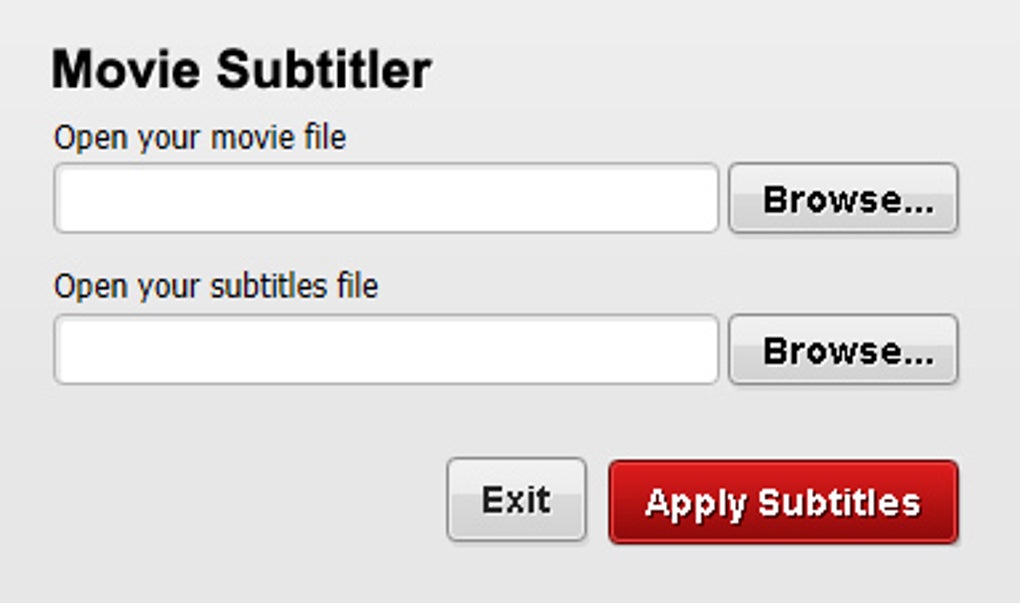
The primary function of Free Movie Subtitler is straightforward: to permanently integrate subtitle tracks into video files. This simplifies the viewing process, especially for users who experience compatibility issues with external subtitle files on various media players, including DVD players and home cinema systems. The software boasts a two-step process, promising a user-friendly experience. Users select their video file and corresponding subtitle file, and then click the “Apply Subtitles” button to initiate the embedding process. This simplicity is a major selling point, targeting users who prefer ease of use over complex settings and numerous options. The software avoids overwhelming users with a multitude of filters or advanced settings, focusing on core functionality.
However, the simplicity has its drawbacks. The lack of advanced options can be limiting for users who require more control over subtitle placement, font styles, size, color, or other stylistic elements. While the software achieves its primary function, it lacks the versatility found in more advanced video editing software.
File Format Compatibility and Performance
A significant limitation highlighted by user reviews is the software’s apparent restricted compatibility with AVI files. Several users reported that the software failed to recognize or process more common video formats such as MKV and MP4. This limitation significantly restricts the software’s applicability, as MKV and MP4 are widely used and often preferred for their superior quality and compression efficiency compared to AVI. This omission is a major drawback that severely impacts the software’s overall usability and appeal to a broader audience.
The processing speed is another area requiring attention. While the software claims a quick conversion process, user feedback suggests that the embedding process can take a considerable amount of time, often comparable to the length of the video itself. This lengthy processing time might deter users looking for a rapid solution, especially when dealing with longer videos. The lack of a visual progress bar, as noted in some user reviews, adds to the frustration, leaving users uncertain whether the process is still active or has stalled.
User Reviews and Feedback
User reviews paint a mixed picture of the software’s performance and usability. While some users praise its simplicity and ability to permanently embed subtitles, others express significant dissatisfaction with its limited file format support and slow processing speed. The lack of a visual progress indicator during the embedding process also receives criticism, contributing to user frustration and uncertainty. The following summarizes some key points from user reviews:
-
Positive Feedback: The software’s intuitive interface and simple two-step process are frequently praised. Users appreciate the ability to create single-file videos with embedded subtitles, eliminating compatibility issues with different media players. The fact that the original video and subtitle files remain untouched is also a positive feature, allowing users to retain the original files for potential future use or modification.
-
Negative Feedback: The most significant criticism centers around the limited file format compatibility, primarily the software’s inability to handle MKV and MP4 files. This is a major constraint that significantly reduces the software’s practicality for many users. The slow processing speed, often matching the video length, is another recurring complaint. The absence of a clear visual progress bar adds to the frustration, leaving users uncertain about the progress of the embedding process. Some users reported that the software would start processing, show a minimal percentage (1% or 2%), and then become unresponsive, leaving users unable to determine whether the process had completed or failed.
The overall consensus suggests that the software works as intended for AVI files but suffers from severe limitations that significantly detract from its usefulness. The limited file support and slow processing speed overshadow the software’s simplicity and ease of use for a large portion of potential users.
Alternatives and Comparison
Several alternative applications offer similar or more extensive functionality for embedding subtitles into videos. These alternatives often provide broader file format compatibility, faster processing times, and more advanced features for customizing subtitle appearance and placement. A comparison with some prominent alternatives would illuminate the limitations of Free Movie Subtitler:
-
DivXLand Media Subtitler: This software provides a comparable level of simplicity while potentially offering improved performance and wider file format support, though this would require further investigation.
-
Belle Nuit Subtitler: This software presents a more advanced set of features, including subtitle editing and translation capabilities, but is a trial version, potentially limiting its long-term free usage.
-
SubLight: Similar to DivXLand Media Subtitler, it may offer enhanced functionality and broader compatibility, surpassing the limitations of Free Movie Subtitler. However, a direct comparison of performance and features requires further research.
The lack of detailed specifications regarding the exact codecs and containers supported by Free Movie Subtitler makes a precise comparison challenging. However, the user feedback consistently points to limitations in handling popular video formats such as MKV and MP4.
Conclusion
Free Movie Subtitler offers a simple and straightforward method for embedding subtitles into AVI video files. Its two-step process is appealing for users seeking ease of use, and the preservation of original files is a beneficial feature. However, the software’s significant limitations regarding file format support and processing speed greatly restrict its usability. The lack of a visual progress bar further diminishes the user experience. While it might suffice for users working exclusively with AVI files and who prioritize simplicity above all else, the software falls short compared to alternatives offering broader compatibility, advanced features, and better performance. Users should carefully consider these limitations before choosing Free Movie Subtitler, particularly given the availability of alternative software with potentially superior functionality and broader compatibility. The future development of Free Movie Subtitler may include addressing the issues raised in user feedback, such as expanded file format support and improved processing speed, potentially making it a more compelling option. Until then, users seeking a more robust and versatile solution might benefit from exploring the alternative applications mentioned above.
File Information
- License: “Free”
- Version: “1.0.0.6”
- Latest update: “September 3, 2021”
- Platform: “Windows”
- OS: “Windows 2003”
- Language: “English”
- Downloads: “84K”
- Size: “14.83 MB”


