
Free MP3 CD Burner is a free software application designed for burning MP3 files onto CDs. This review will delve into its features, performance, ease of use, and compare it to alternative options available in the market. While CDs may seem outdated in the age of digital streaming and online music services, there remain specific scenarios where creating physical audio CDs remains a practical solution. For users seeking a straightforward and effective way to transfer their MP3 collections onto CDs, Free MP3 CD Burner provides a viable option.
Ease of Use and Interface
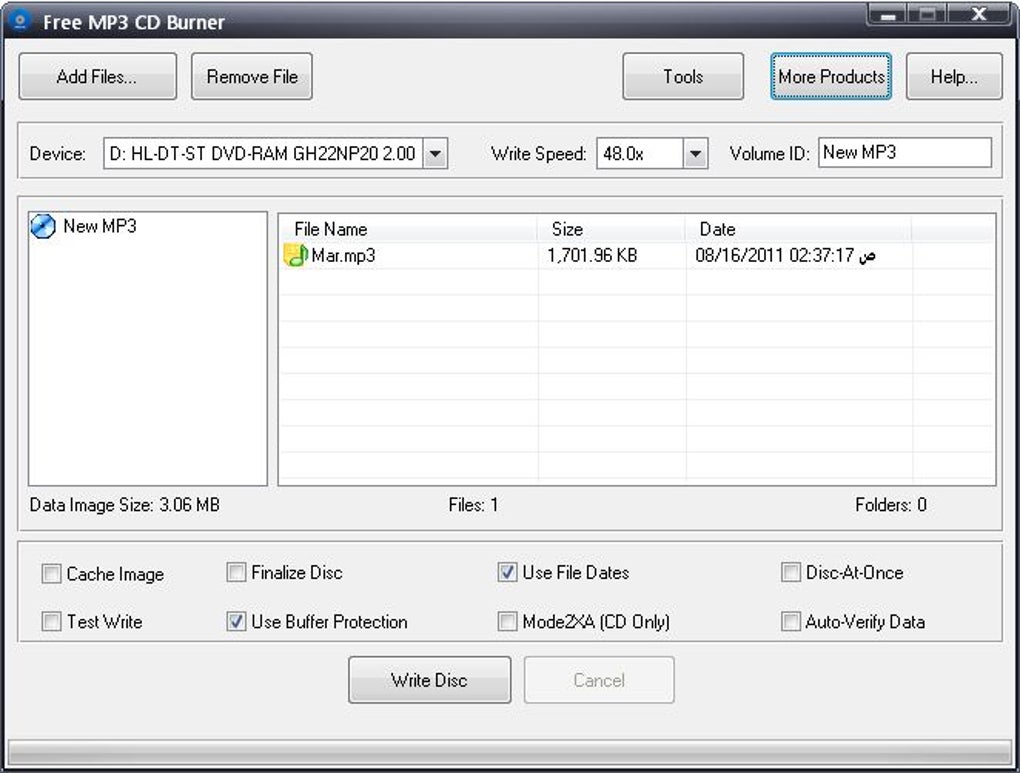
One of the key strengths of Free MP3 CD Burner is its user-friendly interface. The program’s design prioritizes simplicity and intuitive navigation, making it accessible to users of all technical skill levels. The core functionality centers around a drag-and-drop system for adding MP3 files. Users simply select their desired MP3 files from their computer’s file explorer and drag them directly onto the program’s main window. This straightforward approach eliminates the need for complex menus or multiple steps, significantly streamlining the burning process.
Beyond the drag-and-drop functionality, Free MP3 CD Burner incorporates a clear and concise track list. This list dynamically updates as files are added or removed, providing a visual representation of the CD’s contents before burning. The program clearly displays the total size of the selected files, enabling users to easily manage their track selections to ensure they fit within the capacity of a standard CD (approximately 700MB). This feature is particularly useful for preventing errors that can arise from attempting to burn more data than the disc can accommodate.
Moreover, the software offers granular control over the burning process. Users can adjust the burning speed to optimize for either speed or data integrity. Slower burning speeds generally result in more reliable burns, reducing the likelihood of errors. Faster speeds can save time, but might introduce a slightly higher risk of failure, depending on the quality of the CD-R media used. The option to select burning speed gives users flexibility to tailor the process to their specific needs and preferences.
Features and Functionality
Free MP3 CD Burner doesn’t just offer basic MP3-to-CD burning. It provides a range of supplementary features that enhance its usability and versatility:
- Drag and Drop Support: This intuitive feature, as previously highlighted, significantly simplifies the process of adding MP3 files to the burning queue.
-
MP3 File Burning: The program’s primary function is efficiently burning MP3 files onto audio CDs. It supports a wide range of MP3 bitrates and encoding formats, ensuring compatibility with most MP3 files.
-
Erase Functionality: Before initiating a new burn, users can erase existing data from a CD. This is critical for ensuring clean burns and preventing data corruption. The erase function helps to prepare the CD for a fresh recording.
-
ISO Image Support: The software supports creating and burning ISO image files. This allows users to create a virtual representation of the CD’s contents, making it possible to back up their projects and share them easily. ISO images are also useful for testing the burn list before committing to a physical CD.
-
File Management: Users can easily add or delete files from the track list even after they have been initially added. This flexibility allows for last-minute adjustments to the CD’s contents before the actual burning begins. This dynamic management of the track list eliminates the need to start the entire process over again for minor changes.
-
Burning Speed and Mode Control: The ability to adjust burning speed and select burning modes (DAO and TAO) provides users with advanced control over the burning process. DAO (Disc At Once) burns all data in a single session, while TAO (Track At Once) allows for multi-session burning. The choice of method depends on user preferences and the specific needs of the project.
-
High-Quality Audio Output: Free MP3 CD Burner prioritizes maintaining high audio quality during the burning process. This ensures that the resulting CDs offer an excellent listening experience, preserving the fidelity of the original MP3 files.
Performance and Speed
Free MP3 CD Burner is lauded for its relatively high burning speeds. While precise speeds will vary depending on factors like the computer’s hardware, the type of CD-R media used, and the chosen burning speed settings, the software generally completes the burning process efficiently. This efficiency is a key advantage for users who frequently burn large numbers of MP3 files or require quick turnaround times.
The software’s performance is also notable for its reliability. Anecdotal user reports suggest a low error rate during the burning process. This speaks to the software’s stability and efficient handling of data transfer. It’s important to note, however, that utilizing high-quality CD-R media contributes significantly to reliable burns. Low-quality media can increase the risk of errors, regardless of the software used.
Comparison with Alternative Software
While Free MP3 CD Burner provides a solid solution for burning MP3s to CDs, several alternative applications are available, each with its own strengths and weaknesses. These alternatives often include features beyond basic CD burning, such as DVD burning capabilities, ISO image creation and editing, and data backup functionalities. Some popular alternatives include:
-
Nero Burning ROM: A comprehensive and powerful suite of tools for disc burning, data backup, and multimedia management. However, it is a commercial product, requiring a license purchase.
-
ImgBurn: A free, open-source application offering robust CD and DVD burning capabilities, including support for various disc formats and image files.
-
CDBurnerXP: Another free, open-source program that provides a wide range of burning functionalities and supports various disc types.
The choice between Free MP3 CD Burner and these alternatives often depends on the user’s specific needs and preferences. If the primary need is straightforward MP3-to-CD burning with a user-friendly interface, Free MP3 CD Burner serves this purpose effectively. For users requiring more advanced features or support for a wider array of disc formats, the more feature-rich, albeit sometimes more complex alternatives might be more suitable.
System Requirements and Compatibility
Free MP3 CD Burner is designed for Windows operating systems, specifically targeting Windows 7, Vista, and XP. While its compatibility with newer Windows versions (like Windows 10 and 11) is not explicitly stated in all sources, user reviews suggest that compatibility can be inconsistent. Some users have reported successful use on newer Windows versions, while others have encountered difficulties. This highlights the importance of checking for compatibility updates or seeking confirmation before using it on operating systems outside of its officially supported range.
The software’s system requirements are generally modest. A standard computer with a CD-RW drive should be sufficient to run the program without significant performance issues. The specific requirements can vary slightly depending on the version of the software, but it is generally compatible with most standard computer configurations. It is advisable to check the official website or source for the most up-to-date system requirements before installation.
Conclusion
Free MP3 CD Burner provides a simple, efficient, and user-friendly solution for burning MP3 files to CDs. Its intuitive drag-and-drop interface and straightforward design make it an excellent choice for users who prioritize ease of use and require a reliable burning tool. While it may lack some of the advanced features found in more comprehensive burning suites, its focus on core functionality and efficient performance makes it a strong contender for its intended purpose. However, potential users should check for compatibility with their specific operating system and consider alternative options if they require more extensive functionalities or support for other media types beyond CDs.
File Information
- License: “Free”
- Version: “2”
- Latest update: “February 1, 2023”
- Platform: “Windows”
- OS: “Windows 7”
- Language: “English”
- Downloads: “175.3K”
- Size: “2.48 MB”


