
The Free MP3 Player offers a straightforward and efficient way to enjoy your music collection on Windows devices. This lightweight application prioritizes ease of use and requires minimal system resources, making it an ideal choice for users seeking a simple, no-frills music player without compromising audio quality. Its intuitive interface and essential features make it accessible to users of all technical skill levels.
Effortless Music Playback
The Free MP3 Player is designed for uncomplicated music playback. The core functionality centers around playing MP3 and MP4 audio files. Users can easily load their music library, create playlists, adjust volume levels, and skip tracks – all within a clean and user-friendly interface. This streamlined approach eliminates unnecessary complexities, focusing on providing a seamless listening experience. The program’s minimalist design ensures a fast startup and minimal impact on system performance, making it a suitable option even for older or less powerful computers.
The application’s interface is intentionally familiar, mirroring the design of the classic Windows Media Player. This familiarity reduces the learning curve for users already accustomed to similar software. The main window clearly displays playback controls, making it easy to navigate and manage your music. The ability to switch between full-screen and minimized modes provides further customization for different listening preferences.
Essential Features and Functionality
While lacking advanced features found in more complex audio players, the Free MP3 Player effectively delivers on its core function: playing music. Its simplicity is a significant advantage for users who prioritize efficiency and ease of use. The absence of complex settings and options makes the application accessible to a wide range of users, regardless of their technical expertise.
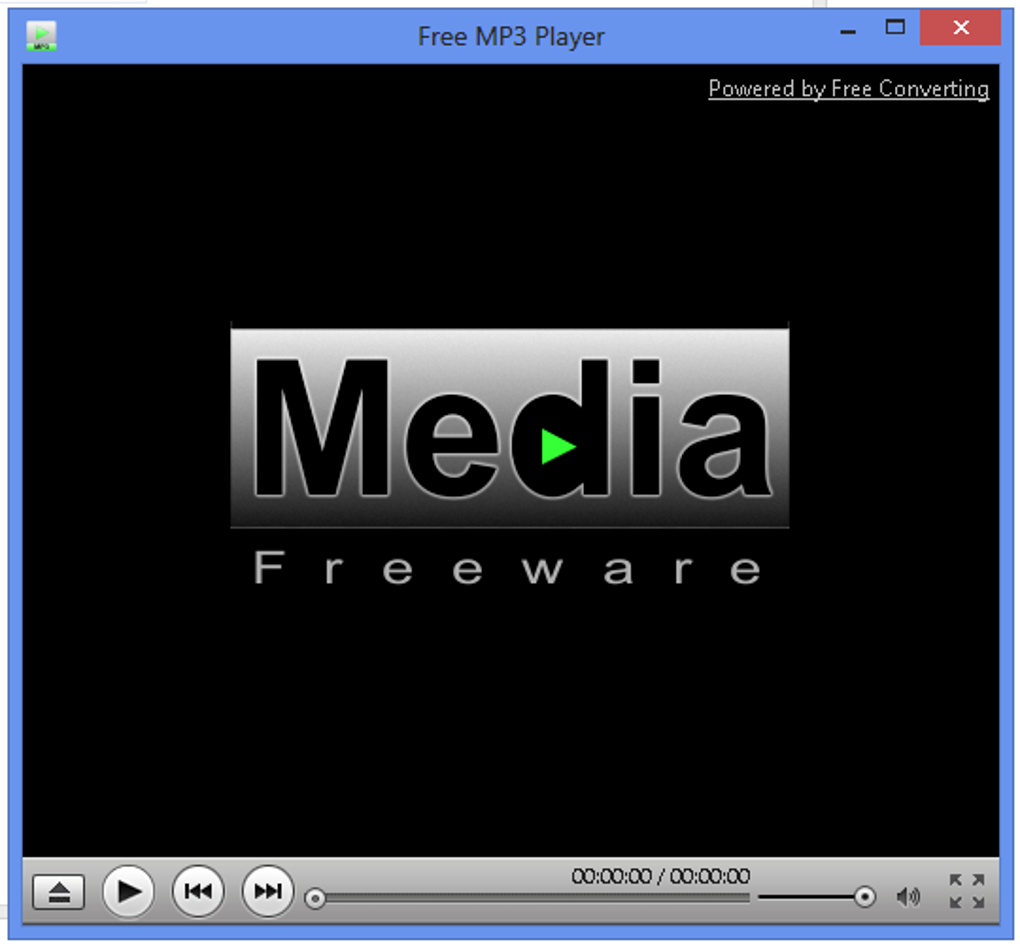
Key features include:
- MP3 and MP4 Playback: Supports the most common audio file formats, ensuring compatibility with a broad range of music files.
- Volume Control: Allows for precise adjustments to the audio volume.
- Track Skipping: Enables users to easily navigate between tracks within their playlist.
- Playlist Creation: Provides the ability to organize music files into custom playlists for efficient playback.
- Full-Screen and Minimized Modes: Offers flexibility in how the application is displayed on the screen.
- Lightweight and Efficient: Consumes minimal system resources, ensuring smooth playback without lagging or performance issues.
The application doesn’t require any additional software or dependencies, ensuring a clean installation and a straightforward user experience. The intuitive interface makes it easy for beginners to quickly grasp the core functionalities, while its speed and minimal resource usage make it attractive to users who prioritize efficiency.
Offline Music Management
In a world increasingly dominated by streaming services, the ability to manage and play offline music remains important. The Free MP3 Player caters to this need by offering a simple yet effective solution for building and playing offline playlists. Users can easily organize their music library by artist, album, or any other custom criteria. The automatic playback function ensures a continuous listening experience without interruption.
Furthermore, the option to set the Free MP3 Player as the default music player adds convenience. This ensures that whenever an MP3 or MP4 file is opened on the system, the Free MP3 Player will automatically launch, streamlining the process of listening to music files.
Security and Reliability
The Free MP3 Player prioritizes user safety. It is rigorously scanned for malware, spyware, and viruses, ensuring a secure and reliable experience. The software is free from any harmful components, allowing users to enjoy their music without compromising their system’s security. The developers maintain a clean and safe application, free from intrusive advertisements or potentially unwanted programs. The focus is on delivering a reliable and safe audio playback solution.
Alternatives and Comparison
While the Free MP3 Player excels in its simplicity and ease of use, other audio players offer more advanced features. Popular alternatives include VLC Media Player, KMPlayer, PotPlayer, and GOM Player. These applications often include features such as audio editing capabilities, sound enhancement tools, and advanced playback options like slow playback. However, these often come at the cost of increased system resource consumption and a more complex interface.
The Free MP3 Player distinguishes itself by its lightweight nature and minimal system requirements. Users looking for a tool that prioritizes ease of use and efficiency over extensive feature sets will find the Free MP3 Player an attractive option. Its focus on core functionality ensures a reliable and efficient music playback experience without the bloat of more complex audio players.
Should You Download Free MP3 Player?
The Free MP3 Player is a compelling choice for users seeking a straightforward and efficient audio player for Windows. Its simplicity, combined with its support for common audio file formats and minimal system requirements, makes it a highly accessible and user-friendly option. If you prioritize ease of use, speed, and a lack of complex features, the Free MP3 Player is an excellent candidate.
The program is entirely free to download and use, removing any financial barrier to entry. Its compatibility with both MP3 and MP4 audio files further enhances its versatility. The lack of intrusive ads or additional software ensures a clean and safe listening experience. For users seeking a simple, effective, and safe solution for playing music on their Windows PC, the Free MP3 Player is an excellent choice.
Frequently Asked Questions (FAQs)
How can I download songs for free?
The Free MP3 Player only plays audio files; it doesn’t offer download functionality. To download music, you’ll need to use separate applications such as uTorrent or BitTorrent. Remember to respect copyright laws and only download music you have the legal right to possess.
What’s better than Windows Media Player for music?
The Free MP3 Player offers a lightweight alternative to Windows Media Player, particularly for users who prefer a simpler, more streamlined interface and a lower system footprint. It retains the essential features for music playback while maintaining a clean and easy-to-use design.
Are there any alternatives to Free MP3 Player?
Yes, many alternatives exist, each with its own strengths and weaknesses. VLC Media Player, KMPlayer, PotPlayer, and GOM Player are popular options, often offering more advanced features but sometimes at the cost of increased system resource usage. The best choice depends on individual needs and preferences.
Is the Free MP3 Player safe to download?
Yes, the Free MP3 Player is rigorously scanned for malware and is considered safe for download and use. It’s free from spyware, viruses, and other harmful components, ensuring a secure listening experience.
The Free MP3 Player, despite its simplicity, provides a valuable service for users who need a reliable and easy-to-use audio player for Windows. Its focus on efficiency and ease of use, combined with its commitment to security, makes it a practical and attractive choice for a wide range of users.
File Information
- License: “Free”
- Version: “1.0”
- Latest update: “July 20, 2021”
- Platform: “Windows”
- OS: “Windows 7”
- Language: “English”
- Downloads: “77.2K”
- Size: “18.93 MB”


