
Free MP4 Joiner is a freeware application designed for Windows operating systems, offering a straightforward solution for combining multiple MP4 video files into a single, cohesive video. This review delves into the software’s features, performance, ease of use, and compares it to alternative options available in the market.
Ease of Use and Interface
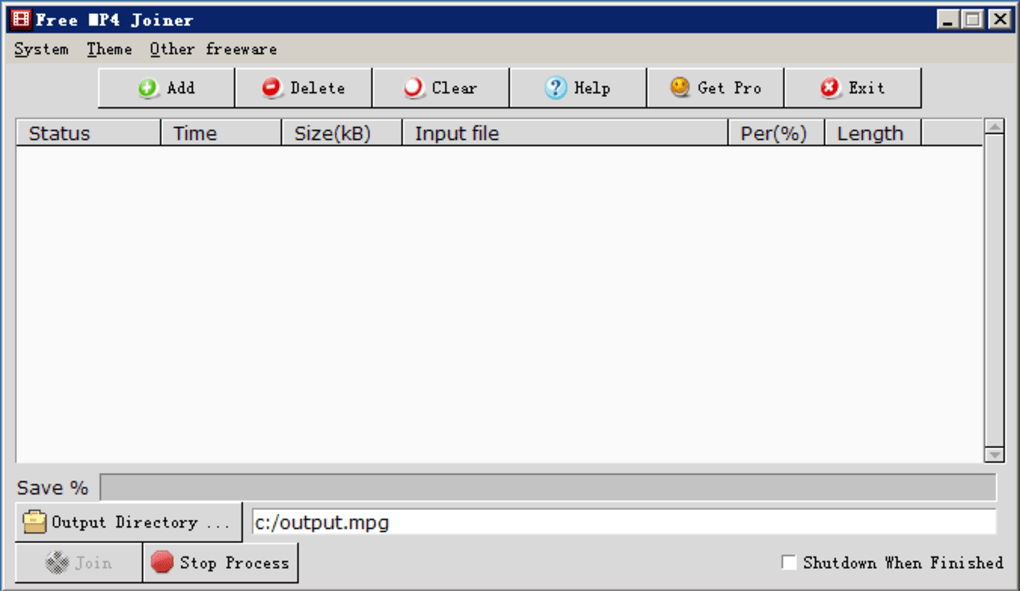
One of Free MP4 Joiner’s primary strengths lies in its intuitive user interface. The software boasts a clean, uncluttered design that prioritizes simplicity. Users are not confronted with an overwhelming array of options or complex settings. The main window typically presents a clear drag-and-drop area for adding MP4 files, along with a “Join” button that initiates the merging process. This streamlined approach makes it exceptionally user-friendly, even for individuals with limited experience in video editing software. The lack of advanced features, while potentially limiting for some users, contributes significantly to its ease of use. New users can quickly grasp the functionality without needing to consult extensive tutorials or documentation. The straightforward process of adding files, arranging their order, and initiating the join operation makes it an ideal choice for quick video merging tasks.
Performance and Efficiency
Free MP4 Joiner’s performance is noteworthy for its speed and efficiency. The software leverages multithreading to significantly accelerate the merging process, often exceeding the speed of comparable applications. The exact speed, however, can vary depending on several factors, including the size and number of MP4 files being joined, the specifications of the user’s computer (processor speed, RAM, hard drive speed), and the complexity of the video encoding. While the software claims to offer a speed increase of over 300%, this figure should be considered relative, as the actual performance improvement will depend on the variables mentioned above. Despite this variability, user reports generally indicate a notably fast joining process compared to many alternatives. The automatic shutdown feature after task completion is also a helpful addition, enhancing convenience for users. This automated shutdown ensures that the computer is not left running unnecessarily after the video joining is complete.
Supported Formats and Features
Free MP4 Joiner’s primary focus is on MP4 files. While it offers excellent support for various MP4 video codecs, including MPEG-4 Part 10 (H.264/MPEG-4 AVC) and MPEG-4 Part 2, it typically does not offer support for a wide range of other video formats. This limitation might restrict its utility for users working with diverse video file types. Users who need to merge files in formats like AVI, WMV, or MOV will need to convert those files to MP4 before using the software. The lack of advanced features, such as video editing capabilities (trimming, cutting, adding transitions), is a deliberate design choice aimed at maintaining simplicity. While this simplifies the user experience, it also limits the software’s functionality for users requiring more advanced video editing options. The software’s primary focus remains on efficient and quick merging of MP4 video files.
Comparison with Alternative Software
The market offers several alternatives to Free MP4 Joiner, each with its own strengths and weaknesses. Some alternatives provide more extensive format support, enabling the merging of videos in various file types without prior conversion. Others incorporate advanced features, such as video editing tools, allowing for more comprehensive control over the final output. However, these advanced features often come at the cost of increased complexity and potentially slower processing speeds. Free MP4 Joiner distinguishes itself by prioritizing speed and simplicity. It excels at quickly merging MP4 files without the overhead of complex settings or additional editing functionalities. Choosing between Free MP4 Joiner and alternative software often depends on the user’s specific needs and priorities. If speed and simplicity are paramount, Free MP4 Joiner is a strong contender. However, if broader format support or advanced video editing capabilities are required, users may prefer more feature-rich alternatives, even if those options might be slower or more complex to use. A thorough comparison of features, performance, and user interface is recommended before selecting a video joiner.
Security and Reliability
The software’s security status is generally reported as clean, indicating that it is unlikely to contain malware or harmful components. However, as with any downloaded software, it is crucial to download it from a reputable source to minimize security risks. Regular updates from the software developer are important for addressing potential vulnerabilities and improving performance. User reviews and ratings can offer additional insights into the software’s reliability and overall user experience. Always exercising caution when downloading and installing software from unknown or untrusted sources is recommended. Reputable download platforms often conduct security checks and offer user reviews that can help evaluate the software’s safety and reliability before installation. Being aware of these security considerations is crucial to ensuring a safe computing experience.
The provided information about the software’s size, version number, and last update date aids in assessing its current state and its level of active maintenance. The size (11.37 MB) suggests a relatively lightweight program. The version number and last update date (V3.0.12.4(11), February 28, 2013) indicate that while it might be functional, it hasn’t received significant updates in a considerable amount of time. This lack of recent updates might suggest that the software’s development has ceased, meaning there could be compatibility issues with newer operating systems or video codecs. It is essential to consider this factor before deciding to use this software, particularly if compatibility with the user’s current system is a critical concern. Outdated software can also pose security vulnerabilities, although the reported clean security status mitigates this concern somewhat. Nevertheless, the user should assess the risks and potential benefits before committing to its use.
Conclusion
Free MP4 Joiner caters to users who prioritize speed and ease of use in merging MP4 video files. Its intuitive interface and efficient multithreading technology deliver rapid performance. However, its limited format support and lack of advanced features might restrict its usefulness for users with more complex video editing needs or who work with diverse video file formats. While it represents a robust solution for simple MP4 merging tasks, users should carefully evaluate their requirements and consider the trade-offs between speed, simplicity, and advanced functionality before deciding whether Free MP4 Joiner fits their workflow. Exploring alternative software is recommended to determine which program aligns best with individual needs and priorities. The age of the software should also be carefully considered before downloading and installing it.
File Information
- License: “Free”
- Latest update: “February 28, 2013”
- Platform: “Windows”
- OS: “Windows 7”
- Language: “English”
- Downloads: “12.7K”
- Size: “11.37 MB”


