
Free MP4 MP3 Converter is a straightforward application designed for a singular purpose: converting MP4 video files into MP3 audio files. This process, often referred to as “ripping audio from video,” allows users to extract the audio track from a video for listening on music players or other audio devices. While its functionality is limited, its simplicity and speed make it a viable option for users with basic needs. This review will delve into the software’s features, ease of use, performance, and compare it to alternative solutions.
Download, Installation, and Initial Impressions
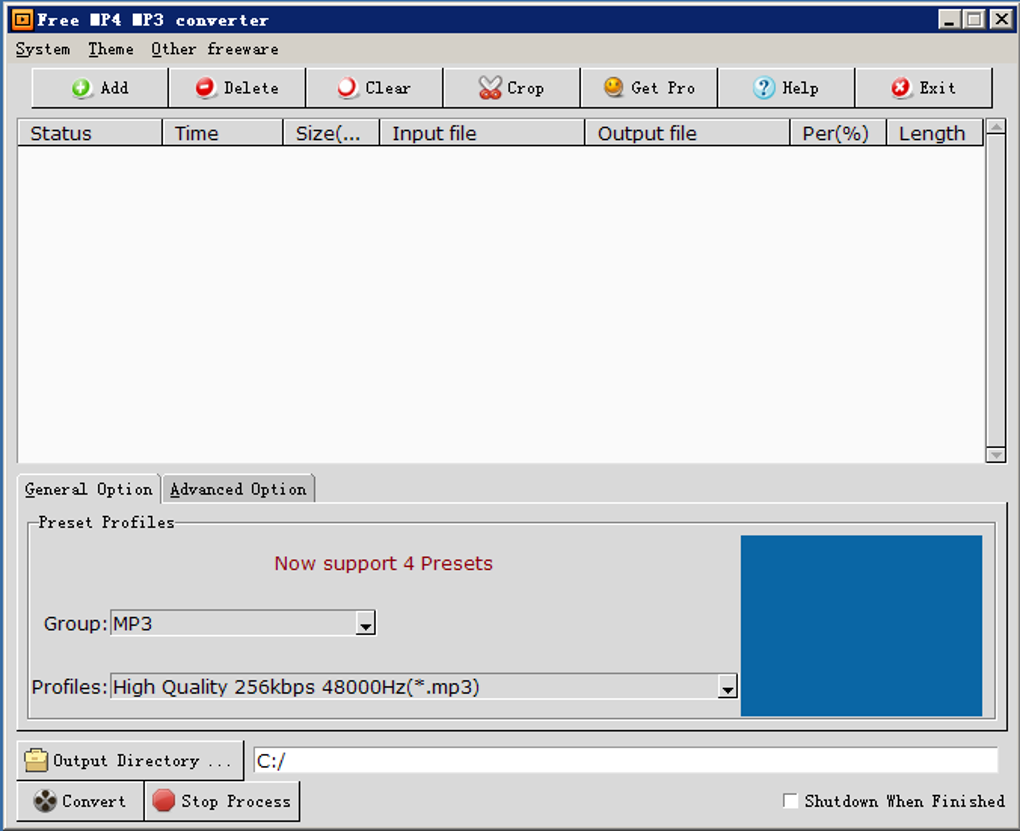
Downloading and installing Free MP4 MP3 Converter is a seamless experience. The installation file is compact, resulting in a quick download, and the installation process itself requires only a few clicks, minimizing any potential complications or unwanted bundled software. The user interface, however, presents a more dated aesthetic, reminiscent of older Windows operating systems. Although several themes are offered, none significantly update the overall visual appeal. The interface’s simplicity, while functional, might not appeal to users accustomed to more modern and visually appealing software.
Functionality and Usage
Free MP4 MP3 Converter’s core functionality is entirely focused on converting MP4 files to MP3. It does not offer reverse conversion (MP3 to MP4) nor does it support any other file formats. This limited scope is both its greatest strength and its most significant weakness. Its simplicity is undeniably beneficial for users seeking a quick and easy solution for extracting audio from videos, but its lack of versatility limits its applicability to a broader range of tasks.
The conversion process is remarkably user-friendly. Users simply add the desired MP4 files, select their preferred conversion options, choose a save location, and click “Convert.” The software offers both standard and advanced settings. Standard settings provide five pre-configured presets, balancing audio quality and file size for different priorities:
- Economy: Prioritizes smaller file sizes at the expense of audio quality.
- High quality 1: A balance between file size and high audio quality.
- High quality 2: Prioritizes higher audio quality over file size.
- Optimal quality: Aims for the best possible balance between quality and file size.
- Standard: A mid-range option offering a good compromise between quality and file size.
These presets cater to various user needs and levels of audio fidelity. The kilobits per second (kbps) range from 96 to 320, reflecting the varying levels of compression and resultant quality.
Advanced options offer greater control over the conversion process, allowing users to customize parameters such as codecs, aspect ratio (although irrelevant for audio-only conversion), video size (again, irrelevant for audio), and video quality (also irrelevant for audio-only extraction). While these options are provided, they are largely unnecessary for the average user who will find the pre-set options perfectly adequate for their needs. It is noteworthy that these advanced settings are largely extraneous in the context of MP4-to-MP3 conversion, as they directly relate to video aspects that are discarded during the process.
Batch conversion is supported, allowing for efficient processing of multiple files simultaneously. A useful feature is the option to automatically shut down the computer upon completion of the conversion, particularly beneficial for large batch conversions run overnight.
Performance and Testing
During testing, Free MP4 MP3 Converter demonstrated satisfactory speed and conversion accuracy. The audio quality of the resulting MP3 files was consistent with the selected preset. However, a minor issue was encountered during the program’s closure; in instances where the automatic shutdown option was not selected, closing the program sometimes required manual termination via the task manager. This is a minor inconvenience, but it indicates a potential area for improvement in future versions.
Comparison with Alternatives
While Free MP4 MP3 Converter fulfills its stated purpose effectively, it’s crucial to consider alternative solutions available to users. Both VLC media player and Windows Media Player (depending on codecs installed) include native functionalities to extract audio from video files, eliminating the need for dedicated software. These versatile media players offer a much broader range of features beyond simple audio extraction, making them potentially more attractive choices for users with diverse media handling requirements.
Several other dedicated MP4-to-MP3 converters are also available. Some of these offer additional features, such as support for a wider range of input and output formats (e.g., MOV, AVI, MPEG, WMV). This added flexibility makes them more attractive choices for users requiring versatility beyond basic MP4-to-MP3 conversion.
Pros and Cons
Pros:
- Easy Installation and Use: The download and installation process is straightforward and intuitive, requiring minimal user intervention.
- Fast Conversion Speed: The software converts files efficiently, making it suitable for users who prioritize speed.
- Pre-set Options: The standard settings offer readily available presets that simplify the conversion process for users unfamiliar with audio settings.
- Batch Conversion: Supports efficient processing of multiple files simultaneously.
- Automatic Shutdown: Option to automatically shut down the computer after the conversion is complete.
Cons:
- Limited Functionality: The program’s sole purpose is converting MP4 to MP3, limiting its overall usefulness.
- Dated Interface: The user interface appears outdated compared to modern software applications.
- Occasional Closure Issues: The program may sometimes require manual termination through task manager.
- Redundancy: The functionality is already offered within widely used media players.
Conclusion
Free MP4 MP3 Converter is a functional tool for extracting audio from MP4 videos, offering a simple and quick solution for its limited task. However, its restrictive functionality, outdated interface, and occasional closure difficulties make it a less attractive option compared to versatile media players or more feature-rich converter software. While it fulfills its niche purpose adequately, users should carefully consider whether its limited functionality justifies its use over more comprehensive alternatives. The decision of whether to use Free MP4 MP3 Converter ultimately depends on the user’s specific needs and priorities. If the user requires only a simple and fast solution for converting MP4 to MP3 and doesn’t mind the outdated interface, it might suffice. However, for users requiring more versatility or a smoother user experience, exploring alternative options is highly recommended.
File Information
- License: “Free”
- Latest update: “September 24, 2024”
- Platform: “Windows”
- OS: “Windows 2000”
- Language: “English”
- Downloads: “1.7M”


