
Free MPG Converter is a straightforward Windows application designed to address the compatibility issues often encountered with MPG video files. Many media players and platforms don’t inherently support MPG, limiting playback options. This free tool provides a simple solution: converting MPG videos to a wider range of compatible formats. While its functionality is limited to this single task, its ease of use and speed make it a valuable asset for users needing quick and efficient MPG conversions.
Ease of Use and Speed
One of Free MPG Converter’s key strengths lies in its user-friendly interface and rapid processing speed. Converting MPG videos takes mere minutes, a significant advantage over more complex, feature-rich converters that might require considerably longer processing times. This speed is particularly appealing to users who frequently need to convert multiple files or are working under time constraints. The intuitive layout is designed for users of all technical skill levels, requiring no prior knowledge or tutorials to effectively navigate and utilize the software. The clear, uncluttered interface minimizes any potential confusion, placing all necessary options and settings within easy reach.
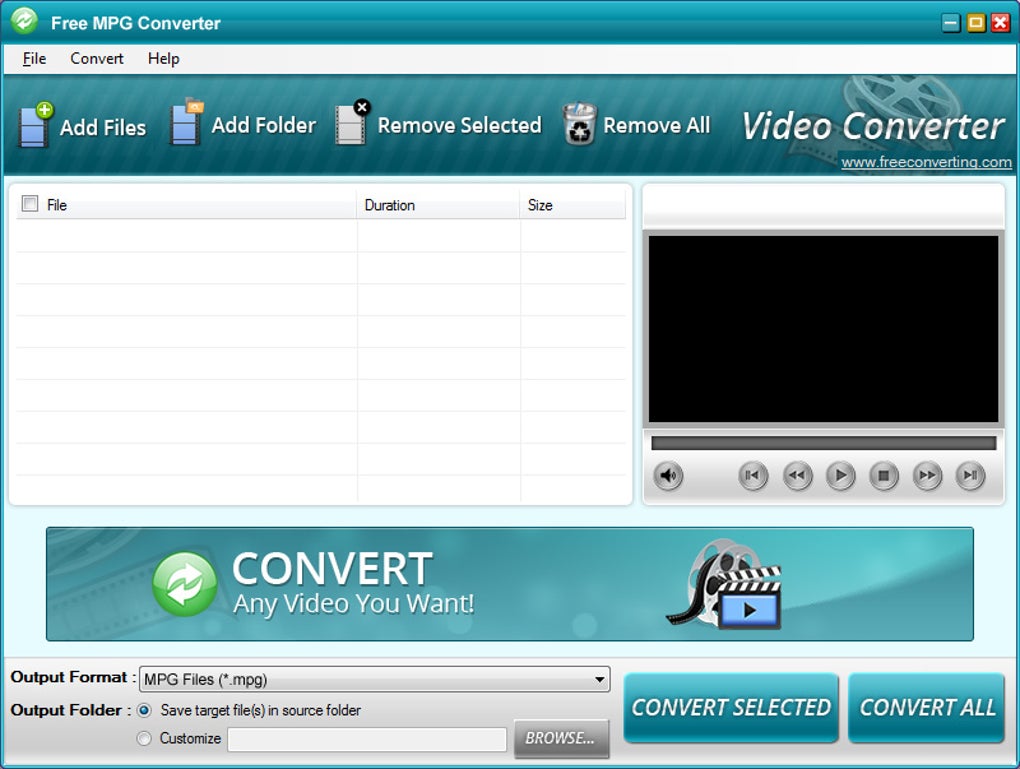
The application presents its functions with clear icons and readily accessible options. Below this, a generous space is dedicated to displaying the list of files selected for conversion, coupled with a small preview window. This preview window allows users to double-check the selected video files before initiating the conversion process, ensuring the correct files are being processed. Convenient drop-down menus are located at the bottom, allowing users to easily select the desired output format and destination folder. Once the settings are confirmed, users can choose to convert either selected files individually or all files at once, offering flexibility depending on their needs.
Supported Formats and Functionality
While Free MPG Converter’s primary function is converting MPG files to other formats, the range of supported output formats is a critical aspect of its functionality. The software boasts broad compatibility, significantly increasing the likelihood of finding a compatible format for your chosen media player or streaming platform. This wide array of options makes it a versatile tool, accommodating various playback devices and software. However, it’s crucial to understand that this application only converts from MPG; it does not offer reverse conversion capabilities, meaning you cannot use it to convert other file formats to MPG. This limitation is important to consider when assessing its suitability for your specific needs.
The simplicity of the software is both its strength and its weakness. The lack of advanced features, while contributing to its ease of use and speed, also restricts its functionality. Users looking for sophisticated editing capabilities, such as video compression settings, watermarking, or other advanced options, will find this converter insufficient. Its primary focus remains on the straightforward conversion of MPG video files to compatible formats, offering a quick and efficient solution for this specific task.
Interface Design and User Experience
The developer’s emphasis on simplicity is evident in the application’s design. The interface is clean, uncluttered, and intuitive, avoiding unnecessary complexities. This straightforward design minimizes the learning curve, making the software accessible to users regardless of their technological expertise. The placement of icons, menus, and the file list is logical and well-organized, contributing to a seamless user experience. The preview window, mentioned earlier, further enhances the user experience by allowing a visual confirmation before initiating the conversion process, minimizing the risk of errors.
The accessibility of Free MPG Converter is a significant selling point. The lack of complex settings and overwhelming options makes it an ideal choice for users who prioritize ease of use over extensive customization. This straightforward approach is particularly beneficial for users who are unfamiliar with video editing software or prefer a simple, hassle-free conversion process. The absence of advanced features is not a drawback for all users; for many, the focus on speed and efficiency outweighs the need for intricate adjustments and controls.
Comparison to Other Video Converters
While many video converters offer far more comprehensive features, including advanced editing tools and extensive format support (often including bidirectional conversions), Free MPG Converter excels in its simplicity and speed. Software like Handbrake, FFmpeg, or even online converters often provide a broader range of options, but these often come with a steeper learning curve and may not always be as fast for a basic MPG conversion. Free MPG Converter occupies a niche by offering a streamlined experience specifically tailored to the conversion of MPG files, without the extraneous features that can complicate the process.
Consider the trade-offs: comprehensive converters offer greater flexibility and control, but this comes at the cost of a more complex interface and potentially longer processing times. Free MPG Converter’s primary benefit is its speed and simplicity. The choice between these approaches ultimately depends on the user’s priorities. If speed and ease of use for a single, specific task are paramount, Free MPG Converter provides a compelling solution. If you require extensive editing tools and a broader range of formats, a more feature-rich converter will be necessary.
System Requirements and Availability
Free MPG Converter is designed for Windows operating systems, specifically supporting Windows 8.1 and later versions. The relatively small file size (around 15 MB) minimizes download time and system storage requirements. The application’s availability is widespread, with downloads available directly from the developer’s website and various other software distribution platforms. The ease of access contributes to its overall user-friendliness, ensuring users can quickly download and begin using the software without significant hurdles.
The developer’s commitment to providing a free, easily accessible converter is commendable, making it a valuable tool for users who may not have the budget or technical expertise to utilize more complex, often paid, video conversion software. This accessibility expands its reach to a wider audience, contributing to its popularity among users who prioritize simplicity and affordability.
Conclusion
Free MPG Converter is a niche tool designed for a specific purpose: converting MPG video files to a variety of more widely compatible formats. While it lacks advanced features found in more complex video converters, its simplicity, speed, and ease of use make it an effective solution for its intended function. Users who prioritize speed and straightforward functionality will find it highly valuable, particularly those who regularly encounter compatibility issues with MPG files. However, users seeking sophisticated editing tools or a broader range of format support should explore other options, which offer more extensive capabilities but might come with a higher level of complexity. The software’s strength is in its streamlined design and quick conversion times, making it a strong contender for users with basic MPG conversion needs.


