
The world of video production often involves navigating a variety of file formats. MXF (Material eXchange Format), a professional format known for its high quality and robustness, can sometimes present challenges when it comes to compatibility with various editing software and playback devices. This is where a free MXF converter comes into play, providing a simple solution for transforming MXF files into more widely compatible formats. This guide explores the features, benefits, and considerations surrounding free MXF converter software, helping you make an informed choice for your video workflow.
Understanding MXF Files and the Need for Conversion
MXF, as mentioned, is a professional-grade container format commonly used in broadcast and high-end video production. Its strength lies in its ability to maintain high-quality video and audio data, often including metadata crucial for professional workflows. However, this very robustness can lead to compatibility issues. Many consumer-level video editing software, mobile devices, and even some older computers might not inherently support MXF files. This necessitates conversion to more universally accepted formats like MP4, MOV, AVI, or MKV.
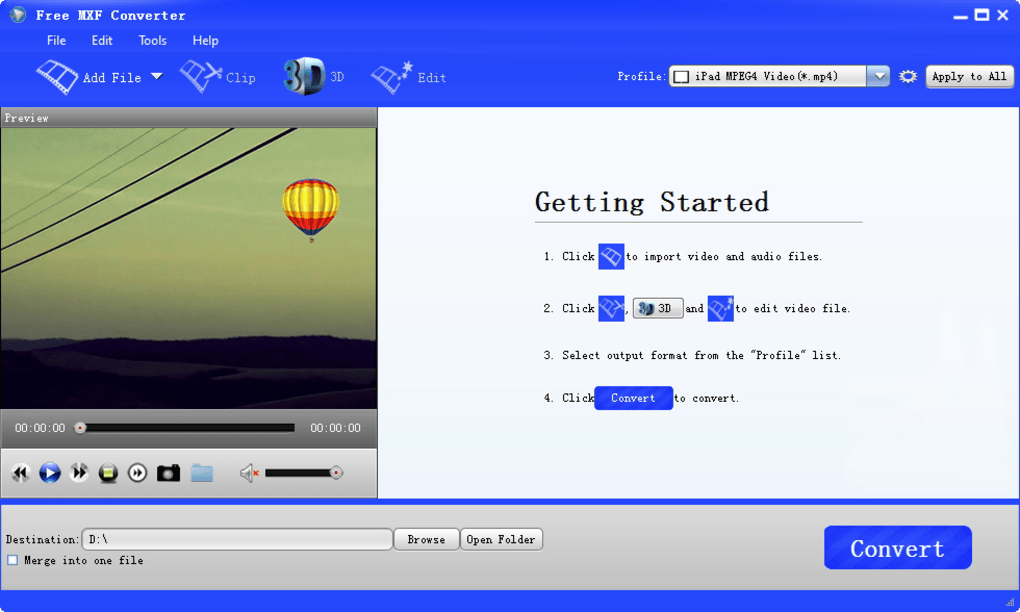
The process of MXF conversion involves taking the video and audio data encapsulated within the MXF file and repackaging it into a new container format. This doesn’t necessarily alter the underlying video quality; rather, it changes how the data is structured and presented to the playback or editing application. The choice of output format depends on the intended use: MP4 is often preferred for general compatibility and web use, while MOV might be suitable for Apple-based systems. MKV offers flexibility in handling various codecs and subtitles.
Features of a Typical Free MXF Converter
A good free MXF converter offers a range of essential features aimed at simplifying the conversion process and delivering high-quality results. These typically include:
-
Wide Format Support: The converter should support a broad array of input and output formats. Beyond MXF, it should be capable of handling common video formats such as MP4, MOV, AVI, MKV, WMV, and more. It’s also beneficial if it can convert to a variety of audio formats like MP3, WAV, and AAC.
-
Batch Conversion: This feature allows you to convert multiple MXF files simultaneously, saving significant time and effort, particularly when dealing with large volumes of footage.
-
Preview Functionality: Before initiating conversion, the ability to preview the MXF file ensures that you’re working with the correct source material and can assess its quality.
-
Customizable Output Settings: A good free MXF converter should offer control over output parameters, including resolution, bitrate, frame rate, and codec. This allows you to fine-tune the converted file’s quality and size to meet specific needs. Higher bitrates generally result in better quality but larger file sizes. Lower bitrates offer smaller files but potentially at the cost of some quality.
-
Easy-to-Use Interface: While advanced features are valuable, the software’s interface should be intuitive and user-friendly, making it accessible to users of all technical skill levels. A clear and straightforward layout simplifies the conversion process.
-
Fast Conversion Speed: The speed at which the conversion process is completed is a key factor. Hardware acceleration, when available, can significantly improve conversion speed.
Choosing the Right Free MXF Converter: Factors to Consider
Selecting a suitable free MXF converter requires careful consideration of several factors:
-
Software Reputation: Look for converters from reputable developers with positive user reviews. Check for any reports of malware or unwanted bundled software. Reliable software often has a dedicated support team to address user issues.
-
System Compatibility: Ensure the converter is compatible with your operating system (Windows, macOS, Linux). Some converters might be limited to specific platforms.
-
Supported MXF Variations: MXF is a flexible format, and different cameras and recording devices might generate MXF files with slightly different characteristics. It’s beneficial if the converter handles these variations effectively.
-
Output Quality: Test the converter with sample MXF files to evaluate the quality of the output in different formats. Compare the resulting files to the original to gauge any loss of quality.
-
Additional Features: While basic conversion is paramount, some converters offer added features such as basic video editing capabilities (trimming, cropping), watermarking, or merging multiple files. Consider if these extra features are relevant to your workflow.
Potential Challenges and Limitations of Free MXF Converters
While free MXF converters provide a valuable service, it’s important to acknowledge potential limitations:
-
Feature Restrictions: Free versions often have limitations compared to their paid counterparts. This might involve restrictions on the number of files that can be converted at once, limitations on output format choices, or the absence of advanced features.
-
Slower Conversion Speeds: Compared to paid or professional software, free converters might exhibit slower conversion speeds, particularly when handling large, high-resolution MXF files. This is often due to the absence of hardware acceleration or optimized algorithms.
-
Occasional Bugs and Issues: Free software may occasionally encounter bugs or stability issues. This is more likely with less-established developers or those lacking robust testing procedures.
-
Limited Support: Support options for free software are generally more limited compared to commercial products. You might have to rely on community forums or online resources for assistance.
Alternatives to Free MXF Converters
If the limitations of free converters are problematic, consider these alternatives:
-
Paid MXF Converters: Paid software generally offers enhanced features, faster conversion speeds, better support, and more reliable performance. The cost might be justified if you regularly work with large MXF files or require advanced capabilities.
-
Professional Video Editing Software: Many professional-level video editing suites (Adobe Premiere Pro, DaVinci Resolve, Final Cut Pro) natively support MXF files. While they have a steeper learning curve and higher price point, their ability to handle MXF directly eliminates the need for conversion.
-
Online MXF Converters: Various online services offer MXF conversion, but this approach introduces concerns about uploading your video files to a third-party server. Security and privacy should be carefully considered before using such services.
In conclusion, a free MXF converter can be a valuable tool for converting MXF files to more universally compatible formats. By carefully considering the factors discussed above and selecting a reputable software option, you can efficiently manage your MXF files and integrate them seamlessly into your video workflow. Remember to always back up your original files before performing any conversion, just in case unexpected issues arise.
File Information
- License: “Free”
- Latest update: “May 23, 2023”
- Platform: “Windows”
- OS: “Windows 2000”
- Language: “English”
- Downloads: “25.5K”
- Size: “28.67 MB”


