
Free PC Audio Recorder, developed by Cok Free Software, is a versatile audio recording tool designed for ease of use and high-quality output. This review delves into its features, performance, and overall user experience, comparing it to other available options in the market.
Ease of Use and Interface
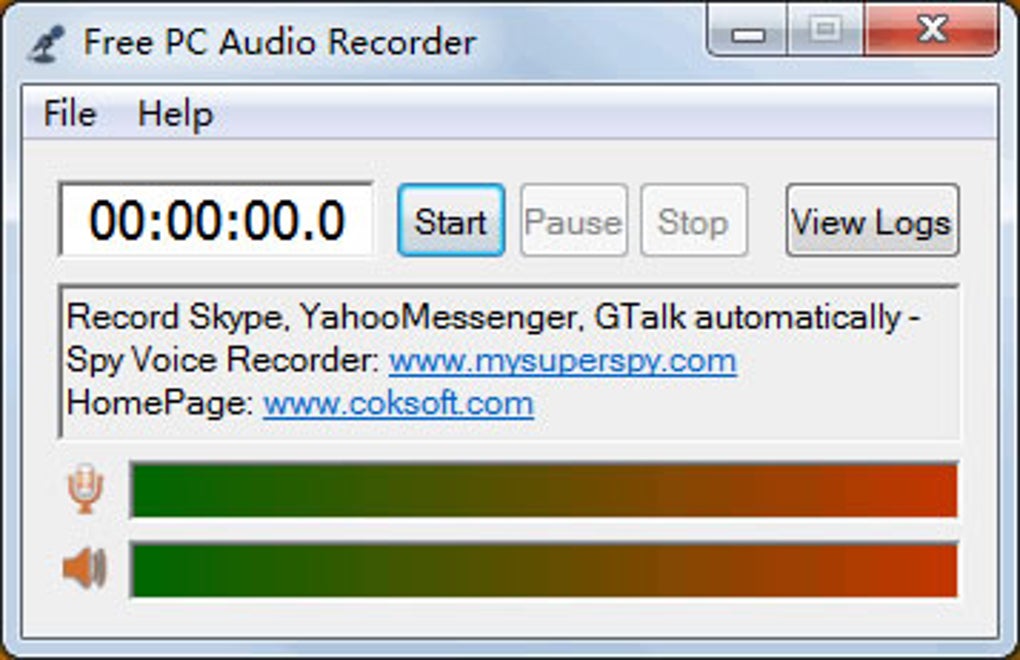
Free PC Audio Recorder boasts an intuitive and user-friendly interface, making it accessible even to those with limited experience in audio recording. The program’s main screen presents a straightforward layout, featuring prominent “Start,” “Pause,” and “Stop” buttons, facilitating effortless recording control. This minimalist design eliminates unnecessary complexities, ensuring a smooth and efficient recording process. New users will appreciate the lack of overwhelming options and menus, allowing them to quickly begin recording audio.
Beyond the basic recording controls, the program offers a menu of essential sound settings. These settings include crucial parameters like sample rate and bitrate, allowing users to fine-tune the audio quality according to their specific needs and preferences. While the options aren’t as extensive as those found in professional-grade software, the selection provided is sufficient for most everyday recording tasks. The clarity of these settings and their impact on the final audio output is clearly indicated, further enhancing the user experience. The logical arrangement of menus and settings minimizes confusion and streamlines the recording workflow.
Recording Capabilities and Quality
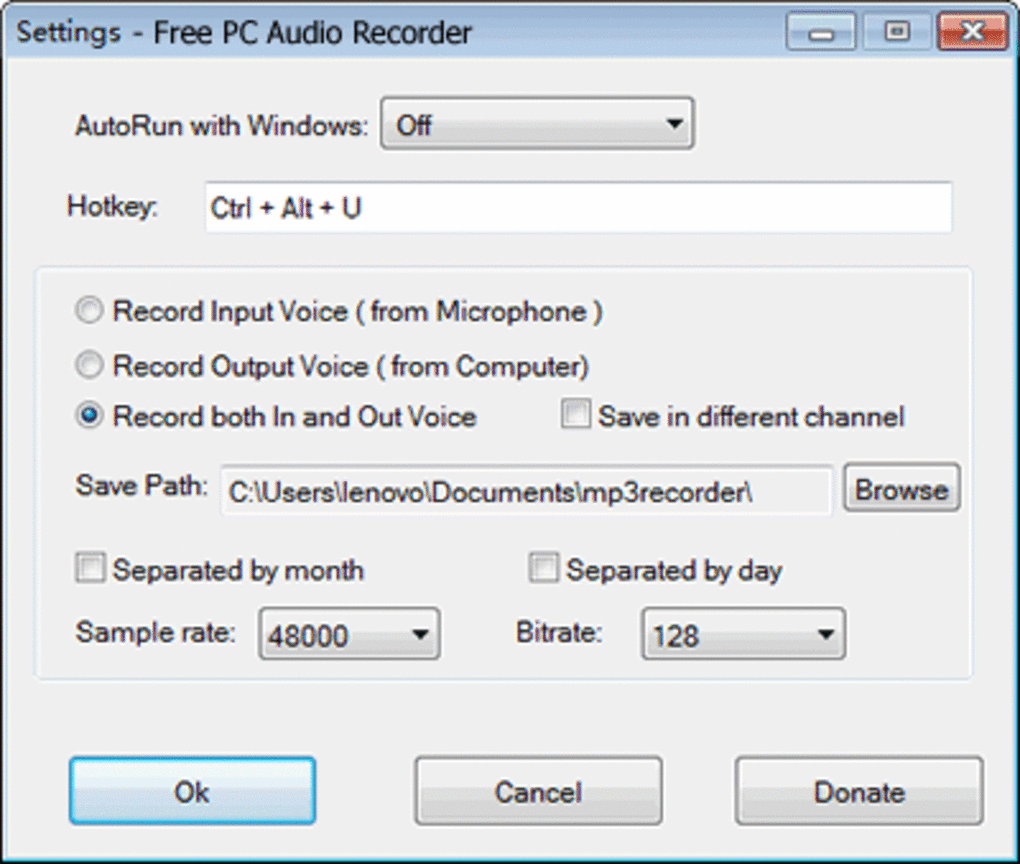
Free PC Audio Recorder excels in its ability to capture audio from multiple sources. It can record directly from a microphone, either a connected external device or its built-in microphone functionality. This versatility is further enhanced by its capacity to record system audio – the sound playing through your computer’s sound card. This feature allows users to capture audio from streaming services, online videos, or any other application producing sound on their system. The software also efficiently records VoIP conversations from applications such as Skype, Viber, Windows Media Player, RealPlayer, and iTunes, making it useful for archiving online calls or meetings.
A key strength of Free PC Audio Recorder lies in its high-quality audio recording capability. The software produces clear and crisp audio, eliminating the need for expensive external equipment. The recorded audio maintains a professional level of sound quality, ideal for a wide variety of uses from casual recording to more demanding projects. The absence of any discernible distortion or background noise even at higher recording levels is a significant advantage. The software’s ability to deliver professional-sounding output without any cost is a significant selling point.
System Performance and Resource Usage
One of the most attractive features of Free PC Audio Recorder is its lightweight nature. Unlike some audio recording software that consumes significant system resources, Free PC Audio Recorder operates efficiently without slowing down or impacting the performance of other applications. Its minimal memory footprint makes it ideal for systems with limited resources. This performance advantage means users can run the software alongside other applications without experiencing any noticeable lag or performance degradation. The low system requirements allow the software to run smoothly on a wide range of PCs, from older models to the latest high-powered machines.
Furthermore, the software is free from intrusive advertisements and unnecessary plug-ins, contributing to its streamlined and clean operation. The absence of bloatware ensures a smooth and uninterrupted user experience, focusing solely on the core function of audio recording. This enhances security by reducing the potential for malware or unwanted software bundles, providing a more secure and reliable recording solution.
Limitations and Missing Features
While Free PC Audio Recorder offers a compelling set of features, it is not without limitations. A notable omission is the lack of integrated audio editing capabilities. Users cannot directly edit or modify recordings within the program itself. This necessitates the use of a separate audio editing software if any post-recording modifications, such as trimming, noise reduction, or adding effects are required. This limitation may prove inconvenient for users requiring immediate editing functionalities, necessitating additional software and workflow steps.
Another minor drawback, as reported by some users, is the occasional appearance of a nag screen promoting a paid version of the software. While the software remains functional as a free tool, this interruption can be slightly irritating and detracts from the completely free experience promised.
Comparison with Alternative Software
Free PC Audio Recorder stands favorably against other free audio recording software available. Many free alternatives lack the same level of versatility in recording sources or the consistent high-quality audio output. Some may struggle with recording system audio or VoIP calls reliably. Others may include bundled software or intrusive advertising that diminishes the user experience.
In contrast, Free PC Audio Recorder provides a superior blend of ease of use, high-quality recording, and minimal system impact. While some professional audio recording packages offer far more comprehensive features and editing options, the price tag for such software is often prohibitive for casual users. Free PC Audio Recorder provides a compelling middle ground, offering excellent audio recording capabilities without the need for advanced editing features or a significant financial investment.
Conclusion
Free PC Audio Recorder is a highly effective and user-friendly audio recording tool. Its intuitive interface, high-quality audio output, and minimal system resource consumption make it a strong choice for both novice and experienced users. While the absence of built-in editing features and the occasional nag screen are minor drawbacks, these are outweighed by its overall ease of use and strong performance. The software represents a reliable and efficient solution for various audio recording needs, proving a valuable tool for individuals seeking a free, high-quality audio recording application. Its versatility, coupled with its efficient operation and straightforward interface, firmly establishes it as a top contender in the free PC audio recording software landscape.
File Information
- License: “Free”
- Latest update: “May 23, 2023”
- Platform: “Windows”
- OS: “Windows 2000”
- Language: “English”
- Downloads: “583.4K”
- Size: “1.17 MB”


