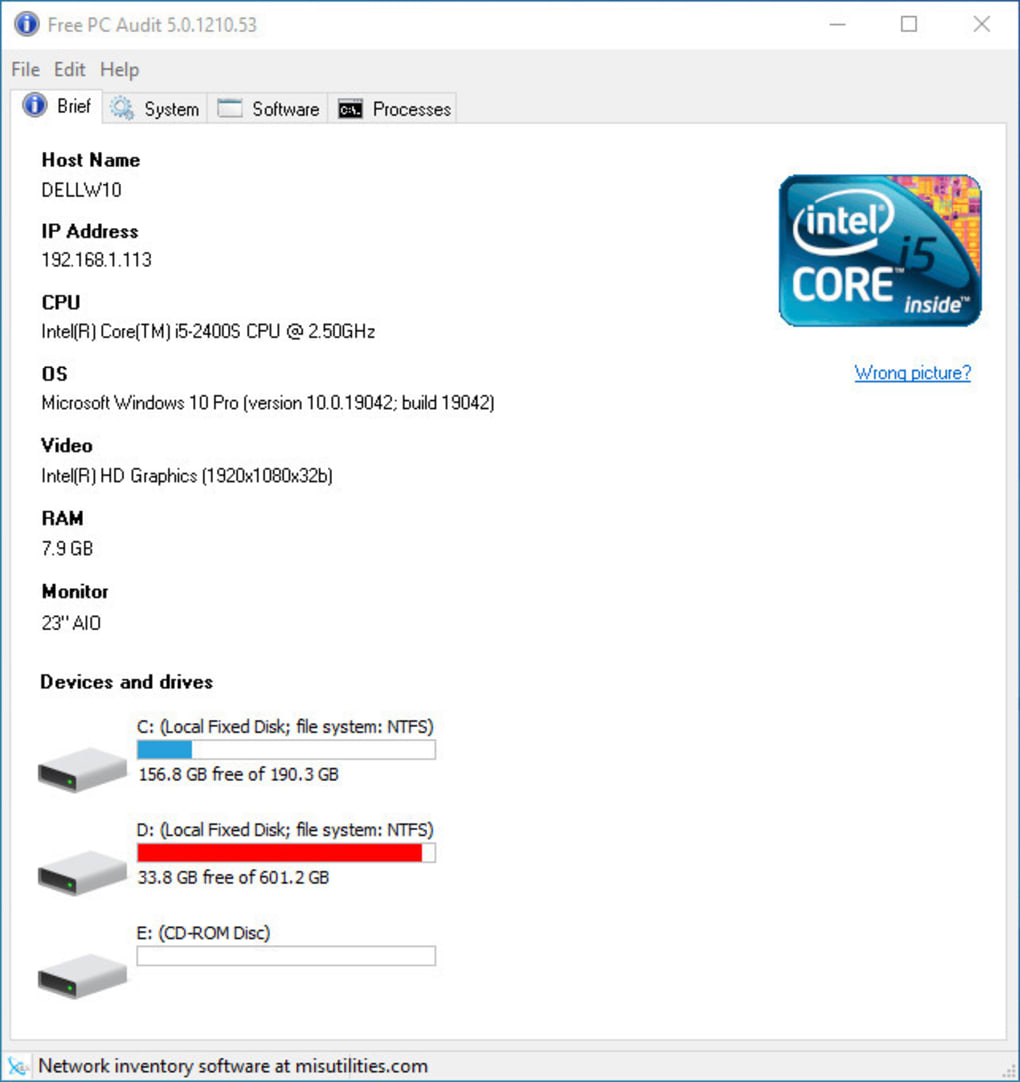
Free PC Audit is a free, lightweight utility designed for Windows operating systems. Developed by MIS Utilities, this tool provides users with a detailed overview of their computer’s system information, encompassing hardware specifications, software installations, and active background processes. Its functionality is comparable to other system information utilities like Speccy, offering a comprehensive diagnostic scan to extract crucial data for various purposes. The program’s intuitive interface makes it accessible to users of all technical skill levels.
Understanding Your PC’s Inner Workings
Personal computing, while continually evolving to provide enhanced user experiences, can present a level of complexity that may be daunting for the average user. The rapid advancements in technology and hardware often leave users struggling to understand the intricacies of their own machines. This is where system analysis tools, such as Free PC Audit, become invaluable. The program offers a portable and efficient solution to scan your system and provide crucial information about its components and processes. This readily accessible information enables users to better understand their computer’s performance, identify potential issues, and make informed decisions regarding upgrades or troubleshooting.
Free PC Audit eliminates the need for complex technical knowledge to access essential system details. Its straightforward approach allows even novice users to quickly grasp their computer’s configuration and operational status. The software’s clear and concise presentation of data empowers users to actively participate in maintaining and optimizing their computer’s performance, fostering a sense of control and understanding over their technology.
Key Features and Functionality
Free PC Audit organizes its system information into several easily navigable sections. The main features are as follows:
-
Brief Overview: This section provides a concise summary of key system specifications, including the operating system version, CPU details (model, speed, and number of cores), and the amount of installed RAM. This rapid overview allows for immediate assessment of core system resources.
-
System Information: This detailed section presents a comprehensive breakdown of virtually every aspect of the PC’s hardware and configuration. Information included here goes beyond the basics offered in the “Brief” tab. This may encompass detailed information about motherboard components, storage devices (hard drives, SSDs), network adapters, and other peripherals. This level of detail empowers users to identify specific hardware components and their individual specifications.
-
Software Information: This segment provides a complete list of all currently installed software applications. It often includes information such as the application name, version, installation date, and the path to its installation directory. This comprehensive list aids in software management, identifying outdated applications, and managing digital assets.
-
Processes Overview: This section allows users to view all active background processes. This real-time display of running programs and services provides insights into resource utilization and helps identify potential issues. Users can gain a better understanding of which applications are consuming significant resources, aiding in system optimization.
-
Data Export: Free PC Audit allows users to export the gathered system information into a text file. This feature provides a convenient way to save a snapshot of the system’s configuration for future reference, troubleshooting, or sharing with technical support personnel. The exported text file can be easily saved and referred to at any time. The capability to copy individual lines of information provides further flexibility for those who require only specific data points.
Ease of Use and User Interface
The software’s user interface is designed for intuitive navigation. The clearly defined tabs and sections allow for seamless access to the different types of system information. The program’s uncluttered design prioritizes ease of use, ensuring that users can quickly locate and interpret the necessary information without encountering unnecessary complexity. The layout is consistent with widely accepted software design principles, enhancing the overall user experience.
The absence of complex settings or configurations minimizes the learning curve for new users. Free PC Audit delivers a user-friendly experience, allowing users to focus on the information it provides rather than navigating complicated interfaces. This streamlined approach makes the program accessible to a broader range of users, regardless of their technical proficiency.
Limitations and Future Development
At the time of writing this review, Free PC Audit does not support Windows 11. This limitation may affect users who are running the latest version of the Windows operating system. However, the developers might release updates that include compatibility with Windows 11 in the future. Users should periodically check for updates to ensure they are using the latest version of the software. This ongoing development is a positive sign, indicating the developer’s commitment to improving the program and expanding its compatibility.
Comparison to Alternative Applications
While Free PC Audit offers robust functionality, it’s important to compare it to similar system information utilities. Applications like Speccy, for example, often offer similar features and may provide additional functionalities or more detailed reporting options. The choice between different system information utilities will often depend on individual user preferences and specific requirements.
Conclusion: A Valuable Free Tool
Free PC Audit offers a valuable and efficient way to obtain detailed system information on Windows-based computers. Its lightweight design, intuitive interface, and comprehensive reporting make it an excellent choice for users of all technical skill levels. While the lack of Windows 11 support at the moment is a notable limitation, the program’s overall functionality and potential for future development make it a worthy addition to any user’s toolkit. The fact that this comprehensive tool is entirely free further enhances its appeal and makes it a highly recommended option for those seeking a simple yet powerful solution for understanding their computer’s configuration and performance. The ability to export data and the clear presentation of information adds to the program’s practicality and value. The developer’s ongoing efforts to update and improve the software suggests a commitment to maintaining and enhancing its capabilities, promising an even more comprehensive tool in future versions.
File Information
- License: “Free”
- Version: “5.1.211.96”
- Latest update: “March 28, 2022”
- Platform: “Windows”
- OS: “Windows 8”
- Language: “English”
- Downloads: “3.2K”
- Size: “12.76 MB”