
Creating photo collages is a fun and engaging way to showcase cherished memories and artistic visions. While powerful software like Photoshop offers extensive capabilities, its high cost can be prohibitive for casual users. Free Photo Collage Maker, offered by Media Freeware, presents itself as an accessible alternative. However, does this free program offer a compelling solution, or does it fall short in comparison to its more robust (and often paid) competitors? This review delves into the software’s strengths and weaknesses, providing a comprehensive assessment of its usability, functionality, and overall value.
First Impressions: A Clash of Aesthetics
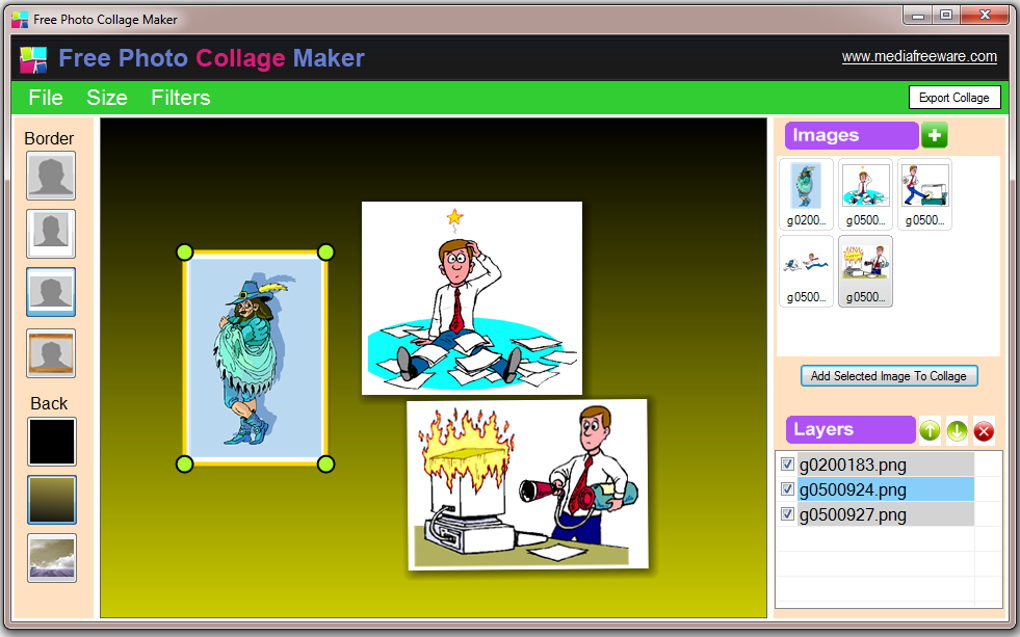
The initial installation process of Free Photo Collage Maker is straightforward, a definite positive. However, the user experience quickly shifts from smooth sailing to a turbulent sea of inconsistent design choices. The software’s visual presentation is jarring, lacking a cohesive aesthetic. A disjointed color scheme, where colors clash rather than complement each other, immediately creates visual fatigue. This is further compounded by inconsistent font choices and pixelated, rough-looking icons and buttons. For a program ostensibly centered around creative expression, this jarring design is a significant detriment. While the interface’s simplicity might initially appear intuitive, the visual clutter paradoxically makes the program feel more complex than it actually is. This initial negative impression casts a long shadow over the subsequent user experience.
Functionality: A Limited Toolkit
In its most basic function, Free Photo Collage Maker does what it claims: it allows you to create photo collages. Users can readily add images and arrange them according to their preferences, offering a degree of flexibility in the layout and design of the final product. The software’s support for layers is also a useful feature, allowing for non-destructive editing and rearrangement of images without affecting other elements within the collage. The ability to add borders provides additional customization options for enhancing the visual appeal of the finished collage.
However, this functionality is severely limited. The program’s biggest flaw lies in its cumbersome image manipulation tools. Resizing images proves exceptionally difficult, lacking the crucial option to maintain aspect ratios while resizing. This leads to images becoming distorted and misaligned, requiring constant readjustment and increasing the overall time investment. Furthermore, the editing capabilities are restricted to individual objects. Users cannot perform global adjustments to hue, saturation, brightness, or contrast across the entire collage. Each image requires manual individual editing, a frustrating process that becomes exponentially tedious with a larger number of images. This limitation significantly hampers the software’s potential for effective image manipulation and refinement.
Comparison with Alternatives: A Clear Lack of Competitiveness
Even within the realm of free photo collage software, Free Photo Collage Maker struggles to compete. Its limited feature set and awkward interface make it a less-than-ideal choice for anyone seeking a user-friendly and efficient collage-making experience. While the program successfully allows for basic collage creation, it falls significantly short in providing the tools and features necessary for a satisfying and productive workflow. Many free alternatives offer a more polished user experience and a broader range of features, making Free Photo Collage Maker a less appealing option. The time and effort required to overcome the software’s usability issues often outweigh the convenience of using a free program, ultimately reducing its practical value.
User Reviews: A Mixed Bag, but Mostly Negative
User reviews of Free Photo Collage Maker reveal a mixed reception, with a preponderance of negative feedback echoing the points raised in this review. Many users cite the clunky interface and limited functionality as significant drawbacks. While some users find it adequate for basic collage creation, the general consensus suggests that the program’s shortcomings outweigh its benefits. The lack of intuitive resizing tools and the absence of global image editing options frequently lead to frustration and a less-than-satisfying user experience. Positive feedback tends to be limited to the software’s ease of installation and its basic functionality, but these are not enough to counterbalance the overwhelmingly negative aspects of the software.
Conclusion: Proceed with Extreme Caution
Free Photo Collage Maker, while technically functional, ultimately falls short of expectations. Its glaring visual inconsistencies and remarkably limited capabilities make it a difficult program to recommend, even as a free alternative to more sophisticated software. The considerable drawbacks associated with its poor interface design and restricted editing tools significantly hamper its usability and negate any potential benefits of a free price tag. If you require a simple collage maker with minimal functionality, you may find it adequate, but if you desire a smooth, efficient, and creatively rewarding experience, exploring other, more feature-rich options, even paid ones, is strongly advised. The time saved and increased satisfaction gained by using a more user-friendly program will likely outweigh any perceived benefit of using this free software. There are far better options available, both free and paid, that will deliver a much more satisfactory collage-making experience. Only download Free Photo Collage Maker if your expectations are exceptionally low, and you only need the most basic functionality. Even then, more user-friendly alternatives may ultimately save you considerable time and frustration.
File Information
- License: “Free”
- Version: “1”
- Latest update: “September 1, 2021”
- Platform: “Windows”
- OS: “Windows 8.1”
- Language: “English”
- Downloads: “119.3K”
- Size: “3.99 MB”


