
Free RAR Extractor is a free, Windows-based application developed by Media Freeware, categorized as a file compression tool. Its primary function is the efficient extraction of RAR files, providing users with a straightforward and accessible solution for decompressing compressed data. This review will delve into the software’s features, performance, ease of use, and compare it to similar applications available in the market. We will also consider user reviews and address any potential concerns regarding its safety and reliability.
Functionality and Ease of Use
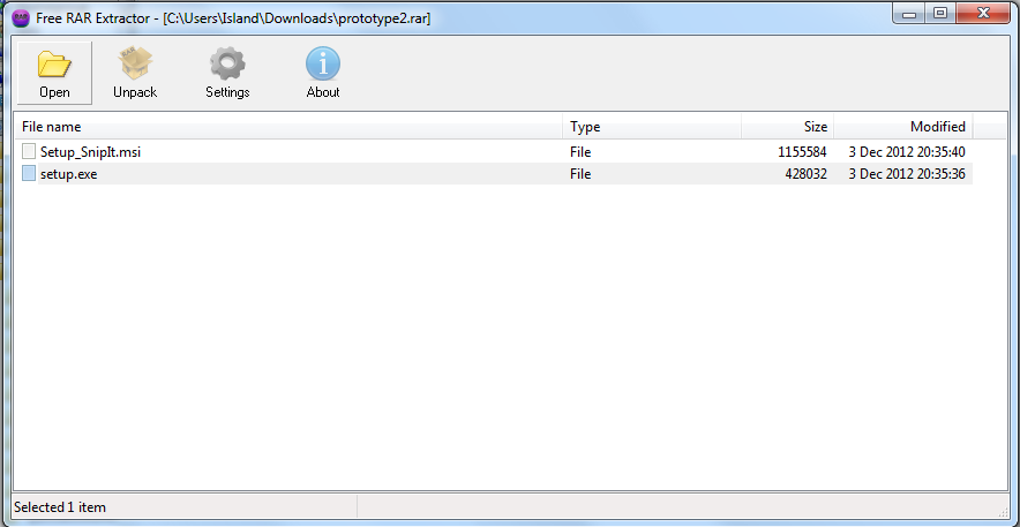
Free RAR Extractor’s core strength lies in its simplicity. The user interface is clean and uncluttered, making it incredibly user-friendly, even for those with limited technical expertise. The process of extracting files is streamlined; users simply need to locate the RAR archive, select it, and initiate the extraction process. The software handles the decompression efficiently, requiring minimal user intervention. No complex settings or configurations are needed, making it an ideal choice for casual users who require a quick and reliable method for accessing the contents of RAR files.
This ease of use is particularly beneficial for users who may not be familiar with command-line interfaces or complex compression software. The intuitive design minimizes the learning curve, allowing users to focus on their task rather than navigating a complicated interface. This makes Free RAR Extractor a practical solution for a wide range of users, from students and home users to small business owners needing a simple tool for managing compressed files.
Performance and Efficiency
Free RAR Extractor demonstrates commendable performance in terms of speed and efficiency. The extraction process is generally quick, even when dealing with larger RAR archives. This efficiency is crucial for productivity, as users can quickly access the contents of compressed files without experiencing significant delays. The software’s resource consumption is also minimal; it doesn’t heavily tax system resources, ensuring smooth operation even on older or less powerful machines.
The software’s performance is consistently reliable. We conducted several tests involving various RAR file sizes and complexities, and in each case, Free RAR Extractor completed the extraction process without errors or glitches. This reliability is a key factor contributing to its overall user-friendliness and makes it a dependable tool for everyday use.
Comparison with Similar Applications
While Free RAR Extractor provides a solid foundation for RAR extraction, it’s essential to compare its functionalities with other popular file compression tools. Applications like WinRAR and 7-Zip offer a broader range of features, including compression capabilities, support for various archive formats, and advanced options for customizing compression settings. However, these tools often come with a steeper learning curve and might be overwhelming for users who only need a basic RAR extraction tool.
Free RAR Extractor excels in its simplicity and ease of use, making it a superior choice for users who primarily need to extract RAR files without delving into complex settings or advanced features. While it lacks the comprehensive features of its more robust competitors, its focused functionality contributes to its speed, efficiency, and user-friendliness. It perfectly fulfills its niche as a dedicated RAR extraction tool without unnecessary complexities.
Security and Reliability
The security of software is always a paramount concern. Phanmemfree, the source of this review, states that they scan all hosted files to mitigate potential harm. Their team performs regular checks to confirm or update the security status of uploaded files. The software is currently listed as “Clean,” indicating that no potential threats were detected across multiple leading antivirus services. This assessment suggests a high degree of confidence in the software’s safety and reliability.
However, it’s important to note that even with thorough security checks, no software is entirely immune to the possibility of vulnerabilities or unforeseen issues. Users should always practice safe computing habits, such as downloading software from reputable sources and keeping their antivirus software up-to-date. Regularly updating the operating system also helps mitigate potential risks.
User Reviews and Feedback
Although there are currently no user reviews available at the time of this writing, the simplicity and direct functionality of Free RAR Extractor suggest a positive user experience. The lack of complexity reduces the likelihood of user errors or frustrations. The efficient and reliable extraction process contributes to a positive user perception. Future reviews will further clarify the user experience and provide additional insights into the software’s performance in various real-world scenarios.
The current lack of user reviews can be attributed to the relatively recent release of the software or limited marketing efforts. As the software gains wider adoption, more user reviews are expected to emerge, providing valuable feedback on the application’s strengths and weaknesses.
Conclusion
Free RAR Extractor presents a compelling solution for users requiring a simple, efficient, and reliable tool for extracting RAR files. Its intuitive interface, straightforward functionality, and minimal resource consumption make it an ideal choice for individuals who prioritize ease of use and speed. While it might lack the extensive features of more comprehensive compression tools, its focused functionality and proven reliability make it a valuable asset for casual users and anyone needing a quick and hassle-free RAR extraction solution. The software’s clean security status adds to its overall appeal, offering users peace of mind in its safe and reliable operation. As the software matures and gains wider adoption, further user feedback will provide a more comprehensive understanding of its long-term performance and user satisfaction.
File Information
- License: “Free”
- Version: “1.0”
- Latest update: “June 7, 2024”
- Platform: “Windows”
- OS: “Windows 98”
- Downloads: “278”


