
Free Resize Video, a free tool developed by Easy Video Maker, is a straightforward video editing application primarily designed for resizing videos and adjusting their resolution. Its simple interface and ease of use make it an accessible option for users seeking a quick and uncomplicated solution for modifying video dimensions. However, its limited functionality restricts its application to this specific task, leaving out many features found in more comprehensive video editing software.
User Interface and Functionality
The software boasts a user-friendly interface, designed for simplicity and ease of navigation. The primary function, video resizing, is front and center, requiring minimal technical expertise. The large, red “plus” button for importing video files is prominently displayed, making the process intuitive even for novice users. Once a video is imported, users can directly input new height and width values, providing precise control over the resizing process. The “Settings” option allows users to select the desired output format, ensuring compatibility with various video players and devices. Finally, clicking “Render” initiates the resizing process, concluding the workflow.
The simplicity of Free Resize Video is its greatest strength. The intuitive design eliminates the steep learning curve often associated with more complex video editing software. The direct input fields for height and width measurements allow for quick and accurate resizing, making it ideal for tasks requiring rapid video dimension adjustments. This straightforward approach caters to users who need a quick and easy solution without delving into advanced video editing features. The clean interface makes the tool extremely accessible, even for those with minimal technical experience. The clear labeling and placement of buttons ensure a smooth workflow, minimizing confusion and maximizing efficiency. The focus on core functionality, resizing, creates a streamlined user experience that avoids unnecessary complexity. For users with very specific needs—primarily video resizing—this simple interface is a valuable asset.
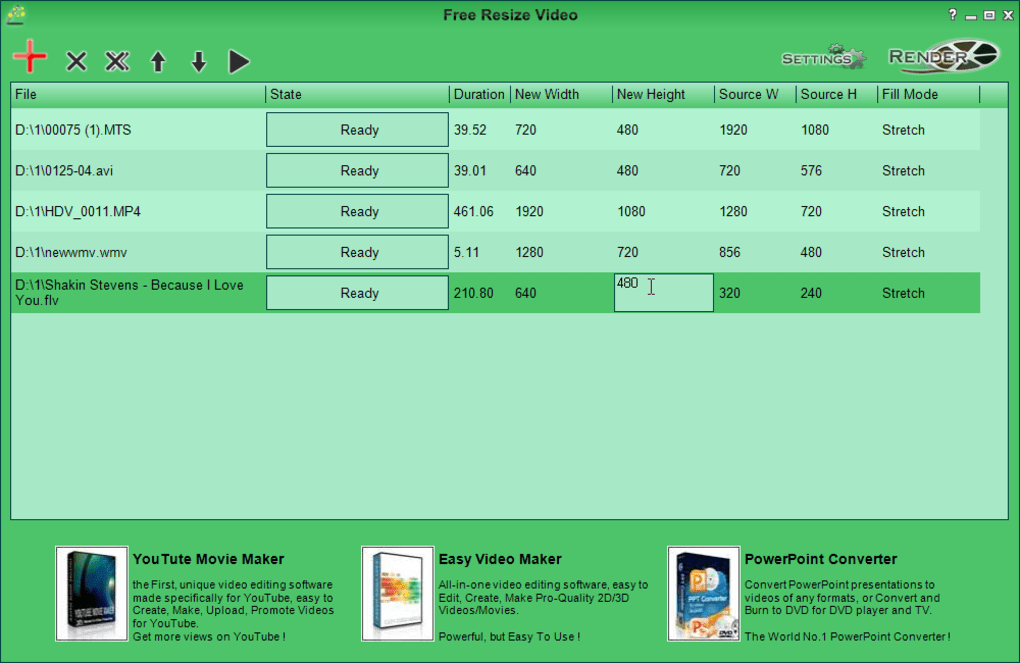
However, this simplicity also represents a significant limitation. The lack of advanced features restricts its applicability to more complex video editing tasks. Users seeking sophisticated editing tools, such as video trimming, effects, filters, or more advanced resolution adjustments, will find Free Resize Video insufficient. The software’s core function is resizing, and it does not provide options for enhancing video quality or addressing other common video editing requirements. The absence of these features could be a significant drawback for users with a broader range of video editing needs.
Supported Formats and System Requirements
Free Resize Video boasts compatibility with a wide range of video formats, ensuring versatility for users working with diverse video files. This broad format support eliminates the need for format conversion before resizing, streamlining the workflow and avoiding potential compatibility issues. The software’s compatibility extends to various Windows operating systems, including Windows XP, Vista, 7, 8, and 10, both 32-bit and 64-bit versions, ensuring wide accessibility across different computer systems. This broad support across various operating systems and versions ensures maximum usability for a wide range of users. The ability to handle numerous formats eliminates the need for external converters, further contributing to the program’s ease of use and efficiency.
While the broad compatibility of Free Resize Video is advantageous, the lack of specific details regarding supported codecs and potential limitations for certain high-resolution or specialized video formats could be a concern for some users. Although the software claims to support “any format,” a more detailed specification of supported codecs and file size limits would be beneficial. This level of detail would assist users in determining whether the software meets their specific technical requirements. Providing this level of transparency builds user trust and confidence in the program’s functionality.
Performance and Efficiency
While Free Resize Video delivers on its promise of easy resizing, performance can vary depending on the size and complexity of the input video files. Smaller videos typically process quickly, making it a swift solution for minor resizing tasks. However, larger videos can take significantly longer to process, potentially extending the waiting time considerably. This discrepancy in processing time highlights the limitation of the software’s processing capabilities, particularly when dealing with large video files. This might be a significant drawback for users regularly working with high-resolution or long-duration videos who need fast turnaround times.
Several user reviews mention slow processing speeds, especially with larger files. Some users reported that the output video quality was also negatively impacted with larger files, with jerky playback and other noticeable artifacts. These issues could be attributed to the software’s limitations in handling complex or high-resolution videos. The processing speed differences between small and large files suggest that the software may not be optimized for processing high-resolution or very large video files efficiently. This could potentially limit its practical use for professional or high-volume video editing tasks. The quality degradation observed in some user reviews warrants further investigation and potential software optimization.
Comparison with Alternative Software
Compared to other video resizing tools, Free Resize Video offers a simplified approach. While comprehensive video editing suites provide a plethora of features, they often come with complex interfaces and steeper learning curves. Free Resize Video excels in its simplicity, making it an ideal choice for users who only need to resize videos without needing extensive editing capabilities. However, professional video editing software might offer superior quality, more control over resizing parameters, batch processing options, and advanced features like video stabilization or enhancement.
Alternatives such as Batch Video Resizer or Video Compressor offer similar functionalities but may provide additional features or better performance. Batch Video Resizer, for instance, enables batch processing, allowing for resizing multiple videos simultaneously. Video Compressor prioritizes file size reduction alongside resizing, optimizing videos for online sharing or storage. The selection of the best software depends on the user’s specific needs and priorities. If simple resizing is the only requirement, Free Resize Video is adequate. However, for users requiring advanced features or improved performance, exploring alternative software is recommended.
Conclusion
Free Resize Video provides a simple and user-friendly solution for resizing videos. Its ease of use and broad format support make it an accessible tool for individuals with basic video editing needs. However, its limitations in terms of features, performance with large files, and lack of advanced video editing capabilities restrict its applicability. Users seeking comprehensive video editing tools should explore alternative software options offering more extensive functionality and better performance. For users solely focused on quick and simple video resizing, Free Resize Video is a suitable, free option, although performance issues with larger files should be considered. The choice of using Free Resize Video ultimately depends on the user’s individual needs and tolerance for its limitations.
File Information
- License: “Free”
- Latest update: “May 23, 2023”
- Platform: “Windows”
- OS: “Windows 7”
- Language: “English”
- Downloads: “36.6K”
- Size: “26.94 MB”


