
Free Scan to PDF is a free software application designed for Windows operating systems, offering a straightforward solution for converting scanned documents and images into high-quality PDF files. Unlike many scanner-bundled software packages that often offer a multitude of features, Free Scan to PDF focuses on a single, crucial task: efficiently creating PDFs. This streamlined approach translates to an intuitive user interface and a rapid conversion process, making it a valuable tool for users of all technical skill levels. This review delves into its strengths and weaknesses, examining its ease of use, performance, and overall user experience.
Simplicity and Efficiency: A User-Friendly Interface
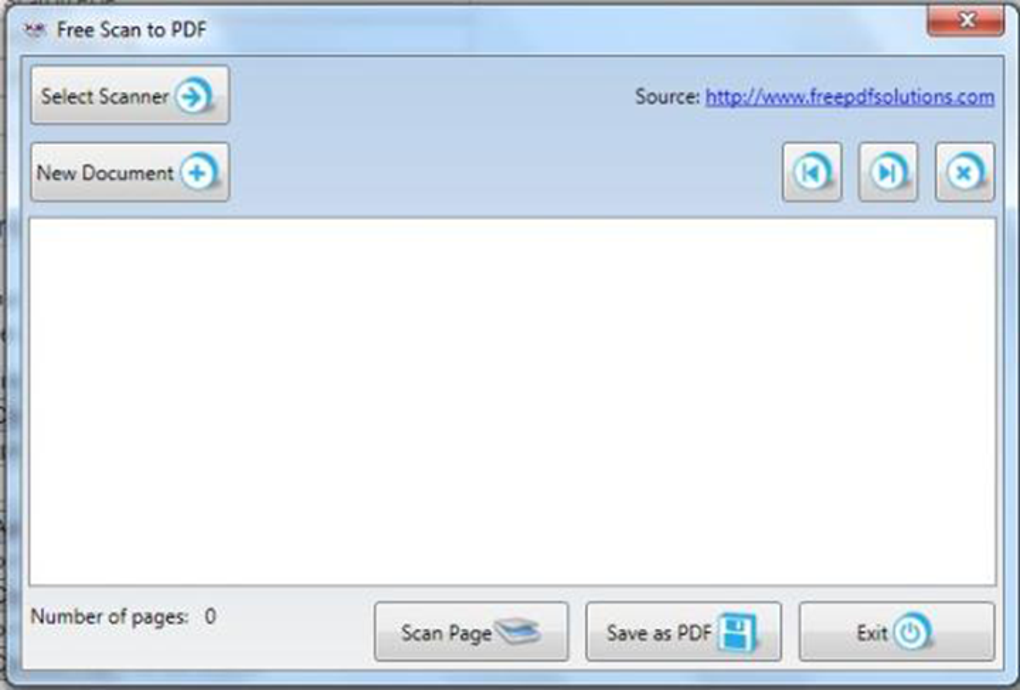
One of the most striking aspects of Free Scan to PDF is its uncomplicated design. The software interface is deliberately minimalist, prioritizing ease of use over extensive features. This minimalist approach eliminates the learning curve often associated with complex software, enabling users to quickly grasp the core functionality. The focus on a single function—scanning to PDF—results in a remarkably intuitive workflow. Users can scan documents and images directly to PDF format without needing to navigate through convoluted menus or settings. This “one-click” functionality significantly streamlines the conversion process, saving valuable time and effort. The absence of unnecessary options contributes to the clean and uncluttered interface, enhancing overall usability. Even novice computer users can effortlessly navigate the software and generate PDF files with minimal effort.
High-Quality PDF Creation: Preserving Document Integrity
Free Scan to PDF prioritizes the creation of high-quality PDF files. This commitment to quality ensures that the converted documents maintain their original formatting, image clarity, and text readability. Unlike multi-step processes that involve intermediate file conversions (such as scanning to JPEG and then converting to PDF), which can often degrade image quality, Free Scan to PDF directly generates PDF files, minimizing any loss of fidelity. This direct conversion ensures that crucial details within scanned documents, including text, images, and graphical elements, are faithfully preserved in the final PDF. The software’s ability to maintain this level of detail makes it particularly useful for preserving important documents where accuracy and clarity are paramount.
System Compatibility and Performance: A Robust Solution
Free Scan to PDF boasts broad compatibility with various Windows operating systems, including Windows Me, XP, Vista, 7, 8, and later versions. This wide range of supported operating systems makes it accessible to a large user base, regardless of their specific Windows version. The software’s performance is generally praised for its speed and efficiency. The conversion process is remarkably fast, generating high-quality PDF files in minimal time. This rapid processing speed is a significant advantage for users who need to convert numerous documents or images quickly. Moreover, the software’s compatibility with various scanner models contributes to its versatility and widespread appeal. Users with a range of scanning hardware can utilize Free Scan to PDF to efficiently convert their scanned materials into easily shareable and manageable PDF files.
Limitations and Alternatives: Addressing Shortcomings
While Free Scan to PDF provides a convenient and efficient solution for many users, it does have some limitations. A primary drawback is its exclusive availability for Windows operating systems. Users operating on macOS, Linux, or other platforms will need to seek alternative solutions. The software’s lack of support for other file formats beyond PDF is another constraint. While its focus on PDF generation is its strength, users needing to convert scanned images to other formats such as JPEG, TIFF, or PNG will have to explore different applications. Finally, while user reviews generally highlight its ease of use, some users have reported occasional issues with scanning multiple pages from feeder trays, although the frequency of this problem seems to vary.
Several alternative applications offer similar functionality and may address some of the shortcomings of Free Scan to PDF. These alternatives often provide broader OS compatibility, support for multiple output formats, and potentially more advanced features such as optical character recognition (OCR) for text extraction. Some popular alternatives include:
-
Canon IJ Scan Utility: This software, provided by Canon, is specifically designed for use with Canon scanners. Its integration with Canon hardware often provides a seamless scanning experience for Canon users. However, it may not offer the same broad compatibility with other scanner brands.
-
Image to PDF: This free software offers a straightforward approach to converting images to PDFs. While its interface might not be as minimal as Free Scan to PDF, it provides a reliable alternative for those needing a simple image-to-PDF converter.
-
JPEG to PDF: This free software is specifically geared towards converting JPEG images into PDF documents. It focuses on a narrow range of functionalities, but if you only need to convert JPEGs, it can be an efficient choice.
-
Scan2PDF: This application offers a more comprehensive set of features, potentially including OCR and support for various scanners and output formats.
Choosing the best software depends on individual needs and priorities. Free Scan to PDF’s exceptional ease of use and speed make it an excellent choice for users who primarily need a simple and efficient way to convert scanned documents to PDFs on Windows. However, users requiring broader compatibility, additional file format support, or advanced features should consider exploring some of the alternatives discussed above.
User Reviews and Overall Assessment
User reviews for Free Scan to PDF generally reflect its ease of use and efficiency. Many users praise its simplicity and speed, highlighting the software’s ability to quickly generate high-quality PDFs. The streamlined interface and lack of unnecessary features are frequently cited as key advantages. However, some negative reviews mention limitations regarding multiple-page scanning and the lack of Mac compatibility. Overall, the positive feedback significantly outweighs the negative, pointing towards a generally well-received software application. The consistent mention of its simplicity and speed suggests that Free Scan to PDF effectively fulfills its primary function: providing a quick and easy solution for creating PDFs from scanned documents. This combination of simplicity and efficiency makes it a valuable tool for individuals and small businesses requiring a straightforward PDF conversion solution on Windows systems. For those willing to compromise on features for optimal ease of use and speed, Free Scan to PDF proves to be a reliable and effective option. The software’s consistent positive feedback underscores its ability to satisfy its core objective efficiently and effectively.
File Information
- License: “Free”
- Version: “1”
- Latest update: “November 15, 2021”
- Platform: “Windows”
- OS: “Windows 98 SE”
- Language: “English”
- Downloads: “430.7K”
- Size: “2.28 MB”


