
Recovering lost data from an SD card can be a stressful experience, especially when precious photos, videos, or important documents are at stake. Fortunately, numerous data recovery tools are available, offering varying degrees of effectiveness and ease of use. This article focuses on understanding the process of free SD card data recovery, exploring available options, and guiding you through the crucial steps to retrieve your lost files. We’ll examine the benefits and limitations of free software, compare it to paid alternatives, and address common concerns and misconceptions surrounding data recovery.
Understanding SD Card Data Loss
Before delving into recovery methods, it’s essential to understand why data loss occurs on SD cards. Several factors can contribute to this:
-
Accidental Deletion: The most common cause is accidentally deleting files. While seemingly simple, this action doesn’t immediately erase the data; it merely removes the file’s entry from the file system’s directory. The actual data remains on the card until overwritten.
-
Card Formatting: Formatting an SD card completely erases all data and restructures the card’s file system. This makes recovery more challenging but not impossible.
-
Virus Infection: Malware can corrupt files or the entire file system, rendering data inaccessible. Antivirus software is crucial for prevention, but recovery tools can sometimes salvage data even after an infection.
-
Physical Damage: Physical damage to the SD card, such as bending or water damage, can lead to data loss. In such cases, specialized data recovery services may be necessary.
-
Sudden Power Loss: Interruptions during data transfer or writing processes can corrupt the file system, resulting in data loss or inaccessibility.
-
File System Corruption: Various factors, including improper ejection, faulty devices, or software glitches, can corrupt the SD card’s file system, making it difficult or impossible to access the files.
Choosing a Free SD Card Data Recovery Tool
The abundance of free SD card data recovery software presents both opportunities and challenges. While cost-effective, free tools might have limitations compared to their paid counterparts. Here’s a guide to help you make an informed decision:
-
Features: Consider the file systems supported (FAT32, NTFS, exFAT), the types of files recoverable (photos, videos, documents, etc.), and the preview functionality. Some free tools allow you to preview recoverable files before initiating the full recovery process, which is a significant advantage.
-
Ease of Use: Look for user-friendly interfaces with intuitive navigation and clear instructions. Complicated software can be frustrating, especially when dealing with the stress of data loss.
-
Reviews and Reputation: Check user reviews and ratings from reputable sources. Pay attention to feedback regarding the software’s effectiveness, reliability, and customer support.
-
Security: Download software only from trusted websites to avoid malware or unwanted bundled programs. Be cautious of excessive permissions requested during installation.
-
Limitations: Free versions often have limitations such as recovery size limits, restricted file types, or lack of advanced features like deep scan capabilities. Understand these limitations before proceeding.
Steps for Free SD Card Data Recovery
The process generally involves these key steps, although the specific interface and options will vary based on the chosen software:
-
Download and Install: Download the chosen free data recovery software from a trusted source. Install it on a computer with sufficient storage space. Avoid installing the software directly onto the drive containing the SD card you’re attempting to recover data from.
-
Connect the SD Card: Safely connect the SD card to your computer using a card reader. Ensure the card is properly detected by your computer.
-
Scan the SD Card: Launch the recovery software and select the SD card as the target drive. The software will initiate a scan to locate lost or deleted files. This process can take a significant amount of time, depending on the card’s size and the software’s scanning algorithm. Some tools offer different scan modes (e.g., quick scan, deep scan); a deep scan is more thorough but considerably slower.
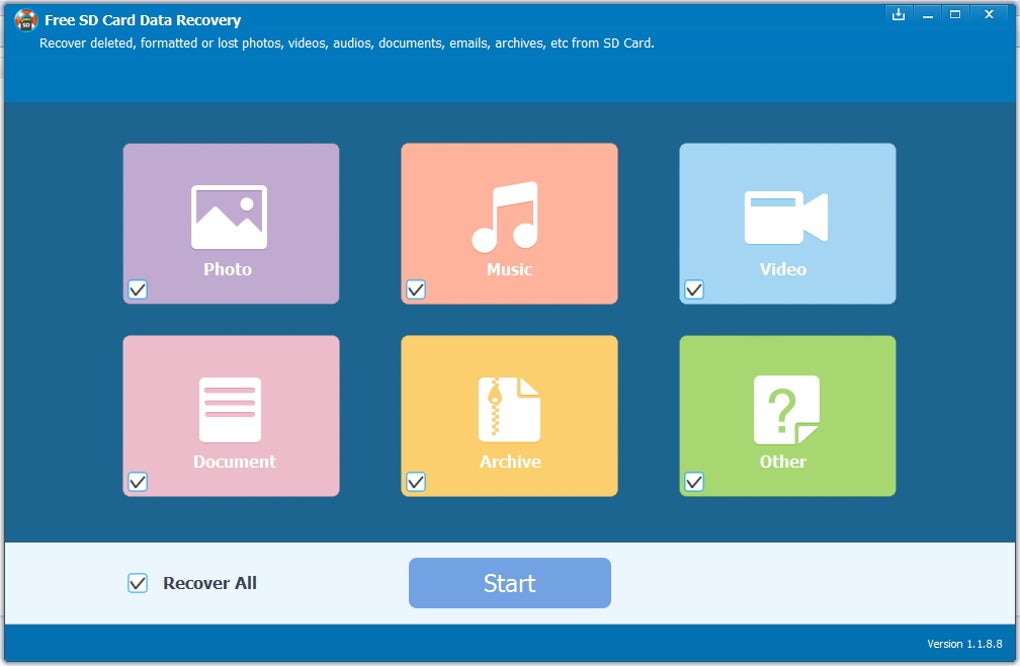
- Preview Recoverable Files: Before proceeding, preview the recoverable files. This allows you to verify whether the software has detected your desired files. Not all files might be completely recoverable, particularly severely damaged or overwritten ones.
-
Select Files for Recovery: Choose the files you want to recover. Be selective, as recovering large numbers of files can extend the recovery time.
-
Specify Recovery Location: Select a different drive or location to save the recovered files. Do not save them back to the SD card; this could overwrite the data you are trying to recover.
-
Recover and Verify: Initiate the recovery process. After completion, verify the recovered files. It’s advisable to make copies of these files as a backup in case further issues arise.
Comparing Free and Paid Data Recovery Software
Free SD card data recovery software is a good starting point, especially if the data loss is recent and not extensive. However, paid solutions usually offer several advantages:
-
Advanced Features: Paid software typically includes more advanced features, such as deep scan capabilities for severely damaged or overwritten files, support for a wider range of file systems and file types, and more robust data recovery algorithms.
-
Larger Recovery Limits: Free tools often have limitations on the size or number of files that can be recovered. Paid versions usually remove these restrictions.
-
Technical Support: Paid software often comes with dedicated technical support, providing assistance if you encounter problems during the recovery process.
-
Data Recovery Guarantee: Some paid software offers data recovery guarantees, assuring a successful recovery or a refund.
Preventing Future Data Loss
Prevention is always better than cure. Here are several proactive steps to minimize the risk of future SD card data loss:
-
Regular Backups: Create regular backups of your important data to an external hard drive, cloud storage, or another SD card. This safeguards your data even if the original card fails.
-
Safe Ejection: Always safely eject the SD card from your device before removing it. Improper ejection can corrupt the file system.
-
Virus Protection: Use reliable antivirus software to prevent virus infections that can damage files or the entire file system.
-
Proper Handling: Handle SD cards carefully; avoid bending, dropping, or exposing them to extreme temperatures or moisture.
-
Check Card Health: Periodically check your SD card’s health using specialized software or tools. This can help identify potential problems before they lead to data loss.
-
Use Quality Cards: Invest in high-quality, reputable brand SD cards. These tend to be more durable and less prone to failure.
Conclusion
Free SD card data recovery software offers a valuable option for recovering lost data, especially for minor data loss incidents. However, understanding its limitations and carefully choosing a reputable tool is crucial. For significant data loss or severely damaged cards, professional data recovery services might be necessary. Remember that prevention plays a vital role in minimizing data loss risks. Regular backups, safe handling practices, and timely maintenance can save you considerable time, stress, and potential data loss.
File Information
- License: “Free”
- Latest update: “May 23, 2023”
- Platform: “Windows”
- OS: “Windows 8.1”
- Language: “English”
- Downloads: “224.6K”
- Size: “11.85 MB”


