Free Time Games is a Chrome extension offering a seamless and ad-free gaming experience directly within your browser. Developed by Devin Baeten, this free extension eliminates the need to navigate to various websites to enjoy your favorite games. It provides a convenient and accessible platform for casual gaming, directly integrated into your Google Chrome browser. This review will delve into its features, ease of use, and overall gaming experience.
Apps and Games: A Seamless Browser Integration
Free Time Games leverages the power of HTML5 to deliver a diverse selection of games directly within the Chrome environment. The extension’s core functionality lies in its ability to curate and present a catalog of games accessible through a single, user-friendly interface. Instead of searching across numerous websites, users can launch their chosen game with a single click, maximizing efficiency and minimizing disruption to their workflow.
The games themselves are open-source variations, potentially modified to enhance gameplay or address compatibility issues within the Chrome browser. This means the selection may evolve over time, introducing new games or updating existing ones to ensure a consistently engaging experience. The developer actively manages the game library, ensuring a regularly refreshed and appealing roster for users. The focus is on providing an enjoyable, accessible, and easily navigable experience, removing barriers often encountered when sourcing games from multiple external sources. This eliminates the frustration of broken links, outdated versions, or intrusive advertising that can often accompany free online games.
Ease of Use and Installation
Installing Free Time Games is straightforward. Users simply need to download the extension from the Chrome Web Store (or a trusted third-party source) and add it to their browser. Once installed, a distinctive “FT” icon will appear in the Chrome toolbar. Clicking this icon opens the extension’s interface, displaying the current selection of available games. Each game is clearly presented with its title and potentially a small preview image, making selection quick and intuitive.
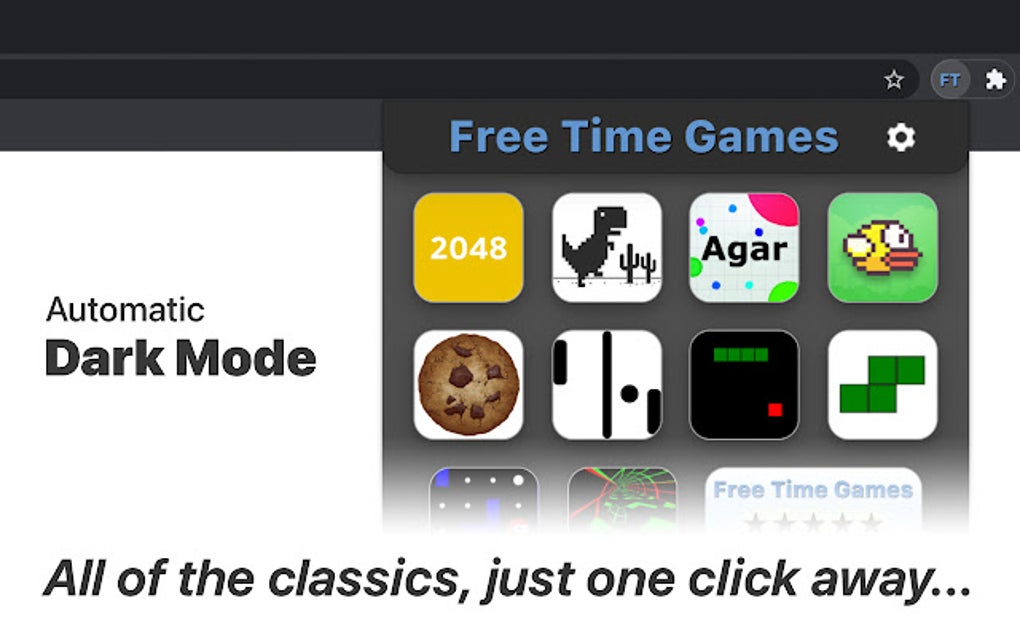
Launching a game is as simple as clicking on its icon. The selected game will open in a new tab, allowing for seamless switching between the extension’s game selection screen and the game itself. The intuitive design ensures even users with limited technical experience can quickly master the extension’s functionality. This simplistic approach prioritizes ease of access, ensuring users can focus on enjoying their games rather than navigating complex menus or troubleshooting technical issues.
Game Selection and Offline Playability
The specific titles available within Free Time Games are subject to change over time, reflecting the dynamic nature of the open-source game development community. However, the extension consistently offers a diverse range of classic and contemporary games, catering to a broad range of preferences. While most games within the extension are designed for offline play, some may require an internet connection, particularly those relying on online leaderboards or cloud saves. This information is not always explicitly indicated for each game, potentially requiring trial-and-error to determine whether a specific game requires online connectivity. This is a minor drawback, as users may occasionally encounter unexpected connectivity requirements. However, the overwhelming majority of the games are playable offline, a significant advantage for users with unreliable internet access or those who prefer uninterrupted gameplay.
News and Updates: Keeping the Experience Fresh
As an actively maintained extension, Free Time Games benefits from regular updates. While specific details regarding update frequency and content aren’t consistently announced, the developer’s commitment to maintaining and enhancing the extension ensures users benefit from ongoing improvements. These updates may include bug fixes, performance enhancements, and the addition of new games to the selection.
The lack of a dedicated news section or update log within the extension could be improved. Providing users with a clear indication of recent updates, new game additions, or bug fixes would enhance transparency and foster a stronger sense of community. This could be achieved through an in-app newsfeed or by providing links to a dedicated changelog on the developer’s website.
For Business: Potential Applications
While Free Time Games is primarily designed for personal use, its potential applications extend to business settings, especially those focusing on employee wellness or creating a more relaxed work environment. The extension could be incorporated into company policies as a means to provide employees with short breaks for stress relief and mental rejuvenation. The ad-free nature of the extension is a considerable advantage, ensuring the focus remains on the games themselves, rather than intrusive advertisements.
However, its suitability for a business setting depends heavily on factors such as company culture and the nature of the work environment. It’s crucial to consider the potential impact on employee productivity before deploying such an extension company-wide. Open communication with employees about the intended use of the extension is crucial for its successful integration. A well-defined policy governing its usage during work hours is also essential to mitigate any potential negative consequences.
Browsers and Compatibility: Google Chrome Exclusivity
Currently, Free Time Games is exclusively available for Google Chrome. This limits its accessibility to users of other browsers, such as Firefox, Edge, or Safari. Expanding compatibility to other popular browsers would significantly broaden its user base and increase its overall impact. This would involve porting the extension’s core functionality to each respective browser’s platform, which can be a significant development undertaking. However, the potential rewards in terms of user acquisition and increased usage would likely outweigh the costs.
Google Chrome: Seamless Integration
Free Time Games demonstrates impressive integration with Google Chrome. The extension’s seamless incorporation into the browser’s interface is a testament to its well-designed architecture. The single-click game launching, the dedicated toolbar icon, and the overall intuitive navigation contribute to a user-friendly experience. This suggests the developers have prioritized a polished and effective integration to ensure a positive user experience. The simple yet effective design makes it ideal for users seeking a hassle-free gaming experience directly within their browser environment.
Conclusion: A Solid Choice for Casual Gaming
Free Time Games is a valuable addition to the Chrome extension ecosystem, offering a user-friendly and ad-free platform for casual gaming. Its straightforward installation, intuitive interface, and diverse selection of games make it an appealing choice for users seeking a quick and enjoyable gaming experience without the hassle of navigating external websites or enduring intrusive advertisements. While its exclusive availability for Google Chrome and the lack of a dedicated news section are minor drawbacks, its overall strengths make it a recommended extension for those looking to add a touch of fun and relaxation to their Chrome browsing sessions. The developer’s ongoing efforts to maintain and update the extension suggest a commitment to providing a consistently improving user experience, further cementing its value as a solid option for casual gamers.
File Information
- License: “Free”
- Version: “4.1.6”
- Latest update: “April 2, 2025”
- Platform: “chrome”
- Downloads: “672”