
Free Video Cutter Joiner is a lightweight and straightforward video editing tool designed for basic video cutting and joining tasks. Its ease of use and compatibility with a wide range of video formats make it a popular choice for users needing quick and simple video manipulation, particularly for personal projects or home videos. This review delves into its functionalities, user experience, safety considerations, and overall performance.
Functionality: Cutting and Joining Made Simple
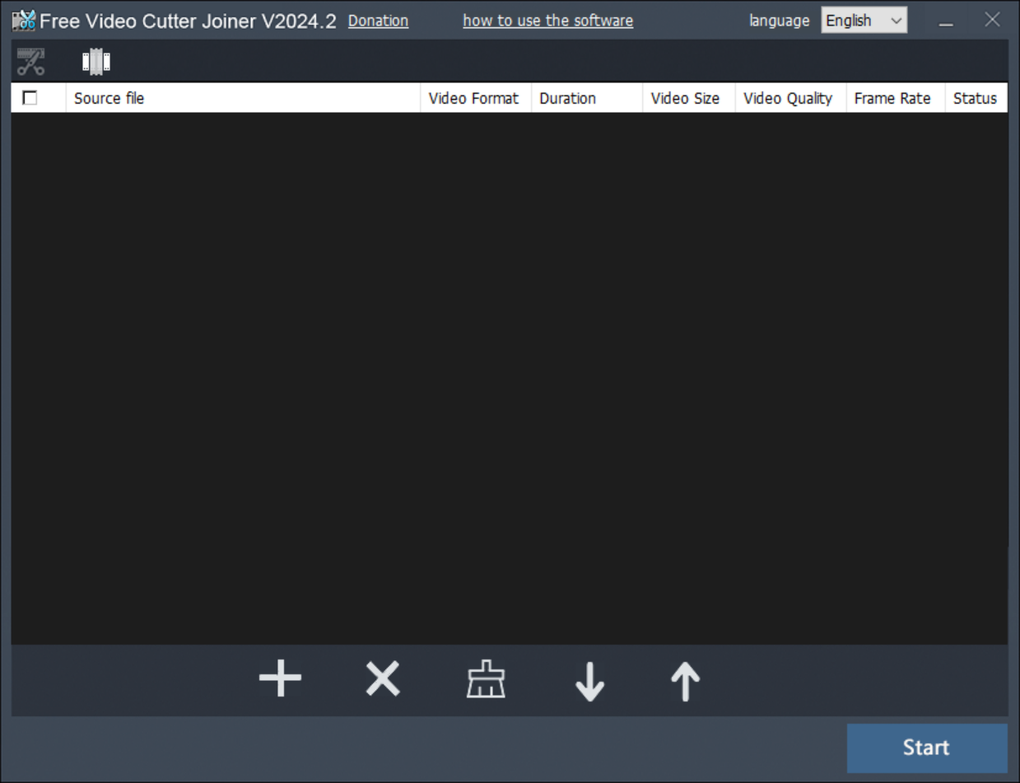
Free Video Cutter Joiner’s core functionality centers around two primary operations: cutting and joining video files. The interface is intentionally minimalistic, focusing on these core functions without overwhelming the user with advanced features. The “Add file” button allows for quick import of video files, and the process of cutting involves selecting the desired segment using a slider bar or by manually inputting start and end timestamps. This allows for precise control over the portion of the video to be removed. The “Cut” button initiates the process, resulting in a new file containing the selected portion, or the original file with the specified segment removed, depending on the user’s selection of ‘Direct Cut’ or ‘Indirect Cut’ modes.
Joining video files is equally straightforward. Users import multiple videos, and the “Join” button merges them into a single output file. Again, the user can select ‘Direct Join’ for speed or ‘Indirect Join’ for more advanced settings. The program supports a wide array of video and audio formats, ensuring compatibility with various sources and devices. This seamless integration of audio and video editing ensures that when sections are cut or joined, the audio track remains synchronized with the visual content.
Supported Formats and Compatibility
A notable strength of Free Video Cutter Joiner lies in its broad support for various video and audio formats. The software boasts compatibility with numerous formats, including but not limited to: 3GP, MP4, MPG, RMVB, AVI, F4V, MPEG, RM, MOV, WMV, VOB, MKV, ASF, and more. This versatility is especially valuable for users working with videos from diverse sources, such as mobile phones, cameras, and downloaded content. The ability to seamlessly join files of different formats further enhances its practicality for users needing to combine footage from different devices or projects. The program’s ability to handle both video and audio files simultaneously simplifies the editing process, eliminating the need for separate audio editing software for basic tasks.
User Interface and Experience
While Free Video Cutter Joiner’s simplicity is a significant advantage for ease of use, the interface’s visual design might be considered outdated by some users. The program lacks modern aesthetics and customizable themes, presenting a rather plain and functional design. This simplicity, however, contributes significantly to the program’s ease of use. The intuitive layout ensures that even novice users can quickly grasp the basic functionalities and navigate the software without difficulty. The clear labeling of sections, such as “Video Cutter” and “Video Joiner,” further contributes to its user-friendly nature. This design philosophy prioritizes functionality over visual appeal, making it ideal for users who prioritize speed and efficiency over aesthetic considerations. While the lack of visual customization might be a drawback for some, many users will appreciate the straightforward and uncluttered workspace.
Performance and System Requirements
Free Video Cutter Joiner is praised for its lightweight nature. The program consumes minimal system resources, ensuring smooth operation even on less powerful machines. Its small file size facilitates quick downloads and installation, reducing the waiting time before users can begin their video editing tasks. This efficient performance prevents system slowdowns or crashes, even during the processing of larger video files. Its quick processing speed, particularly noticeable in the “Direct” modes of cutting and joining, enables users to accomplish their tasks rapidly, making it an ideal choice for users who value speed and efficiency in their workflow. The program’s minimal demands on system resources make it accessible to a broader range of users, regardless of their computer’s specifications.
Safety and Security Considerations
While Free Video Cutter Joiner offers efficient video editing capabilities, users should be aware of certain aspects regarding software installation and potential bundled applications. During the installation process, the program often includes offers for additional third-party software. It’s crucial for users to carefully review these options and uncheck any unwanted bundled applications to maintain control over their system’s software inventory. The program itself includes advertisements, a common practice for freeware, that may show pop-ups. Users concerned about privacy should exercise caution and actively manage notification permissions during installation to avoid unnecessary data collection or potentially intrusive advertisements. While the program itself is generally considered safe, exercising diligence during the installation process will mitigate any potential risks associated with bundled software or advertisements.
Comparison with Alternatives
Compared to other video editing software, Free Video Cutter Joiner stands out due to its exceptional simplicity and ease of use. While advanced tools like Adobe Premiere Pro or DaVinci Resolve offer a vast array of features and effects, they come with a steeper learning curve and often higher system requirements. Free Video Cutter Joiner serves as a more accessible alternative for users focused on basic cutting and joining tasks, prioritizing speed and simplicity. Other free video editing tools may offer more advanced features, but Free Video Cutter Joiner’s focus on core functions and its minimal resource consumption makes it a compelling choice for users seeking a quick and easy solution for straightforward video editing.
Conclusion
Free Video Cutter Joiner provides a valuable solution for users requiring a simple and efficient tool for basic video editing. Its straightforward interface, broad format compatibility, lightweight nature, and fast processing speeds make it a compelling option for individuals needing to quickly cut and join video files. While the visual design might be perceived as outdated, and some caution is needed during installation to avoid unwanted bundled software, the overall simplicity and functionality make it a reliable tool for personal video editing projects. The program serves as an effective tool for basic video manipulation, ideal for tasks such as removing unwanted segments from recordings or merging several clips into a single cohesive video. The balance between ease of use and functional capabilities makes Free Video Cutter Joiner a valuable addition to any user’s video editing toolkit.
File Information
- License: “Free”
- Latest update: “June 3, 2025”
- Platform: “Windows”
- OS: “Windows 10”
- Language: “English”
- Downloads: “2.5M”
- Size: “11.79 MB”


