
Free Video Flip and Rotate is a free Windows application designed for quick and easy video orientation adjustments. This software simplifies the process of rotating and flipping video clips, eliminating the need for complex video editing suites. It’s particularly useful for correcting videos accidentally recorded in the wrong orientation, a common issue with mobile phones and digital cameras. This review will delve into its features, ease of use, performance, and limitations, offering a comprehensive assessment of its strengths and weaknesses.
Ease of Use and Interface
Free Video Flip and Rotate boasts an incredibly intuitive and straightforward interface. Even users with minimal video editing experience will find it easy to navigate. The program’s primary function is prominently displayed, with clearly labeled buttons for rotating (90° clockwise, 90° counter-clockwise, and 180°) and flipping (horizontally and vertically). Furthermore, it offers convenient preset combinations of flipping and rotating, saving users the steps of performing multiple operations individually. This simplicity makes it ideal for quick fixes, requiring only a few mouse clicks to achieve the desired result. The lack of overwhelming options and complex settings contributes significantly to its user-friendliness.
The program’s streamlined design minimizes distractions. There are no unnecessary features or menus to clutter the workspace. This focused approach ensures that users can quickly accomplish their task without getting lost in a labyrinth of options. This design philosophy aligns perfectly with its intended purpose: providing a rapid solution for simple video orientation problems.
Functionality and Features
The core functionality of Free Video Flip and Rotate revolves around its ability to rotate and flip videos. It provides seven predefined presets:
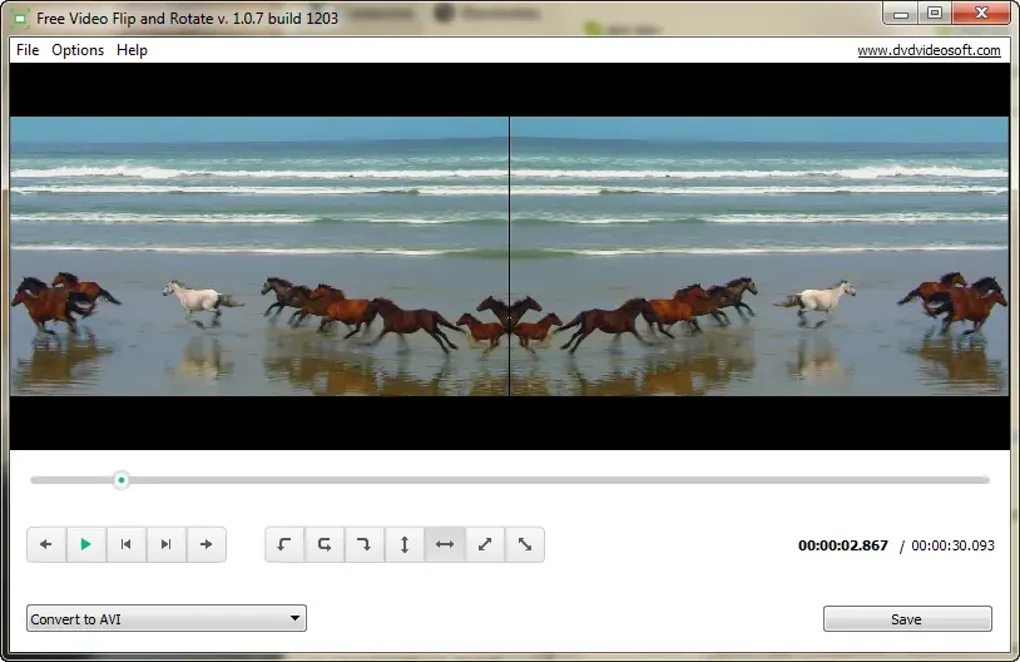
- Rotate video 90º CW (Clockwise): Rotates the video 90 degrees to the right.
- Rotate video 180º: Rotates the video 180 degrees.
- Rotate video 90º CCW (Counter-Clockwise): Rotates the video 90 degrees to the left.
- Flip video horizontally: Mirrors the video horizontally.
- Flip video vertically: Mirrors the video vertically.
- Flip video vertically and rotate 90º CW: Combines vertical flipping with a 90-degree clockwise rotation.
- Flip video vertically and rotate 90º CCW: Combines vertical flipping with a 90-degree counter-clockwise rotation.
These presets cater to most common orientation issues. While the program doesn’t offer granular control over rotation angles (beyond the predefined presets), this limitation is offset by its simplicity and speed. The software excels at its core function—correcting video orientation—without unnecessary complexity. The absence of advanced features is intentional, focusing the application’s strength on its specific task.
Supported File Formats and Performance
Free Video Flip and Rotate supports a range of common video file formats, although the specific list is not explicitly detailed in all promotional materials. However, user reviews and experience suggest a broad compatibility with various formats, including .MOV, .3GP, and likely many others frequently used for mobile phone and digital camera recordings. The program’s processing speed is noteworthy; it generally completes the rotation or flipping process rapidly, even with larger video files. This quick turnaround time aligns with its aim of providing a swift solution for simple video edits.
However, it’s crucial to note that the application doesn’t offer any options to adjust video quality during the conversion process. While processing speed is excellent, users should be aware that this speed comes at the cost of some potential video compression and some reported quality loss.
Output Quality and Limitations
One of the most frequently discussed aspects in user reviews is the potential for output quality degradation. While the software is fast, some users report a noticeable decrease in video quality after processing, particularly with larger files or those already of low resolution. The occurrence of compression artifacts like “digital squares” (as mentioned in some reviews) indicates potential lossy compression employed during the rotation/flipping process. This compression might be necessary to maintain the software’s speed, but it compromises the output quality to some degree.
Another limitation is the inability to save changes directly to the original video file. Instead, the edited version is saved as a new file. While not a significant drawback for many users, it is a point to consider for those managing large video libraries or those seeking to maintain an organized file structure. The lack of finer control over rotation angles is also a constraint. Users are restricted to the predefined 90°, 180°, and combination presets. Advanced rotation or fine-tuning of the angle is not supported.
Alternatives and Comparison
While Free Video Flip and Rotate offers a simple and efficient solution for basic video rotation and flipping, numerous alternative software options exist. Some are more feature-rich, offering advanced editing capabilities, while others specialize in specific functionalities. Popular alternatives include:
- VLC Media Player: A versatile and powerful open-source media player that can handle basic video rotation. However, it’s not solely dedicated to this task, making the process less streamlined than with Free Video Flip and Rotate.
- MPEGStreamclip: A free and open-source video editor providing more comprehensive editing capabilities, including rotation, cropping, and other video adjustments. It offers greater flexibility but has a steeper learning curve compared to Free Video Flip and Rotate.
- Video Rotator: Several freeware video rotators exist with varying functionalities and ease of use. Comparing them requires evaluating individual features and user experiences.
- Commercial video editors: Software like Adobe Premiere Pro, DaVinci Resolve, and Final Cut Pro offer advanced video editing features including rotation, but come with significant cost and a much steeper learning curve.
The best alternative for a user will depend on their specific needs and level of experience. If a simple, quick rotation or flip is all that’s required, Free Video Flip and Rotate is an excellent choice. However, for more complex editing needs or if high-quality preservation is paramount, one of the more advanced options may be more suitable.
Conclusion
Free Video Flip and Rotate serves a niche but valuable purpose. Its strength lies in its exceptional simplicity and speed. The intuitive interface and limited but effective set of functions make it ideal for users who need a quick and easy way to correct the orientation of their videos. While some quality loss is possible, and it lacks the advanced features of professional video editors, its ease of use and rapid processing more than compensate for these limitations for casual users and those simply requiring quick fixes to their video orientation. Its free availability makes it a valuable addition to the toolkit of anyone working with videos, especially those shot on mobile devices where accidental misorientation is common. However, users should be aware of the potential for quality degradation and the limitations of the preset options before deciding if it’s the right tool for their specific needs.
File Information
- License: “Free”
- Latest update: “February 4, 2025”
- Platform: “Windows”
- OS: “Windows Vista”
- Language: “Arabic”
- Downloads: “280.6K”
- Size: “32.76 MB”


