
Free Video Joiner is a free software application designed for Windows operating systems, enabling users to seamlessly combine multiple video files into a single, unified video. This guide delves into the functionalities, advantages, limitations, and alternatives of this popular video editing tool. We will also explore user reviews and address common concerns surrounding its use.
Understanding Free Video Joiner’s Core Functionality
At its core, Free Video Joiner simplifies the process of concatenating video files. Its primary strength lies in its ease of use and relatively quick processing times. The software is specifically designed to join videos that share the same codec, ensuring compatibility and preventing potential quality degradation during the merging process. While it may not offer the advanced editing capabilities of professional-grade software, its simplicity makes it an excellent choice for users needing a quick and straightforward solution for combining video clips.
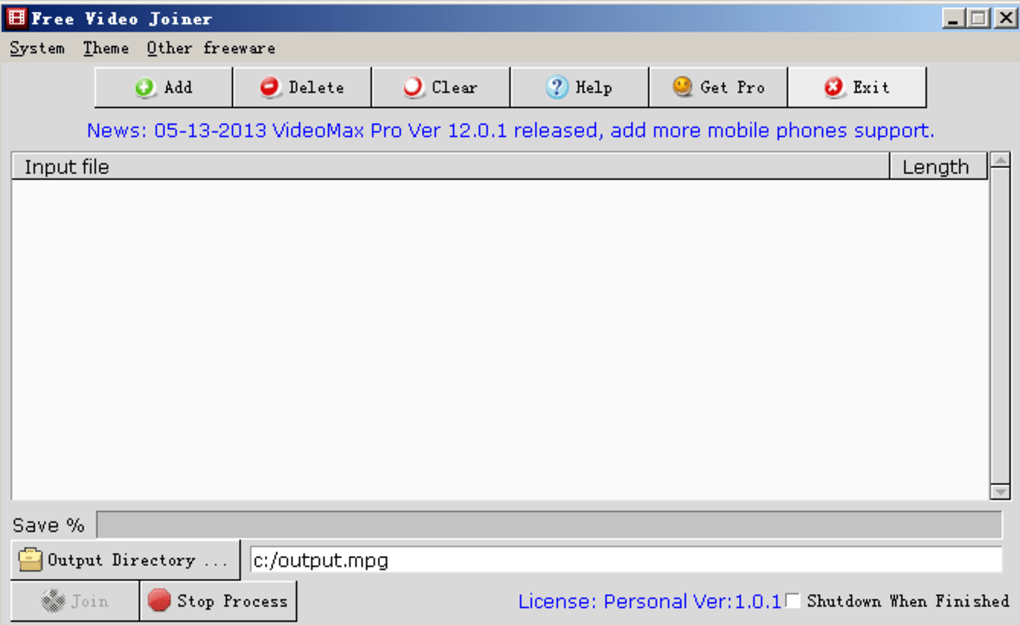
Supported formats are extensive and include popular choices such as AVI, WMV, MP4, MOV, MPEG, MKV, DIVX, and many more. This broad compatibility ensures that a wide range of video files can be joined without requiring format conversion beforehand, streamlining the workflow considerably. The software’s ability to handle an unlimited number of video files adds to its versatility, making it suitable for projects involving numerous short clips or a smaller number of longer videos.
One key feature is the software’s automatic optimization based on hardware configuration. By detecting the system’s capabilities, Free Video Joiner can adjust its joining scheme to achieve optimal processing speed without compromising the quality of the final output. This intelligent approach ensures that users can benefit from fast processing times without sacrificing the visual integrity of their videos. The claim of a more than 300% speed increase through multithreading further underscores its efficiency. Furthermore, the option to automatically shut down the computer after the joining process completes adds to the convenience for users running batch jobs or overnight tasks.
Advantages and Disadvantages of Free Video Joiner
Advantages:
-
Ease of use: The straightforward interface makes Free Video Joiner accessible to users of all technical skill levels. The process of adding videos and initiating the joining process is intuitive and requires minimal technical knowledge.
-
Speed: The software is designed for speed and efficiency, making it a practical choice for users who need to quickly combine video files. Multithreading capabilities contribute significantly to its rapid processing times.
-
Wide format support: The extensive range of supported video formats eliminates the need for pre-conversion steps, saving time and effort.
-
Freeware: The software is available free of charge, making it an accessible option for users on a budget.
-
Hardware optimization: The ability to automatically optimize the joining process based on system hardware ensures efficient use of resources and fast processing times.
-
Preservation of video quality: Free Video Joiner is designed to preserve the original quality of the videos being joined, minimizing any visual degradation.
-
Unlimited video files: The ability to join an unlimited number of video files adds to the software’s flexibility and utility.
-
Automatic shutdown feature: The option to automatically shut down the computer after the joining task enhances convenience, particularly for users running overnight batch jobs.
Disadvantages:
- Codec limitation: The requirement for all videos to use the same codec can be a significant limitation. Users may need to re-encode their videos to a common codec before joining them, adding extra steps to the workflow. This can be time-consuming, especially when dealing with a large number of videos in various formats.
-
Windows only: Free Video Joiner is exclusively designed for Windows operating systems, limiting its accessibility to users of other platforms like macOS, Linux, or Android.
-
Limited features: Unlike more sophisticated video editing software, Free Video Joiner lacks advanced features such as transitions, effects, or subtitle integration. It focuses solely on joining videos.
-
User reviews indicate potential issues: Some user reviews raise concerns about limitations in the free version, suggesting that it may not function properly when joining more than a small number of files. Other reviews mention quality issues with the output. This necessitates caution and potentially exploring alternative solutions.
Alternatives to Free Video Joiner
Several alternative video joining applications exist, each with its own strengths and weaknesses. The choice of alternative will depend on the user’s specific needs and preferences, including operating system compatibility, desired features, and budget constraints.
Some popular alternatives include:
-
All Video Joiner: Offers a wider range of features compared to Free Video Joiner but is a trial version, requiring a purchase for continued use.
-
Free AVI MP4 WMV MPEG Video Joiner: Another free option with a similar functionality, albeit with possibly fewer supported formats. User reviews should be consulted to assess its suitability.
-
Free Video Cutter Joiner: Provides additional capabilities such as video cutting, but again, user reviews should be evaluated for effectiveness and limitations.
- Other commercial software: Many powerful video editing suites, such as Adobe Premiere Pro, Final Cut Pro, DaVinci Resolve (with free and paid versions), and others offer video joining as a core functionality amongst many advanced editing capabilities. These come with a price tag but provide far greater control and creative options.
User Reviews and Feedback
User reviews of Free Video Joiner reveal a mixed bag of experiences. While some users praise its ease of use and speed, others report encountering issues with the free version’s limitations and output quality. Several reviews mention problems with joining more than two files in the free version, suggesting that limitations may be intentionally imposed to encourage paid upgrades to more advanced software. Some negative reviews cite poor output quality, potentially due to codec incompatibility issues. Before committing to using this software, carefully review recent user feedback to get a clear picture of current experiences.
It’s crucial to carefully consider the user reviews when choosing a video joiner. While the software’s simplicity and speed are appealing, the limitations and potential quality issues highlighted in user reviews need to be weighed against those advantages.
Conclusion: Choosing the Right Video Joiner
Free Video Joiner offers a simple and fast solution for joining videos of the same codec. Its ease of use and speed make it suitable for quick tasks where advanced editing features are not required. However, the limitations concerning codec compatibility and potential free-version constraints necessitate careful consideration. Users should weigh the software’s advantages against its limitations and explore alternative options before deciding if it best meets their needs. Considering the mixed user reviews and the availability of other free and commercial options, a comprehensive evaluation of available choices is essential to ensure a smooth and satisfactory video editing experience.
File Information
- License: “Free”
- Latest update: “January 31, 2023”
- Platform: “Windows”
- OS: “Windows ME”
- Language: “English”
- Downloads: “81.9K”
- Size: “11.38 MB”


