
Free Video Rotator is a free, user-friendly application designed for rotating videos on Windows operating systems. This straightforward tool allows users to quickly and easily rotate video files by 90, 180, or 270 degrees clockwise, resolving common video orientation issues. Its intuitive interface and simple functionality make it an ideal choice for users of all technical skill levels, offering a quick solution without the complexity of more advanced video editing software.
Understanding the Need for Video Rotation
In today’s digital world, video recording and sharing are commonplace. Whether capturing precious family moments, creating professional content, or simply documenting daily life, video has become an integral part of our lives. However, despite the ease of capturing video, accidental misalignment or intentional creative choices can often lead to videos being recorded in the wrong orientation. This can range from a simple 90-degree rotation to a complete 180-degree flip, resulting in a frustrating viewing experience. This is where Free Video Rotator steps in, providing a quick and efficient solution to correct these orientation problems. Rather than resorting to complex video editors with extensive learning curves, Free Video Rotator offers a dedicated solution specifically for rotation, making it a valuable tool for both casual users and those needing a quick fix for minor video orientation errors. The program’s streamlined process ensures that users can quickly rotate their videos without navigating through unnecessary features or complex settings.
Key Features and Functionality of Free Video Rotator
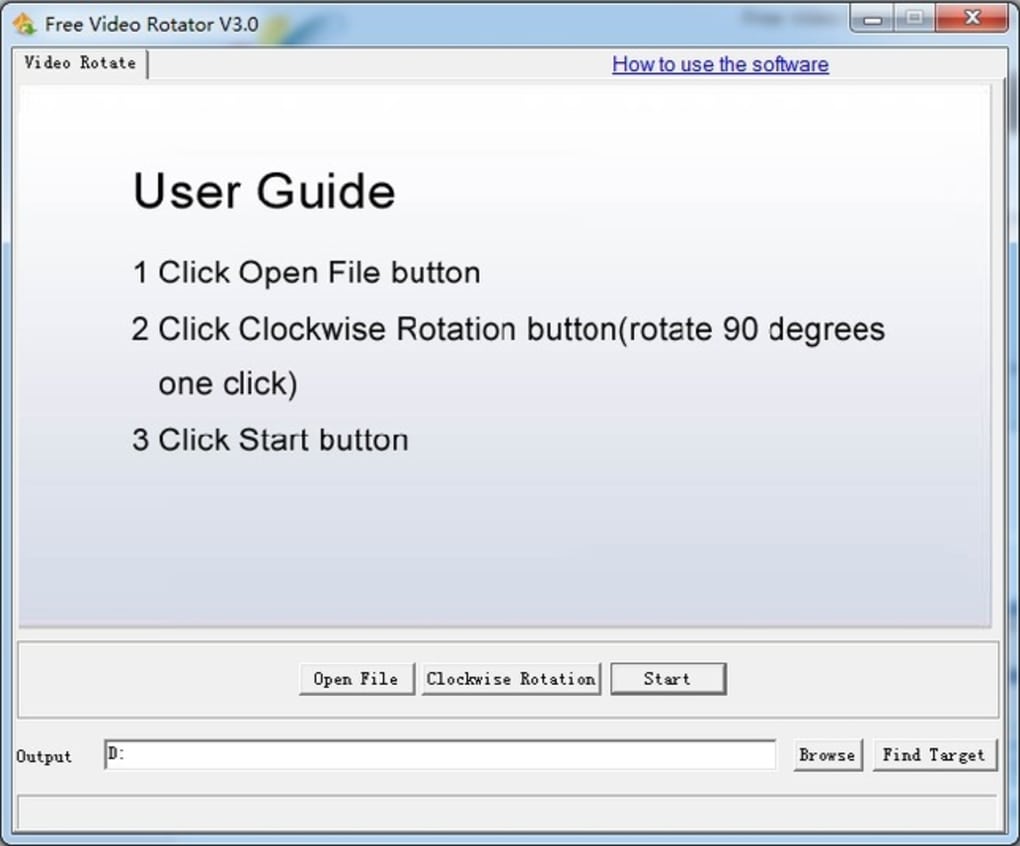
Free Video Rotator boasts a minimalist design, focusing on its core function: video rotation. The user interface is incredibly intuitive, requiring minimal interaction to achieve the desired result. Its core functionalities include:
-
Simple Rotation Options: Users can select from three pre-defined clockwise rotation angles: 90, 180, and 270 degrees. This simplified approach eliminates the need for manual angle adjustments, making the process quick and straightforward.
-
User-Friendly Interface: The program’s interface is exceptionally clean and easy to navigate. Users select their video file, choose the rotation angle, and click “Start.” No complicated menus or settings are required.
-
Customizable Output Location: Users can specify the desired save location for the rotated video file. This offers flexibility and avoids overwriting the original file, ensuring the preservation of the unedited version.
-
Real-Time Preview (Implied): While not explicitly stated in the original description, a good video rotation tool should ideally allow users to preview the rotated video before saving. This feature provides assurance and allows users to confirm that the rotation is correct before committing the changes to the file. This feature is crucial for avoiding unwanted changes and ensures the integrity of the edited video.
-
Support for various video formats (Implied): A practical video rotation tool should support a variety of common video formats. The lack of explicit information regarding supported formats suggests that the software aims to maintain broad compatibility. This is a crucial aspect that would need to be verified upon installation and usage.
These core features, coupled with the program’s speed and efficiency, make Free Video Rotator an excellent tool for quickly rectifying video orientation problems. It’s a focused solution, eliminating the need for users to learn complex video editing software for a simple rotation task.
Advantages and Disadvantages of Free Video Rotator
Like any software, Free Video Rotator presents both advantages and disadvantages. Understanding these aspects is crucial for determining its suitability for a user’s specific needs.
Advantages:
- Ease of Use: The program’s simplicity is its strongest asset. Users with minimal technical expertise can easily use the software to rotate their videos without navigating complex settings or menus. The straightforward interface prioritizes functionality and ease of access, ensuring a streamlined user experience.
-
Speed and Efficiency: For its intended purpose, the software is designed for speed. The rotation process is generally fast, particularly for shorter videos. This quick turnaround time makes it ideal for users who need a rapid solution to video orientation problems.
-
Free of Charge: The software is freely available, making it an accessible option for users who may not wish to invest in paid video editing software for a single function. This cost-effectiveness significantly increases its appeal.
-
Dedicated Functionality: Free Video Rotator focuses solely on video rotation. This dedicated functionality avoids the bloat and complexity associated with comprehensive video editing suites. The absence of unnecessary features simplifies the process and improves efficiency.
Disadvantages:
-
Limited Functionality: The software’s limited feature set is both a strength and a weakness. While its focus on rotation enhances its efficiency, it also means it lacks more advanced features like video trimming, merging, or effects. Users seeking more sophisticated video editing capabilities will need a more comprehensive program.
-
Performance with Large Files: As noted in user reviews, processing larger video files can significantly increase processing time. This limitation means that users with large videos might experience longer wait times compared to smaller videos.
-
Resource Intensive: The software may consume considerable system resources, particularly when processing large files. This may impact system performance, especially on older or less powerful machines.
- Lack of Output Format Control: Users cannot change the output video format, potentially limiting compatibility with certain devices or platforms. This constraint could be problematic for users requiring specific output formats.
User Reviews and Community Feedback
User feedback is crucial in assessing the quality and usability of any software. The available user reviews for Free Video Rotator generally reflect its ease of use and effective execution of its primary function. Users praise the software’s simplicity, speed, and efficient handling of video rotation. However, some negative feedback points towards processing time with large files and potential resource consumption. This mixed feedback underlines the software’s strengths in its simplicity and efficacy for its specific task, while also highlighting the limitations of its restricted functionality and potential performance issues with larger videos.
Conclusion: Free Video Rotator - A Niche Solution Done Well
Free Video Rotator is a highly effective solution for users needing a quick and easy way to rotate their videos. Its straightforward interface, rapid processing speed (for smaller files), and free availability make it an excellent choice for casual users and anyone needing a simple fix for incorrectly oriented videos. However, users should be aware of its limitations, particularly its resource consumption and potential processing delays when dealing with larger videos. For those seeking a comprehensive video editing suite, Free Video Rotator is not the ideal choice. But for its specific purpose – efficient video rotation – it performs admirably. Its niche focus allows it to excel in its designated task, providing a streamlined and user-friendly experience.


