
The Free VOB to MP4 Converter is a free software application designed for Windows users seeking a straightforward method to convert Video Object (VOB) files into the more widely compatible MP4 format. This detailed guide explores the software’s functionality, benefits, limitations, and alternatives. We’ll examine its ease of use, conversion speed, output quality, and the overall user experience.
Understanding VOB and MP4 File Formats
Before diving into the specifics of the converter, it’s crucial to understand the differences between VOB and MP4 file formats. VOB files are primarily associated with DVDs. They contain both video and audio data, making them suitable for playing DVD movies on compatible players. However, VOB files are not universally compatible with various media players and devices, especially smartphones and tablets. Their proprietary nature limits playback options compared to more widely accepted formats.
Conversely, MP4 (MPEG-4 Part 14) is a highly versatile and widely supported multimedia container format. It’s compatible with a vast range of devices, including smartphones, tablets, computers, and streaming platforms. The broader compatibility of MP4 makes it an ideal choice for sharing and playing videos across different platforms. The ability to convert VOB to MP4 therefore significantly enhances the portability and accessibility of DVD content.
Key Features and Benefits of Free VOB to MP4 Converter
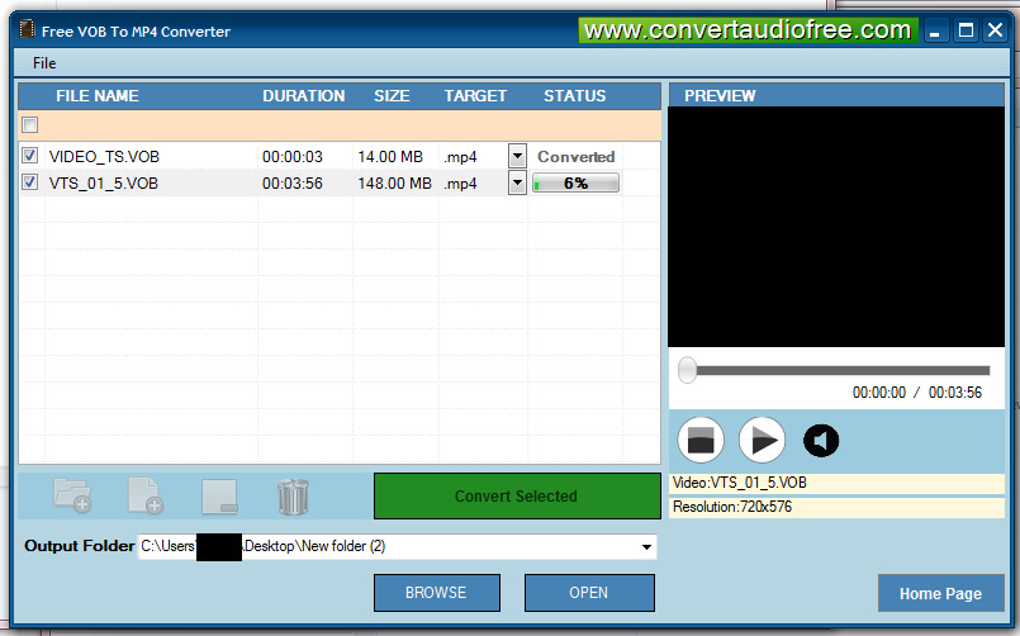
The Free VOB to MP4 Converter’s primary function is to transform VOB files into MP4, overcoming the compatibility limitations of VOB files. This offers several key advantages:
-
Enhanced Compatibility: The most significant advantage is the increased compatibility of the converted files. MP4’s widespread support ensures playback on a vast array of devices and software players, removing the restrictions associated with VOB files. This makes sharing and viewing DVD content significantly easier.
-
Improved Portability: Converting VOB files to MP4 allows for easier portability of your DVD movies. You can easily transfer your converted videos to smartphones, tablets, or portable media players for convenient viewing on the go, without needing to carry around physical DVDs.
-
Maintain Quality (Claimed): The software claims to maintain the original video quality during the conversion process. While the actual quality preservation can vary based on the source VOB file and specific settings, the aim is to prevent significant loss in resolution or audio fidelity.
-
Ease of Use (Claimed): The software is designed for user-friendliness. Its intuitive interface aims to make the conversion process straightforward, even for users without extensive technical expertise. The simplicity of the process makes it accessible to a broader audience.
- Free of Charge: A significant advantage is that the software is available for free download and use. This eliminates the financial barrier often associated with similar commercial software.
Limitations and Potential Drawbacks
While the Free VOB to MP4 Converter offers several advantages, it’s essential to acknowledge its limitations:
-
Windows-Only Compatibility: The software is only compatible with the Windows operating system. Users with macOS, Linux, or other operating systems will need to find alternative solutions to convert their VOB files. This limited platform support restricts its usability for a portion of the potential user base.
-
Potential for Compatibility Issues (with specific Windows Versions): Although it claims compatibility with several Windows versions, there might be compatibility issues with specific older or less common Windows installations. These compatibility problems might necessitate troubleshooting or using an alternative converter.
-
Absence of Advanced Features: Compared to some commercial video converters, the Free VOB to MP4 Converter lacks advanced features such as batch processing, extensive codec options, and video editing capabilities. This might be a drawback for users who need more sophisticated control over the conversion process.
-
No Mac Version: The lack of a macOS version presents a significant hurdle for Apple users, limiting its accessibility to a considerable user segment.
-
Potential for Bugs and Errors: Being a free software product, it might not undergo the same level of rigorous testing and quality assurance as commercial applications. This increases the potential for encountering bugs, glitches, or errors during the conversion process.
-
Uncertain long-term support and development: Because it’s freeware, there is no guarantee of continuous updates or long-term support, which could leave users vulnerable to security issues or compatibility problems with future software and operating systems.
Alternative VOB to MP4 Converters
Several alternative VOB to MP4 converters exist, offering various features and capabilities. Some are free, while others are commercial products with subscription or one-time purchase models. Some popular alternatives include:
-
HandBrake: A free, open-source video transcoder available for Windows, macOS, and Linux. HandBrake offers extensive features, including customization options for video and audio codecs, resolution, and bitrate. Its versatile functionality caters to users with advanced needs.
-
VLC Media Player: This free and open-source media player also includes video conversion capabilities. While not solely a converter, it provides a functional solution for converting VOB to MP4. Its ease of use and cross-platform compatibility make it a convenient option for many users.
-
Freemake Video Converter: This free video converter supports various formats, including VOB and MP4. Freemake offers a user-friendly interface and is a solid option for those who need a simple and straightforward converter. However, it contains ads and might install bundled software if not carefully monitored during installation.
-
Any Video Converter Free: Another free converter supporting a wide range of formats, including VOB. It offers decent conversion speeds and quality, making it a viable option. Like Freemake, however, it contains ads and may come with bundled software.
-
Commercial Converters: Numerous commercial video converters offer advanced features, superior quality, and robust support. Products like Adobe Premiere Pro, CyberLink PowerDirector, and Wondershare UniConverter cater to professional users and individuals seeking higher quality or specialized conversion features. These come at a price, however, and might be overkill for simple conversions.
Choosing the Right VOB to MP4 Converter
Selecting the appropriate VOB to MP4 converter depends on individual needs and technical skills. The Free VOB to MP4 Converter offers a simple and free solution suitable for basic conversion needs. However, users seeking advanced features, cross-platform compatibility, or reliable long-term support might benefit from exploring the alternative options detailed above. Consider the following factors:
-
Operating system: Ensure the converter is compatible with your operating system (Windows, macOS, Linux).
-
Features: Determine if you need basic conversion or advanced options like editing, batch processing, or specific codec support.
-
Ease of use: Choose a converter with a user-friendly interface that matches your technical skill level.
-
Cost: Decide if you are willing to pay for a commercial converter or prefer a free alternative.
-
Quality and speed: Evaluate the quality of the converted videos and the conversion speed of the software.
-
Support and updates: Consider the availability of technical support and the frequency of software updates.
By carefully considering these aspects, users can choose the VOB to MP4 converter that best meets their requirements and preferences. Remember that while the Free VOB to MP4 converter might suffice for simple conversions, exploring alternatives is worthwhile if you have more demanding needs or prefer a more robust and feature-rich solution.
File Information
- License: “Free”
- Version: “1.0”
- Latest update: “January 31, 2023”
- Platform: “Windows”
- OS: “Windows XP”
- Language: “English”
- Downloads: “77.7K”
- Size: “29.91 MB”


