
Tired of staring at the same desktop background day after day? Free Wallpaper Changer offers a simple yet effective solution for automatically refreshing your Windows desktop wallpaper. This freeware utility takes the hassle out of manually changing your background images, allowing you to enjoy a visually dynamic desktop experience with minimal effort. This review delves into the features, pros, and cons of Free Wallpaper Changer, comparing it to similar applications and exploring its suitability for different users.
Key Features and Functionality
Free Wallpaper Changer is a straightforward application designed for users seeking a convenient method to automate their desktop wallpaper changes. Its core functionality revolves around automatically cycling through a pre-selected collection of images at user-defined intervals. This eliminates the need for manual adjustments, providing a consistently fresh and engaging visual backdrop for your computer screen.
The program boasts a user-friendly interface, making it accessible even to users with limited technical expertise. Its intuitive control panel allows for easy customization of key parameters, such as the frequency of wallpaper changes (e.g., every 5 minutes, hourly, daily, or on startup). This flexibility caters to individual preferences, enabling users to tailor the wallpaper-changing experience to suit their specific needs and work style.
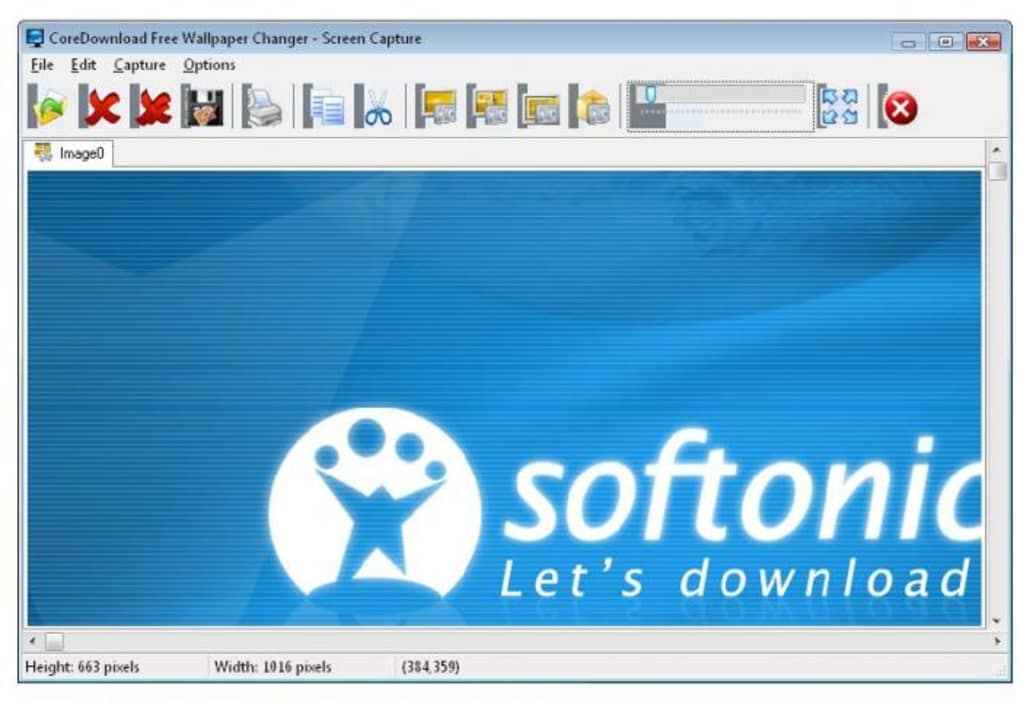
Beyond its core functionality, Free Wallpaper Changer incorporates several additional features that enhance its overall utility. A notable addition is its built-in screen capture tool, which allows users to quickly and easily capture any portion of their screen and instantly set it as their new wallpaper. This is particularly useful for creating personalized wallpapers from specific applications, websites, or game screens. The program’s support for various image formats (including JPG, GIF, PNG, BMP, PCX, TGA, TIF, and WMF) ensures compatibility with a wide range of image types, providing users with maximum flexibility in selecting their background images.
Furthermore, the software offers options for customizing the way wallpapers are displayed on the screen. Users can choose between three display modes: centered, tiled, or fit to screen. While these settings apply globally to all images within the selected set, this provides a basic level of control over the visual presentation of wallpapers. Users can also set a different background color for each wallpaper, adding another layer of customization to the overall aesthetic. Finally, the inclusion of a scheduling option ensures efficient wallpaper changes without manual intervention.
Ease of Use and User Interface
Free Wallpaper Changer stands out for its simplicity and ease of use. The program’s interface is clean, uncluttered, and intuitively designed, making navigation and configuration straightforward. Even users unfamiliar with similar applications can quickly grasp its functionalities and customize their settings without extensive tutorials or technical knowledge. This ease of use is a significant advantage, contributing to its broad appeal and accessibility.
Performance and System Requirements
Free Wallpaper Changer is a lightweight application, placing minimal demands on system resources. Its performance is generally smooth and efficient, with minimal impact on system speed or responsiveness, even when handling large numbers of high-resolution images. The program is compatible with a wide range of Windows versions, ensuring compatibility across numerous systems. The low system requirements make it suitable for use on older or less powerful machines, where resource-intensive applications might struggle.
Comparison with Alternative Applications
Numerous alternative wallpaper changer applications exist, offering similar core functionalities but varying in terms of features, customization options, and user experience. Some competing applications provide more advanced features, such as support for live wallpapers, 3D effects, or sophisticated scheduling options. Others may focus on specific niches, like providing themed wallpaper collections or integrating with online image databases.
However, Free Wallpaper Changer’s strength lies in its simplicity and ease of use. While it lacks some of the more advanced features offered by competing applications, its straightforward design and minimal system requirements make it an attractive option for users who prioritize simplicity and ease of use over advanced customization options. Users seeking highly customizable options or specialized features may find more advanced applications better suited to their needs. Conversely, users prioritizing simplicity and ease of use will find Free Wallpaper Changer an excellent choice.
Pros and Cons of Free Wallpaper Changer
Pros:
- Free to use: The application is freely available, eliminating any upfront costs.
- Ease of use: The user interface is intuitive and user-friendly, making setup and configuration simple.
- Automatic wallpaper changes: Eliminates the need for manual wallpaper adjustments.
- Customizable settings: Offers options for adjusting the frequency of wallpaper changes and display mode.
- Screen capture tool: Allows quick and easy creation of personalized wallpapers.
- Wide image format support: Supports various image formats, ensuring broader compatibility.
- Lightweight application: Places minimal demands on system resources.
- Scheduling options: Allows for time-based automated wallpaper changes.
- Different background color per wallpaper: Provides a visual enhancement option.
Cons:
- Limited customization: Individual wallpaper settings are not available. Global settings apply to all images in the selected set.
- Lacks advanced features: Compared to some competitors, it lacks features such as live wallpapers or 3D effects.
- Basic interface: While user-friendly, the interface lacks advanced design elements found in more premium applications.
Conclusion
Free Wallpaper Changer provides a straightforward and efficient solution for automating desktop wallpaper changes. Its user-friendly interface and minimal system requirements make it an accessible choice for a wide range of users. While it lacks some of the advanced features found in more sophisticated applications, its simplicity, free availability, and core functionality make it an excellent choice for users seeking a convenient and hassle-free method to refresh their desktop backgrounds. The inclusion of a screen capture tool and its support for various image formats adds to its overall utility. However, users seeking highly customizable options or advanced features may want to explore more comprehensive alternatives. Overall, Free Wallpaper Changer offers a solid and functional solution for users who value simplicity and ease of use above all else.
File Information
- License: “Free”
- Latest update: “May 24, 2023”
- Platform: “Windows”
- OS: “Windows 95”
- Language: “English”
- Downloads: “58.6K”
- Size: “3.38 MB”


