
FreeCAD is a powerful, free, and open-source 3D CAD (computer-aided design) modeler that has rapidly gained popularity among engineers, designers, and hobbyists alike. Its versatility, coupled with its open-source nature and extensive community support, makes it a compelling alternative to commercial CAD software. This guide delves into the capabilities, features, and applications of FreeCAD, providing a comprehensive overview for both beginners and experienced users.
Understanding FreeCAD’s Capabilities and Applications
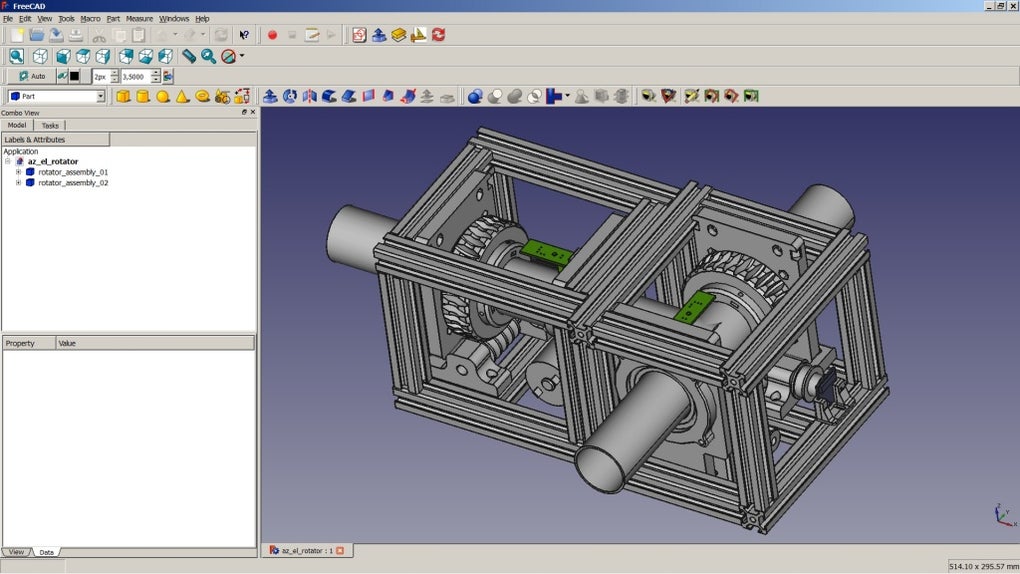
FreeCAD’s primary function is as a parametric 3D modeler, meaning that the design’s geometry is defined by parameters rather than fixed dimensions. This allows for easy modification and iteration of the design, with changes to one parameter automatically propagating throughout the model. While initially designed for mechanical engineering product design, FreeCAD’s flexible architecture has led to its adoption in various fields, including:
-
Mechanical Engineering: This remains FreeCAD’s core strength. It provides the necessary tools for creating complex mechanical parts, assemblies, and simulations, making it suitable for everything from simple machine parts to intricate robotic mechanisms. The software’s ability to handle complex geometries, combined with its parametric modeling capabilities, significantly speeds up the design process and facilitates iterative refinement.
-
Architecture: FreeCAD’s architectural modules allow for the creation of building models, including walls, roofs, and other architectural elements. While not as comprehensive as dedicated architectural CAD software, it provides a viable option for smaller projects or for users already familiar with FreeCAD’s interface and functionality. The ability to integrate 3D models with 2D drawings is a significant advantage in architectural design workflow.
-
Electrical Engineering: FreeCAD’s expanding capabilities now include modules that support the design of electrical circuits and PCB (Printed Circuit Board) layouts. Though it may not match the specialized features of dedicated PCB design software, it offers a useful tool for creating simpler circuits and integrating them into larger mechanical assemblies. This integration capability is a significant advantage, streamlining the design process for electromechanical systems.
-
General 3D Modeling: Beyond specific engineering disciplines, FreeCAD is applicable for general 3D modeling tasks. Its broad range of tools allows for the creation of diverse models, ranging from simple shapes to intricate organic forms. The open-source nature fosters a continuously evolving toolkit, with community-developed plugins expanding the software’s capabilities.
Key Features and Functionality of FreeCAD
FreeCAD’s success stems from its combination of robust features, open-source nature, and a dedicated community that continually develops and enhances its capabilities. Some of the key features include:
-
Open CASCADE Technology (OCCT) Geometry Kernel: FreeCAD utilizes the powerful OCCT geometry kernel, a robust and mature library enabling the creation and manipulation of complex 3D shapes. This ensures accurate and reliable geometric calculations, forming the foundation for the software’s precision and stability.
-
Parametric Modeling: As mentioned earlier, parametric modeling is a core strength of FreeCAD. This approach allows for creating models driven by parameters, making modifications and iterative design highly efficient. Changing a single parameter automatically updates related components, saving time and reducing errors.
-
Python Scripting: FreeCAD’s extensive use of Python scripting allows for powerful customization and automation. Users can write scripts to automate repetitive tasks, extend the software’s functionality, and create custom tools tailored to their specific needs. This contributes to FreeCAD’s adaptability and makes it a highly customizable CAD solution.
-
Extensive Plugin Ecosystem: FreeCAD benefits from a thriving community that develops and shares plugins, significantly expanding the software’s capabilities. These plugins add support for various file formats, specialized tools, and new functionalities, constantly enhancing the user experience and expanding FreeCAD’s applicability.
-
Sketcher Module: FreeCAD includes a dedicated Sketcher module for creating 2D sketches, which serve as the basis for building 3D models. This allows for precise control over the geometry of the model, ensuring accuracy and facilitating complex designs. The sketches are parametric, further enhancing the design workflow.
-
Robot Simulation Module: FreeCAD’s robot simulation module allows users to simulate robot movements and interactions within their designed environments. This feature is valuable for robotic applications, enabling users to test and refine robotic designs virtually before physical prototyping.
-
Multi-Platform Support: FreeCAD is a cross-platform application, meaning it runs on various operating systems, including Windows, macOS, and Linux. This makes it accessible to a wide range of users regardless of their operating system preference.
-
Import and Export Capabilities: FreeCAD supports a wide range of common CAD file formats, making it easy to import and export designs for collaboration or use with other software. This interoperability is critical for integrating FreeCAD into existing workflows and facilitating seamless data exchange.
Getting Started with FreeCAD: A Beginner’s Perspective
For newcomers, FreeCAD’s interface might seem initially daunting due to its extensive feature set. However, the software’s intuitive design and extensive online resources help ease the learning curve. Starting with basic tutorials and focusing on mastering fundamental tools before tackling more complex features is recommended. The community forums and online documentation provide valuable support and guidance for users at all levels.
FreeCAD’s Open-Source Nature and Community Contribution
FreeCAD’s open-source license allows for free use, modification, and distribution of the software. This fosters a collaborative environment where users contribute to the software’s development, resulting in constant improvements and additions of new features. The active community provides valuable support through forums, tutorials, and the ongoing development of plugins and extensions.
Limitations and Considerations
While FreeCAD is a powerful and versatile tool, it is important to acknowledge certain limitations. Some advanced features found in commercial CAD software might not be present in FreeCAD, or might require the installation of third-party plugins. The learning curve, though manageable, can be steeper than some simpler CAD applications. Finally, while the community provides substantial support, the responsiveness might not match that of commercial software with dedicated customer support teams.
Conclusion
FreeCAD presents a compelling alternative to commercial CAD software, especially for users who appreciate its open-source nature, extensive feature set, and active community. Its suitability varies depending on the project’s complexity and the user’s prior experience. However, for many users, FreeCAD’s powerful capabilities, coupled with its cost-effectiveness and potential for customization, make it a highly attractive choice. The software’s continuous evolution, driven by community contributions, ensures its ongoing relevance and improvement within the ever-evolving landscape of 3D CAD technology.
File Information
- License: “Free”
- Latest update: “July 30, 2025”
- Platform: “Windows”
- OS: “Windows 8.1”
- Language: “English”
- Downloads: “76.7K”
- Size: “491.10 MB”


