
Freeplane is a free and open-source mind mapping application designed to help users visualize, organize, and manage their ideas effectively. Its intuitive interface and robust features make it a powerful tool for brainstorming, project planning, note-taking, and a wide range of other tasks requiring visual representation of information. This comprehensive guide explores Freeplane’s capabilities, highlighting its strengths and weaknesses to help you determine if it’s the right mind mapping solution for your needs.
Getting Started with Freeplane: A User-Friendly Interface
Freeplane’s design philosophy prioritizes simplicity and ease of use. The interface, while not visually flashy, is straightforward and intuitive, making it accessible to both novice and experienced users. The core functionality revolves around the creation and manipulation of nodes, which represent individual ideas or pieces of information. These nodes can be connected to form hierarchical structures, representing relationships and dependencies between concepts.
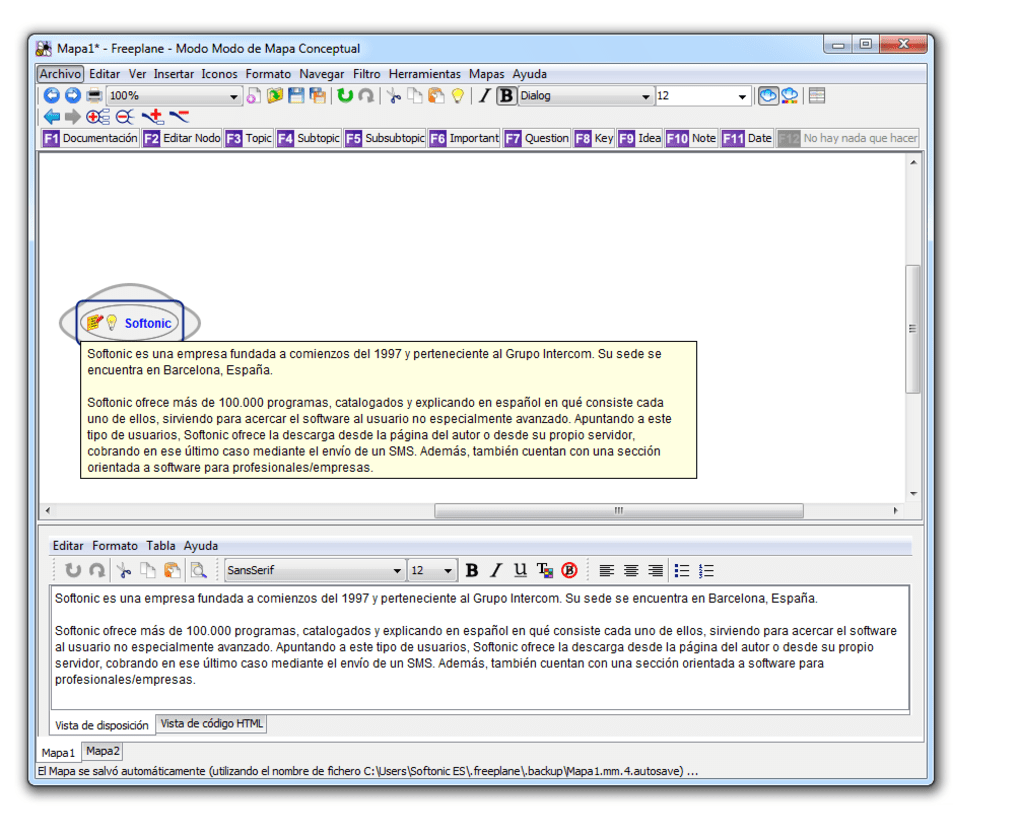
The main window displays the mind map itself, allowing for easy visual navigation and manipulation of nodes. A sidebar provides access to various tools and options, such as adding new nodes, editing existing ones, formatting text, and inserting images or other media. The layout is clean and uncluttered, ensuring a user experience free from distracting elements. This minimalist approach, while potentially limiting in terms of visual customization, contributes significantly to the software’s ease of use. For users prioritizing functionality over aesthetic sophistication, Freeplane’s straightforward approach will prove highly appealing.
Core Features: Building and Customizing Your Mind Maps
Freeplane offers a comprehensive suite of features designed to facilitate efficient mind map creation and management. The core functionality allows for:
- Node Creation and Manipulation: Freeplane makes adding, deleting, and editing nodes simple through intuitive drag-and-drop functionality and keyboard shortcuts. Users can create hierarchical structures, linking nodes to represent relationships between concepts.
-
Node Formatting: Beyond basic text editing, Freeplane allows for advanced formatting options, including font selection, size, color, and style. Users can customize the appearance of individual nodes to highlight key information or emphasize relationships.
-
Media Integration: Freeplane supports the insertion of various media types into nodes, including images, hyperlinks, and even embedded files. This feature allows for the creation of rich, interactive mind maps that go beyond simple text-based representations.
-
Layout Management: The software includes automated layout features to ensure the clarity and readability of even complex mind maps. However, manual adjustments are also possible, allowing for fine-grained control over the visual arrangement of nodes.
-
Templates: To streamline the process of creating mind maps from scratch, Freeplane supports the use of templates. These pre-designed structures can provide a starting point for various projects, saving users time and effort.
-
Multiple Tabs: Freeplane allows for simultaneous work on multiple mind maps within the same application window, increasing efficiency for users managing several projects concurrently.
-
Keyboard Shortcuts: Numerous keyboard shortcuts are available, providing efficient ways to perform common tasks, including node creation, navigation, and editing. This speeds up workflow, particularly for users who prefer keyboard-driven interactions.
Advanced Features: Enhanced Functionality and Customization
While Freeplane’s core features are focused on simplicity, it also incorporates several advanced functionalities that cater to more experienced users. These include:
-
Customization Options: Although not as extensive as some competing software, Freeplane offers a range of customization options accessible through the preferences screen and right-click menus. Users can modify aspects like background color, node styles, edge colors, and more.
-
Scripting: Freeplane provides support for scripting, allowing advanced users to extend the software’s functionality through custom scripts. This enables the creation of highly tailored workflows and automated processes.
-
Add-ons: The application supports add-ons, extending its capabilities beyond the built-in features. This extensibility allows users to adapt Freeplane to their specific requirements and integrate it with other software or services.
-
Password Protection: To ensure the confidentiality of sensitive mind maps, Freeplane provides an option to password-protect files, limiting access to authorized users only.
-
Export Options: Completed mind maps can be exported to a wide range of formats, including HTML, JPEG, XML, and TXT. This versatility ensures compatibility with various platforms and applications.
System Requirements and Performance Considerations
While Freeplane is remarkably lightweight for its capabilities, it’s worth noting that it does require a reasonable amount of system resources to operate effectively. Users should expect to have sufficient CPU and RAM to avoid performance issues, particularly when working with large or complex mind maps. The software’s performance can be affected by the size and complexity of the maps being manipulated, with larger, more intricate maps potentially leading to slower response times. This is a common trade-off in software focused on manipulating large visual datasets.
Freeplane vs. Competitors: A Comparative Analysis
Freeplane occupies a unique space within the mind mapping software landscape. While many competitors offer a greater array of visual customization options and more sophisticated features, Freeplane distinguishes itself through its simplicity, open-source nature, and cross-platform compatibility. Software like MindManager and XMind offer extensive customization and advanced features but often come with a price tag. Freeplane provides a robust alternative for users prioritizing functionality over extensive visual customization and who prefer the flexibility of an open-source platform.
Conclusion: Freeplane - A Powerful Tool for Visual Thinking
Freeplane offers a compelling blend of simplicity and power, making it a versatile choice for various mind mapping needs. Its user-friendly interface and intuitive features make it accessible to beginners, while its advanced capabilities and extensibility cater to experienced users. While it may not boast the visual flair of some competitors, its focus on functionality and open-source nature makes it a strong contender in the mind mapping software market. Whether you’re a student, a project manager, or simply someone looking for a tool to organize thoughts and ideas, Freeplane deserves a place on your consideration list. Its simplicity and robust capabilities make it a valuable asset for those seeking a powerful, yet approachable mind mapping solution.
File Information
- License: “Free”
- Version: “1.1.2”
- Latest update: “July 15, 2022”
- Platform: “Windows”
- OS: “Windows XP”
- Language: “English”
- Downloads: “15.2K”
- Size: “16.79 MB”


