
PSP Converter is a free and easy-to-use video conversion tool designed to transform your favorite video and audio files into a format compatible with Sony’s PlayStation Portable (PSP), including the PS Vita, older PSP models, and even the PS3. This comprehensive guide delves into the features, functionalities, and advantages of using PSP Converter to unlock a world of entertainment on your portable gaming device.
Effortless Video Conversion for Your PSP
PSP Converter streamlines the process of converting video and audio files for your PSP. Its intuitive interface requires minimal technical expertise, making it accessible to both seasoned tech users and casual consumers alike. The software supports a vast range of input formats—over 60, in fact—meaning you’re likely to find compatibility regardless of the original source of your media. This wide compatibility eliminates the frustration of encountering unsupported file types and allows for seamless conversion of videos from various sources, such as downloaded movies, home videos, and personal recordings.
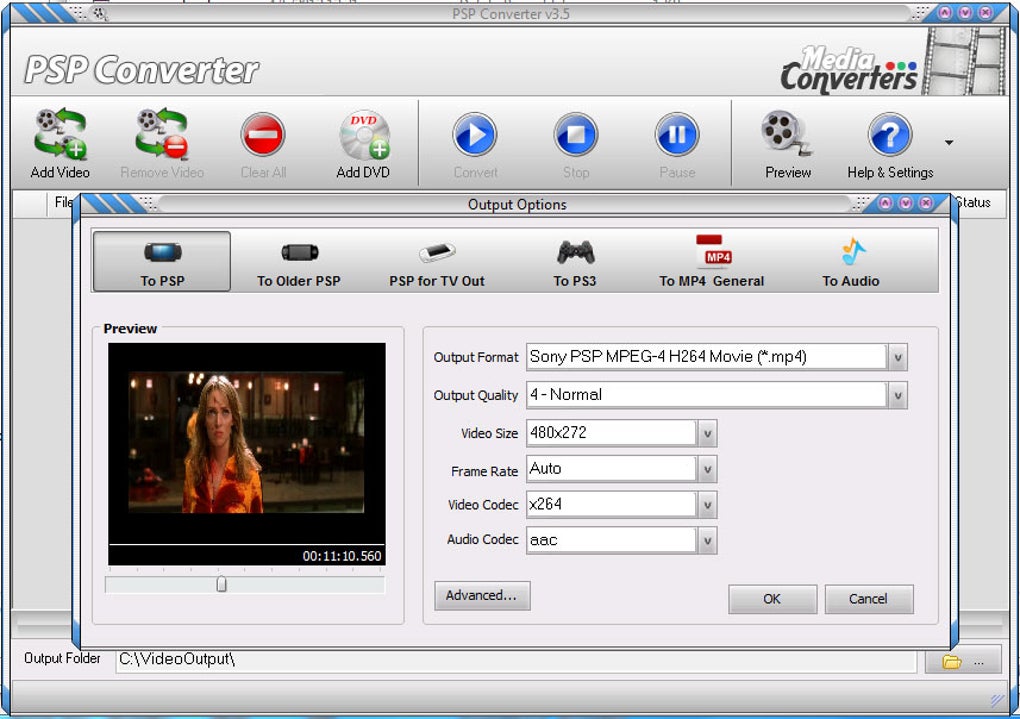
The software excels in its ability to handle a diverse array of audio and video files. Whether you are dealing with MP4s, MOVs, AVIs, or other common formats, PSP Converter simplifies the conversion process. Its compatibility isn’t limited to merely common formats; it also manages lesser-known or more obscure formats, thus increasing its versatility and making it a valuable tool for individuals working with a variety of multimedia content. The broad compatibility extends to both the audio and video aspects of your files, ensuring that you can convert your entire multimedia collection to a format suitable for your PSP.
Beyond simple conversion, PSP Converter also offers granular control over the output quality. Users can adjust crucial parameters, including resolution, frame rate, bitrate (for both audio and video), volume, and sample rate. This level of customization allows for fine-tuning the converted files to optimize for either storage space or viewing quality. For example, users prioritizing storage space on their PSP can choose lower resolutions and bitrates, resulting in smaller file sizes. Conversely, users who prioritize superior visual and auditory quality can opt for higher settings, which results in larger file sizes. The balance between quality and file size is entirely under the user’s control.
Furthermore, PSP Converter provides predefined presets tailored to different PSP models and variations, ensuring optimal compatibility and playback performance. This feature simplifies the conversion process for users unfamiliar with the technical aspects of video encoding. By selecting the appropriate preset, the software automatically configures the optimal settings, eliminating the need for manual adjustments. This automated process significantly reduces the learning curve and eliminates the risk of producing incompatible or poorly optimized files.
Advanced Features and Batch Processing Capabilities
PSP Converter extends beyond its basic conversion capabilities by offering a suite of advanced features. These advanced options cater to users seeking more control and customization over their converted files. The ability to adjust the aspect ratio ensures that your videos are displayed correctly on your PSP’s screen, preventing distortion or unwanted cropping. Batch conversion functionality allows users to queue multiple files for conversion simultaneously, significantly improving efficiency, particularly beneficial for converting large collections of videos or audio files. This feature saves considerable time and streamlines the workflow, making it ideal for users with extensive media libraries.
The built-in video preview allows users to review the converted files before saving, providing a visual check of the quality and ensuring that the conversion process has yielded the desired results. The preview feature is valuable for identifying potential issues early in the process and correcting them before the final file is saved. This helps avoid wasted time and resources on incorrectly converted files and allows users to make any necessary adjustments to the conversion settings before committing to the final output.
The intuitive interface also features an easy-to-understand layout, ensuring that even beginners can navigate and utilize the advanced settings with ease. The interface is designed to be user-friendly, making the potentially complex process of video conversion accessible to a wide range of users, irrespective of their technical expertise. This user-friendly design promotes efficient use of the software and encourages experimentation with different settings to achieve desired results.
PSP Converter: A Free and Secure Solution
One of the key advantages of PSP Converter is its availability as free software. This eliminates any financial barriers to entry, making it a readily accessible tool for users on a budget or those simply testing the software before committing to a paid alternative. The free availability makes it an attractive option for individuals looking to experiment with various conversion settings and functionalities without incurring any costs.
The software has undergone rigorous security checks to ensure a safe and malware-free user experience. The developer prioritizes security measures, ensuring that users can utilize the software without concern for potential threats. The software’s reputation for security fosters trust and encourages its use amongst users concerned about the security of their devices and data.
Comparing PSP Converter to Alternatives
While various video conversion tools are available, PSP Converter stands out due to its combination of user-friendliness, extensive format support, and advanced features. Compared to other free video converters, PSP Converter often surpasses them in the breadth of supported formats and its comprehensive control over output parameters. This differentiates it from simpler converters that may lack the precise control and comprehensive format support. Some competing converters might be more visually appealing, yet they may lack the depth of PSP Converter’s functionalities and compatibility.
Paid video conversion software packages often provide advanced features such as hardware acceleration and more sophisticated editing options. However, for users who primarily require simple and efficient conversion of their video files for the PSP, the free PSP Converter adequately caters to these needs without necessitating the expense of a premium product. The cost-effectiveness of PSP Converter makes it a superior choice for those seeking a free alternative without sacrificing many of the crucial functionalities offered in paid alternatives.
Conclusion: Unlock Your PSP’s Potential
PSP Converter offers a compelling solution for anyone looking to easily and efficiently convert their media for use on their PSP. Its ease of use, broad format support, advanced settings, and free availability make it a versatile and powerful tool. The software empowers users to enjoy their personal media collections on their PSP, expanding the range of entertainment options available on the console. Whether you have a library of home videos, downloaded movies, or music files, PSP Converter facilitates their seamless transfer and playback on your PSP. Therefore, PSP Converter truly unlocks the entertainment potential of your PlayStation Portable, enriching your multimedia experience on this beloved handheld gaming system.
File Information
- License: “Free”
- Version: “3.5.18.11”
- Latest update: “June 6, 2012”
- Platform: “Windows”
- OS: “Windows 2003”
- Language: “English”
- Downloads: “18.7K”
- Size: “6.88 MB”


