
FreeRAM XP is a Windows utility designed to optimize RAM usage, aiming to improve system performance and speed. Unlike some more aggressive RAM cleaners, FreeRAM XP focuses on a balanced approach, intelligently managing memory and cache levels without potentially detrimental effects from overly aggressive RAM clearing. This article will explore its features, functionality, user experience, and place within the broader landscape of RAM management tools.
Understanding FreeRAM XP’s Core Functionality
FreeRAM XP’s primary function is to free up RAM space, a crucial resource for any computer’s operation. The application achieves this through a process of identifying and releasing unused or minimally used RAM. This process differs from simply clearing RAM; FreeRAM XP analyzes memory usage patterns and prioritizes freeing up memory that won’t significantly impact ongoing processes. The tool’s intelligent optimization prevents sudden performance drops which can occur when other RAM cleaners aggressively clear memory without considering running applications’ needs.
The software works by dynamically monitoring RAM usage in real-time. It identifies memory blocks that are no longer actively in use and reclaims them for the operating system. This dynamic monitoring allows FreeRAM XP to adapt to changing system demands, ensuring that memory is released efficiently without disrupting active applications. The process is designed to be largely transparent to the user, with the optimization happening in the background without significant user interaction.
User Interface and Ease of Use
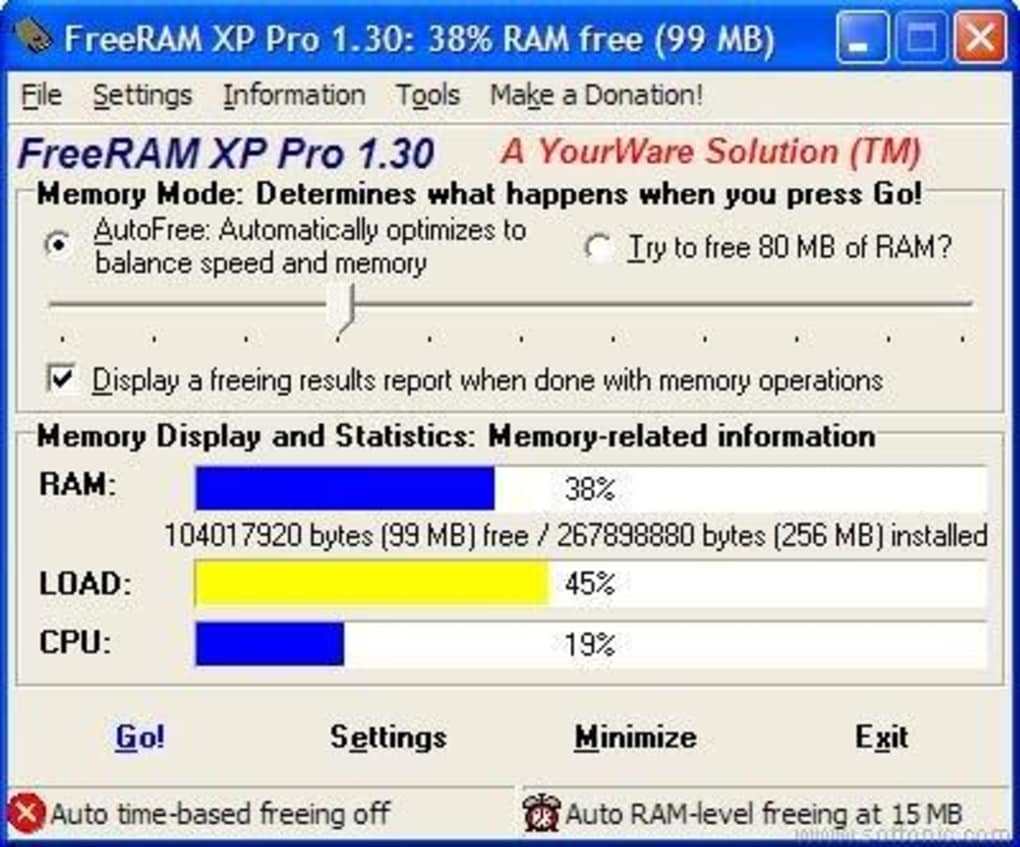
FreeRAM XP boasts an intuitive and user-friendly interface, designed to appeal to both novice and expert users. The clean and uncluttered design minimizes complexity, making navigation and interaction straightforward. Even users unfamiliar with system-level management should find the software easy to understand and use. Essential functions are readily accessible, avoiding the need to delve into complicated menus or settings.
Despite its simplicity, the application offers robust customization options for advanced users. These options allow experienced users to fine-tune memory management settings according to their specific needs and system configuration. This adaptability makes FreeRAM XP versatile enough for a broad range of users and use cases, from casual users seeking a basic performance boost to experienced users looking for precise control over their system’s RAM usage. The balance between simplicity and advanced customization is a key strength of FreeRAM XP.
Key Features and Advanced Options
Beyond its core functionality, FreeRAM XP incorporates a range of additional features designed to enhance its utility and provide users with comprehensive memory management capabilities. These features solidify its position as a robust and versatile tool:
-
Real-time Memory Monitoring: The software provides a constant, real-time display of RAM usage, allowing users to track memory allocation and identify potential bottlenecks. This real-time monitoring is crucial for understanding the impact of FreeRAM XP’s optimization and for diagnosing memory-related issues.
-
Automatic Optimization: FreeRAM XP’s auto-optimization feature intelligently balances RAM usage without demanding manual intervention. It learns system behavior over time, adapting its optimization strategy to provide the most effective performance gains. This intelligent automation eliminates the need for constant adjustments, making it ideal for users who prefer a “set it and forget it” approach.
-
Customizable Hotkey Support: Users can assign custom hotkeys to trigger specific actions, such as immediate memory freeing. This allows for quick and convenient access to FreeRAM XP’s functionality without interrupting workflow. This feature further enhances usability, especially for power users who frequently require on-demand RAM optimization.
-
Memory Reporting and Logging: Comprehensive logging and reporting features allow users to track memory usage trends over time. This detailed information can be invaluable for troubleshooting and optimizing system performance. The logs offer insights into RAM usage patterns, enabling users to pinpoint applications or processes that might be consuming excessive memory.
-
Advanced Tray Support: FreeRAM XP’s minimized tray icon offers discreet monitoring and easy access to essential functions without cluttering the main desktop interface. This allows for continuous monitoring without interfering with other applications or work.
-
Memory Compression Technology (New in version 1.50): A unique feature introduced in later versions, memory compression directly reduces the “working set” memory requirements of applications, potentially improving responsiveness without relying heavily on the swap file. This innovative technology minimizes the need for the system to resort to slower hard drive access for memory paging.
Performance Improvements and Potential Drawbacks
FreeRAM XP’s performance improvements are directly linked to its ability to efficiently manage and optimize RAM usage. By freeing up unused RAM, the software reduces the system’s reliance on the slower hard drive or SSD for paging, resulting in faster application loading times and improved overall system responsiveness. This is particularly noticeable on systems with limited RAM, where even a small improvement in memory management can have a significant impact on performance.
However, it’s important to note that overly aggressive RAM clearance can sometimes be counter-productive. While FreeRAM XP’s intelligent algorithms mitigate this risk, extremely aggressive RAM management can lead to increased hard drive or SSD activity, which can offset any performance gains from having more free RAM, especially on slower storage devices. A balanced approach to RAM management, as implemented in FreeRAM XP, is generally preferred.
Some users might find that other RAM managers offer a broader range of features, or a more granular level of control over individual processes. While FreeRAM XP provides a robust set of features, users requiring highly specific memory control might need to explore more advanced tools.
Comparison with Alternative RAM Management Tools
Several alternative RAM management tools exist, each with its strengths and weaknesses. Direct comparison requires evaluating specific features and user preferences. Some alternative applications might offer more aggressive RAM clearing, while others prioritize detailed reporting or granular process control. FreeRAM XP differentiates itself with its balanced approach, intuitive interface, and blend of simplicity and advanced customization.
It’s crucial to select a RAM management tool that aligns with individual needs and technical proficiency. Some users might prefer the simplicity and ease of use offered by FreeRAM XP, while others might opt for more complex tools that provide more fine-grained control over memory usage. The ideal choice depends on individual priorities.
User Reviews and Community Feedback
Analyzing user reviews offers valuable insight into real-world experiences with FreeRAM XP. While the majority of reviews generally praise its ease of use and positive impact on system performance, there are occasional reports of issues, such as minor bugs or compatibility problems. This is typical of any software application, and feedback from the user community is crucial for identifying and resolving such problems. The developer’s responsiveness to user feedback is an important aspect of the long-term viability and success of the software.
It is important to note that some user reviews may be unreliable or even malicious, so it’s advisable to consider a broad range of reviews and pay attention to the context and details provided.
Conclusion
FreeRAM XP provides a user-friendly and effective solution for managing and optimizing RAM usage on Windows systems. Its intelligent algorithms and balanced approach ensure improved system performance without the potential downsides of overly aggressive memory clearing. The combination of an intuitive interface and advanced customization options caters to both novice and expert users. While other RAM management tools may offer more specialized features, FreeRAM XP remains a strong contender, particularly for users seeking a robust, reliable, and easy-to-use solution for enhancing their system’s performance. Continuous development and responsiveness to user feedback will be essential factors in its future success.
File Information
- License: “Free”
- Version: “1.52”
- Latest update: “July 15, 2022”
- Platform: “Windows”
- OS: “Windows XP”
- Language: “English”
- Downloads: “62.2K”
- Size: “619.44 KB”


