
FreeUndelete is a freeware data recovery program designed to retrieve files accidentally deleted from a computer’s hard drive. Primarily targeting Windows users, it offers a straightforward approach to recovering lost data, particularly on NTFS file systems commonly used in Windows XP, 2000, and NT. While no longer actively updated, its legacy continues to serve users seeking a simple, free solution for data recovery. This review explores its capabilities, limitations, and overall effectiveness compared to contemporary alternatives.
Understanding File Deletion and Data Recovery
Before diving into FreeUndelete’s functionality, it’s crucial to understand the mechanics of file deletion within a computer’s operating system. When a file is deleted, the operating system doesn’t immediately erase its data from the hard drive. Instead, it simply marks the space occupied by the file as available for new data. The actual data remains on the drive until it’s overwritten by new files. This window of opportunity allows data recovery programs like FreeUndelete to potentially restore deleted files. The longer the deleted file remains un-overwritten, the higher the likelihood of successful recovery.
FreeUndelete leverages this principle to scan the hard drive for areas marked as free but still containing remnants of deleted files. It then attempts to reconstruct these files, based on the remaining data structures and file signatures. The success rate depends on several factors, including the type of file system, the extent of data overwriting, and the overall health of the hard drive.
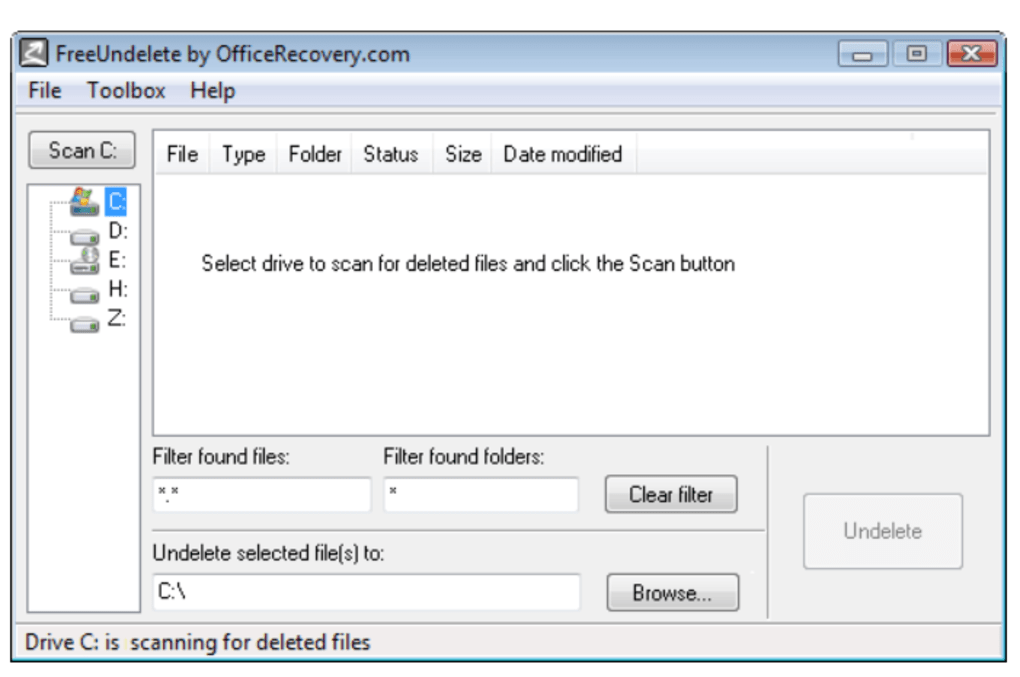
FreeUndelete’s Features and Functionality
FreeUndelete’s design prioritizes simplicity. It presents a user-friendly interface, making it accessible even to users with limited technical expertise. The core functionality centers around scanning specified drives or partitions for deleted files. Users can choose the location to scan, and the program will analyze the selected area, identifying potentially recoverable files. Upon completion of the scan, FreeUndelete displays a list of recoverable files, showcasing their names, sizes, and the likelihood of successful recovery.
While FreeUndelete lacks advanced features found in more sophisticated commercial data recovery software, its simplicity is both its strength and weakness. Its lack of complexities translates to ease of use, but also means it may lack the sophistication to handle complex data loss scenarios such as severe drive corruption or formatted partitions. It primarily focuses on retrieving files deleted through the standard “Delete” function or emptied Recycle Bin.
Limitations and Alternatives
Despite its strengths in ease of use, FreeUndelete does have limitations that users should be aware of. Firstly, its last update was in 2005. This signifies a significant lack of support for newer file systems and operating systems beyond Windows 2000. Its compatibility with modern Windows versions is questionable, and its efficacy on newer file systems might be significantly lower than with NTFS systems from the early 2000s.
Secondly, FreeUndelete’s ability to recover highly fragmented files or files overwritten multiple times is limited. More advanced data recovery tools employ more sophisticated algorithms and techniques to handle such scenarios, resulting in a higher recovery rate for severely damaged files.
Furthermore, the lack of ongoing development and updates poses a risk. Security vulnerabilities that might have been discovered and patched in more contemporary software could remain unresolved in FreeUndelete, potentially exposing users to security threats.
Given these limitations, users might consider exploring more modern alternatives. Several robust and reputable data recovery software packages offer a more comprehensive set of features and capabilities, including support for newer file systems, advanced recovery techniques, and ongoing development and security updates. These alternatives may be commercial products, but they often offer free trials or limited free versions that can be useful for assessing their capabilities before committing to a purchase. Examples include Recuva, DiskDigger, and PC Inspector File Recovery.
User Experience and Interface
One notable aspect of FreeUndelete is its intuitive interface. The program’s simplicity makes navigation straightforward, enabling users of all technical skill levels to effectively use the software without requiring extensive tutorials or manuals. The scan process is initiated with a few clicks, and the results are presented in a clear and concise manner. File previews, if available, aid in the identification of recoverable files.
This streamlined approach is appealing for users looking for a quick and easy solution for data recovery. However, the simplicity also means that some advanced features found in more comprehensive tools, such as file preview for corrupt files or options for deep scanning, are missing from FreeUndelete.
System Requirements and Compatibility
FreeUndelete’s compatibility is restricted to older versions of Windows, specifically Windows 2000 and earlier systems. Users of newer Windows versions should anticipate compatibility issues. The minimal system requirements are relatively low, owing to its age and limited features, meaning it can likely run on relatively older, low-powered hardware. This low resource footprint is an advantage for systems with limited RAM or processing power. However, this limited compatibility restricts its broader applicability to modern computer systems.
Conclusion
FreeUndelete provides a basic, easy-to-use solution for recovering accidentally deleted files, particularly on older NTFS file systems. Its simple interface and straightforward process makes it accessible to a wide range of users. However, its age, lack of updates, and limited capabilities compared to modern data recovery software should be taken into consideration.
While FreeUndelete might suffice for simple data recovery needs on older systems, users requiring a more robust and versatile solution, particularly for newer operating systems and file systems, or for more complex data loss scenarios, should explore alternative, contemporary data recovery tools. The trade-off between ease of use and comprehensive functionality is crucial in selecting the appropriate tool for your specific requirements. The choice between FreeUndelete and a more modern alternative depends heavily on the user’s technical comfort level, the specific needs, and the operating system used.
File Information
- License: “Free”
- Latest update: “May 23, 2023”
- Platform: “Windows”
- OS: “Windows 2003”
- Language: “English”
- Downloads: “22.4K”
- Size: “458.61 KB”


