
Frog Weather Shortcut is a free mobile application for Android devices, developed by Miyavi, designed to provide users with quick and easy access to weather information. As its name implies, the app acts as a convenient shortcut to the weather features already integrated within the Google app. This straightforward approach allows users to effortlessly retrieve real-time weather data for their current location, eliminating the need to navigate multiple menus or apps. This review will explore the app’s functionality, strengths, and weaknesses, helping you decide if it’s the right weather tool for you.
Accessing Real-time Weather Data with Ease
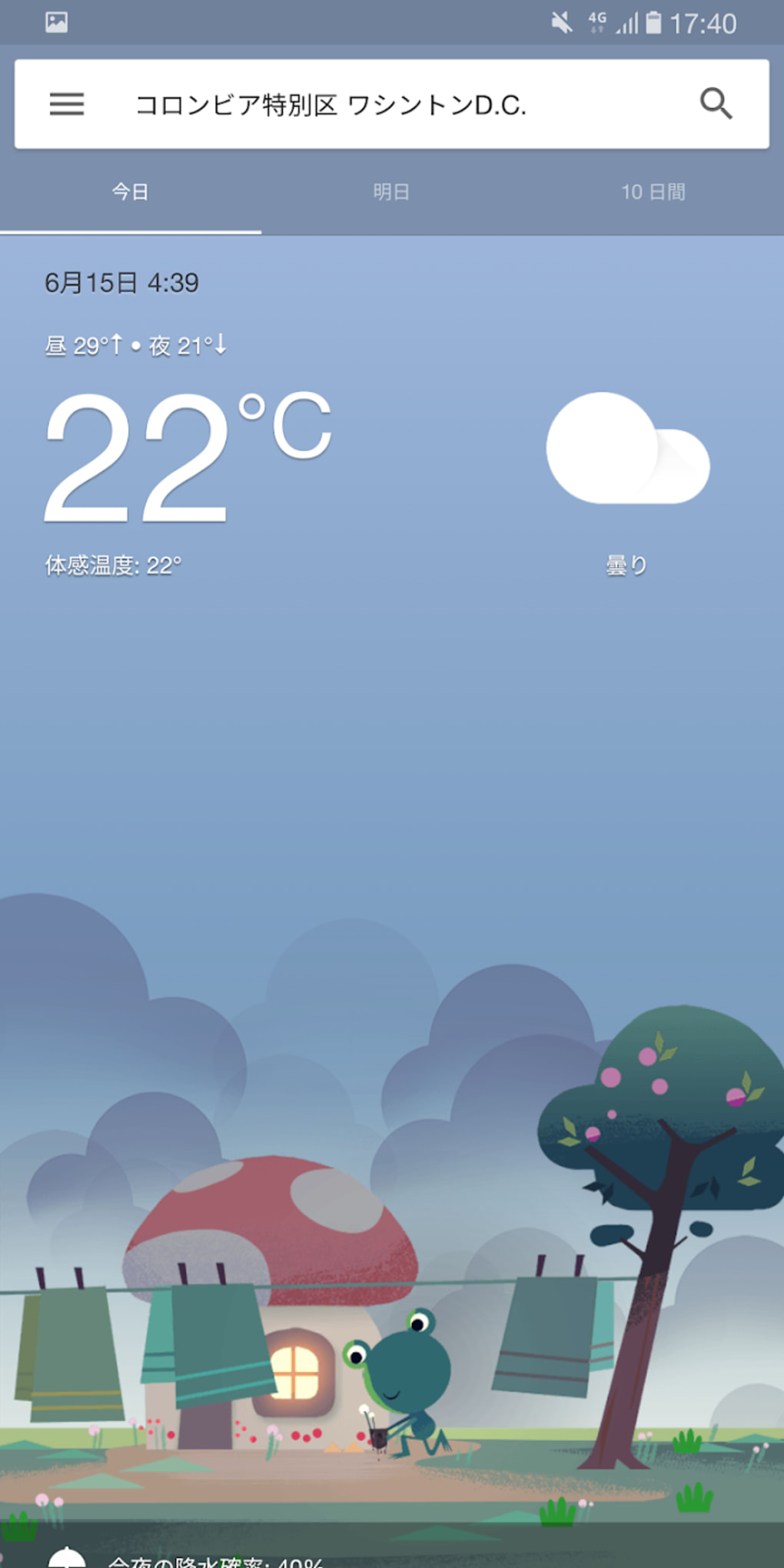
The primary function of Frog Weather Shortcut is, as the name suggests, to provide a shortcut to weather information. Upon launching the application, users are immediately presented with a concise summary of the current weather conditions in their location. This includes the current temperature, along with a textual description of the weather (e.g., “Sunny,” “Cloudy,” “Rainy”). The visual presentation is clean and uncluttered, prioritizing immediate readability.
Beyond the current conditions, a simple scroll reveals a more detailed weather breakdown for the current day, including crucial metrics like humidity, dew point, UV index, and visibility. This allows users to quickly assess not only the temperature but also the overall atmospheric conditions, providing a more comprehensive understanding of the weather.
Multi-Day Forecasts and Location Customization
Frog Weather Shortcut is not limited to simply providing current conditions. The app also offers an extended forecast, providing predictions for up to 10 days into the future. This feature is valuable for planning activities and preparing for potential changes in the weather. The forecast is presented in a user-friendly format, showing both temperature ranges and weather descriptions for each day, making long-term weather planning more accessible.
Recognizing that weather conditions can vary significantly across different locations, Frog Weather Shortcut allows users to check the weather in various places. A simple search bar at the top of the interface enables users to input a location, whether it’s a city, town, or specific address. The app swiftly retrieves the weather data for the searched location, allowing for quick weather checks anywhere in the world. Furthermore, the app facilitates the creation of a customized list of frequently checked locations, streamlining the process of retrieving weather information for multiple places. This feature is particularly helpful for individuals who frequently travel or need to monitor weather conditions in several different areas.
Visual Design and User Interface
The visual design of Frog Weather Shortcut is characterized by simplicity and elegance. The app boasts a clean, minimalist interface, making it visually appealing and easy to navigate. The main screen typically features an image of a frog, although the developers acknowledge that this image might occasionally be unavailable due to issues with Google’s servers. This minor visual inconsistency doesn’t significantly detract from the user experience, however.
The app’s overall design prioritizes functionality over extensive customization options. While the user can switch between Celsius and Fahrenheit for temperature units, more advanced customization settings are absent. This lack of customization is a trade-off for the app’s streamlined and readily accessible design. Despite this limitation, the app’s simple design makes it quick and easy to learn, catering to users who prioritize ease of use over extensive customization. The app can also be added to the user’s home screen for even quicker access.
Offline Functionality and Data Accuracy
While the app description doesn’t explicitly mention offline functionality, user reviews and feedback suggest that Frog Weather Shortcut can function offline to some degree, providing access to previously retrieved data. The reliability of offline access might depend on the frequency of data updates and the user’s internet usage history. However, for the most up-to-date and accurate weather information, an internet connection is recommended.
The accuracy of the weather information provided by Frog Weather Shortcut depends on the underlying data source used by the Google Weather API. Generally, Google provides reasonably accurate weather forecasts, and Frog Weather Shortcut acts as a streamlined interface to access this data. However, as with any weather app, the accuracy of predictions may vary depending on the time frame of the forecast and the inherent unpredictability of weather patterns.
Strengths and Weaknesses of Frog Weather Shortcut
Strengths:
- Ease of Use: The app’s primary strength lies in its unparalleled simplicity. The interface is intuitive and straightforward, making it exceptionally easy to use, even for users unfamiliar with weather applications. Information is readily available, and navigation is effortless.
- Quick Access to Information: The app provides instantaneous access to current weather conditions and extended forecasts, minimizing the time required to obtain necessary weather-related information.
- Multi-Location Tracking: The ability to monitor weather in multiple locations is a significant advantage for users with diverse needs or who frequently travel.
- Detailed Information: While minimalist in design, the app provides detailed information beyond temperature, including humidity, dew point, UV index, and visibility. The 10-day forecast is also a noteworthy feature.
- Free and readily available: The app is completely free to download and use, eliminating any cost barriers to access.
Weaknesses:
- Limited Customization: The lack of extensive customization options might be a drawback for users who prefer personalized interfaces or specific display features.
- Dependence on Google’s Servers: The occasional unavailability of the frog image highlights the app’s reliance on external services, potentially affecting certain visual aspects of the app. This however doesn’t impact core functionality.
- No Extra Features: The app focuses solely on weather information. Users looking for additional features, such as radar maps, severe weather alerts, or integrated maps, might find it lacking compared to more feature-rich weather apps.
Comparison with Alternative Weather Apps
Several alternative weather applications offer similar functionality, but Frog Weather Shortcut distinguishes itself through its minimalist approach and ease of use. Apps like “Weather Frog Shortcut” (a similar sounding app with a slightly different name) and “The Weather Channel” provide a broader range of features, including detailed maps, radar imagery, and severe weather alerts. However, these often come at the cost of a more complex interface and potentially higher resource consumption. If you solely need quick and easy access to weather data, Frog Weather Shortcut surpasses these alternatives in simplicity and efficiency.
Conclusion: Is Frog Weather Shortcut Right for You?
Frog Weather Shortcut is a highly effective tool for users seeking a simple, fast, and efficient way to access accurate weather information. Its minimalist interface and straightforward design make it ideal for those who value ease of use and quick access over extensive customization options. While lacking some advanced features present in other weather apps, its strength lies in its core functionality: providing timely, accurate, and easily digestible weather data. If your primary need is a quick and convenient way to check the weather, Frog Weather Shortcut is an excellent choice. However, users seeking comprehensive features like radar maps, severe weather alerts, or detailed visualizations might find themselves better served by a more feature-rich application.
File Information
- License: “Free”
- Version: “1.1”
- Latest update: “May 12, 2025”
- Platform: “Android”
- OS: “Android 6.0”
- Language: “English”
- Downloads: “4.9K”
- Size: “921.92 KB”
- Download Options: “APK, Google Play”
- Filename: “Frog_Weather_Shortcut_v1.1.apk”


