
FTP Voyager is a veteran FTP client, boasting a long history of assisting users with their file transfer needs. While it might not enjoy the same widespread name recognition as some newer competitors, it remains a robust option for Windows users seeking a reliable and feature-rich FTP solution. This review delves into the strengths and weaknesses of FTP Voyager, examining its interface, functionality, and overall user experience.
Interface and User Experience
FTP Voyager presents a classic, desktop-application interface. While not visually flashy or minimalist like some modern FTP clients, its layout is intuitive and straightforward. Users familiar with traditional file management systems will find the navigation easy to grasp. The main window displays the local file system on one side and the remote FTP server directory on the other, facilitating easy drag-and-drop file transfers. This drag-and-drop functionality is one of the program’s key strengths, simplifying the process of uploading and downloading files to and from FTP servers.
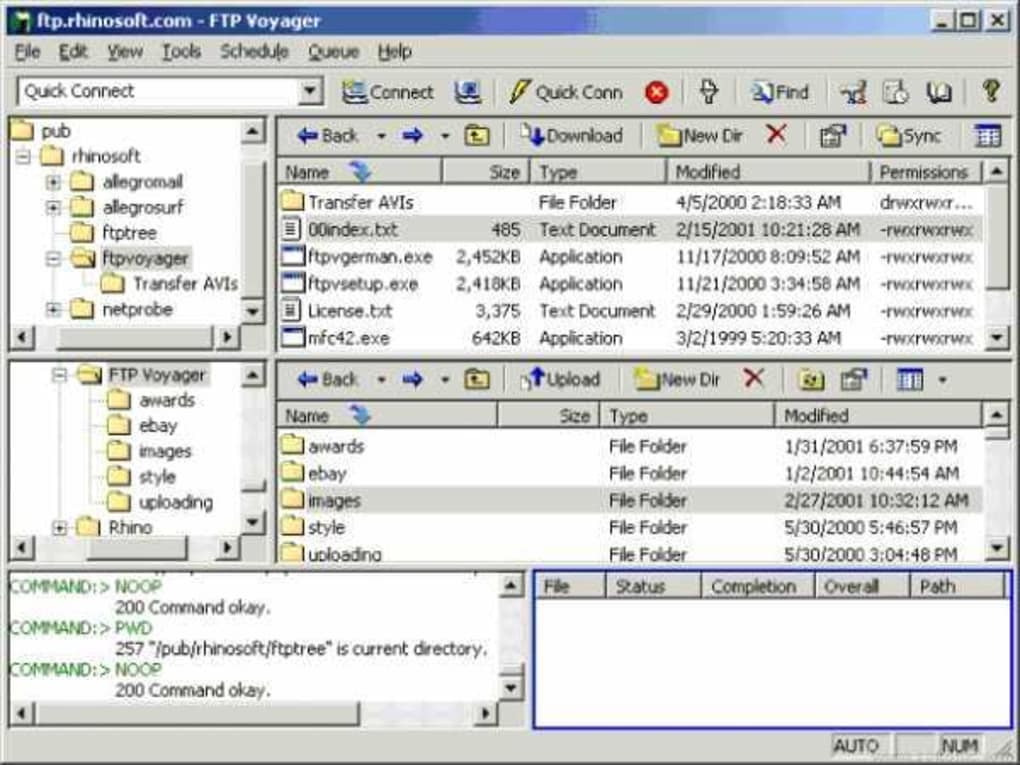
However, the interface’s straightforwardness also limits its adaptability. There’s a lack of extensive customization options for themes or layouts, potentially leaving some users desiring a more personalized experience. The design feels somewhat dated compared to more contemporary FTP clients that incorporate modern UI elements and design principles. While functional and easy to understand, it lacks the sleekness and polish of some competitors.
The lack of a visually intuitive “getting started” guide or tutorial within the application itself could present a minor challenge to new users. While the overall functionality is intuitive, a concise guide to help beginners navigate the various features would significantly improve the on-boarding experience.
Functionality and Features
FTP Voyager provides a comprehensive range of features expected from a mature FTP client. Beyond the fundamental upload and download functionalities, it offers several advanced options:
-
Drag-and-Drop File Transfer: As mentioned previously, the drag-and-drop interface is a significant advantage, making file transfers incredibly efficient. Users can simply drag files from their local folders to the remote server directory, or vice-versa.
-
Resume Interrupted Downloads: A crucial feature for large file transfers, FTP Voyager allows users to resume downloads interrupted by connection issues or power outages, saving time and preventing the need to restart the entire transfer process.
-
FTP Scheduler: This built-in scheduler allows users to automate file transfers, ensuring regular backups or updates occur at pre-determined times. This functionality is particularly useful for website maintenance or synchronizing files across different servers.
-
Direct Transfer Between FTP Servers: This advanced feature simplifies file transfers between different FTP servers, eliminating the need to download to a local machine before uploading to another server. This feature dramatically speeds up workflows involving multiple remote locations.
-
Support for Multiple Protocols: While the specific protocols supported aren’t explicitly detailed in the provided text, given its age and capabilities, it’s reasonable to expect support for standard FTP, and potentially SFTP (Secure FTP) for enhanced security. However, confirmation of specific protocol support through the official documentation would be beneficial.
These capabilities make FTP Voyager suitable for a wide range of users, from casual webmasters updating small websites to professionals managing large-scale file transfers. The combination of ease of use and advanced features positions it well within the competitive FTP client landscape.
Security Considerations
While the provided text mentions a “Security Status” indicator during the download process, specific details about its security features are lacking. In the context of handling sensitive files, security is paramount. An FTP client needs to incorporate robust security measures to protect data during transfer. The lack of explicit details regarding encryption protocols (such as SSL/TLS for FTPS), or other security mechanisms, is a significant gap in the information provided. Potential users should thoroughly investigate this aspect before utilizing FTP Voyager for sensitive data transfers.
Comparison with Other FTP Clients
FTP Voyager faces competition from numerous other FTP clients, both free and commercial. Compared to free, open-source options like FileZilla, it may lack the same level of community support and continuous development. However, FTP Voyager’s intuitive interface and advanced features might appeal to users who prioritize ease of use and specific functionalities, even if it means foregoing some of the features found in open-source alternatives with broader community backing.
Commercial FTP clients often offer more advanced features, such as built-in editors, synchronization capabilities, and integration with other software. FTP Voyager’s feature set, while strong, may not be as extensive as some high-end commercial options. The cost-benefit analysis would need to be considered based on individual user needs and budget. A thorough comparison of features and pricing with other options on the market is recommended.
Performance and System Requirements
The provided information doesn’t detail specific performance metrics or system requirements for FTP Voyager. This is crucial information for potential users to assess compatibility with their hardware and operating systems. Knowing the minimum system specifications, RAM requirements, and typical transfer speeds will allow users to make an informed decision. The lack of this information creates an area of uncertainty.
Overall Assessment
FTP Voyager presents itself as a reliable and functional FTP client, especially appealing to users who prioritize a straightforward interface and robust core features. Its drag-and-drop functionality and built-in scheduler are significant advantages. However, the absence of detailed information regarding security features, performance metrics, and system requirements raises concerns. Furthermore, the somewhat dated interface might not appeal to users accustomed to more modern, visually appealing software.
While FTP Voyager remains a viable option for many, a more comprehensive understanding of its security protocols, performance characteristics, and a comparison against competing FTP clients are essential for making an informed decision. The developer should consider updating the software’s documentation and website to include more detailed specifications and address the gaps identified in this review. Addressing these issues would significantly improve the overall user experience and build greater trust and confidence in the software. For users needing a simple, reliable, and functional FTP client, FTP Voyager deserves consideration, but thorough research and consideration of alternatives is recommended.
File Information
- License: “Trial version”
- Latest update: “May 24, 2023”
- Platform: “Windows”
- OS: “Windows Vista”
- Language: “English”
- Downloads: “11K”
- Size: “13.50 MB”


