
In the rapidly evolving landscape of digital content creation, the ability to seamlessly blend visual and auditory elements is no longer a luxury but a fundamental necessity. From burgeoning YouTubers and aspiring filmmakers to students crafting engaging presentations and small businesses creating promotional material, the demand for accessible and efficient multimedia tools continues to grow. Amidst a plethora of complex and often expensive professional software, Full Video Audio Mixer emerges as a refreshingly straightforward and entirely free solution, specifically tailored for the Windows operating system. Developed by DanDans Digital Media, this application positions itself as an invaluable utility for anyone looking to perform quick, minor edits and achieve cohesive audio-video synchronicity without the steep learning curve or financial investment typically associated with multimedia production.
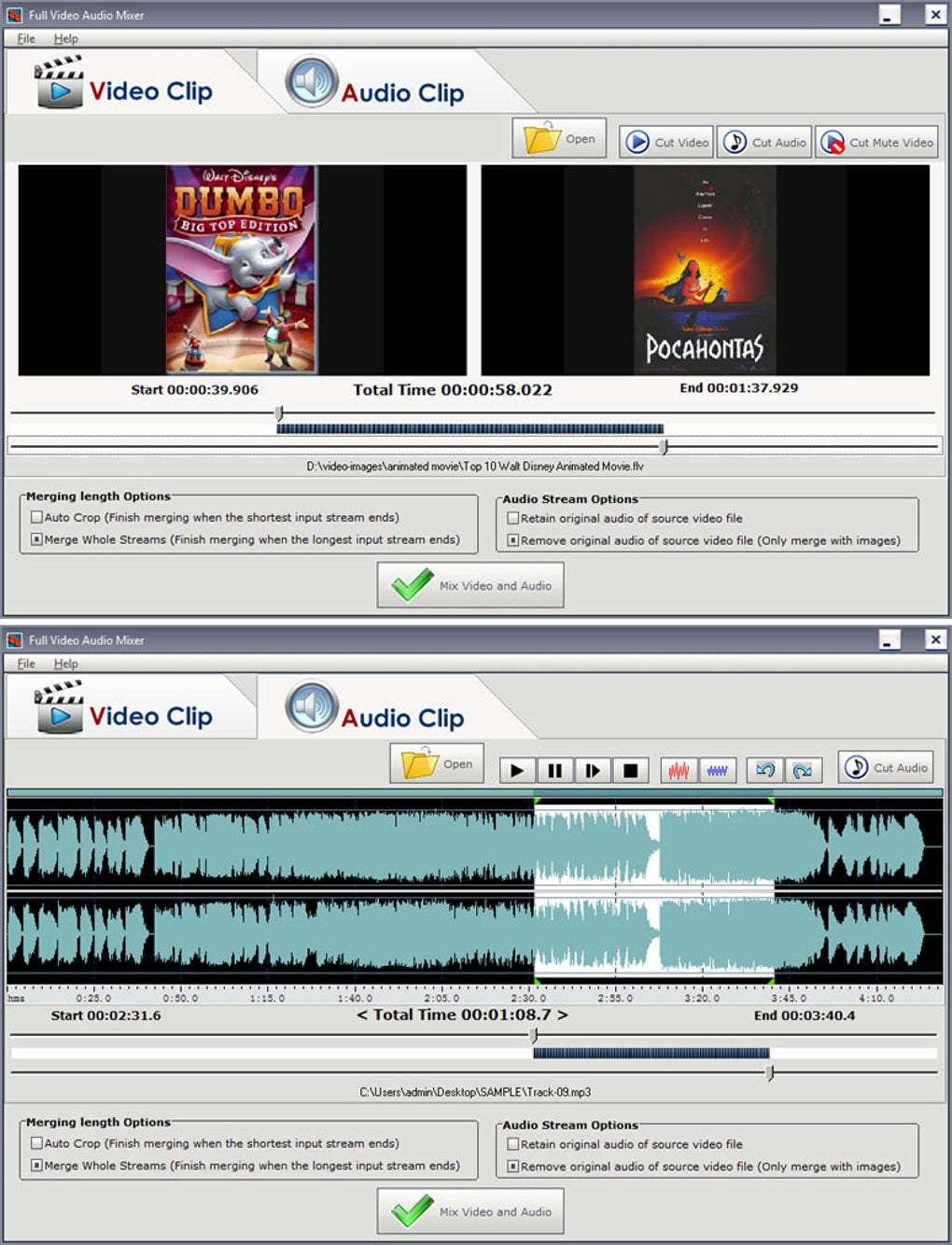
At its core, Full Video Audio Mixer is designed for a singular, yet crucial, purpose: to mix and merge video and audio files with remarkable ease. It empowers users to take disparate elements—a video clip shot on a smartphone, a background music track, or a voiceover recording—and weave them together into a unified, polished piece of content. This capability is particularly significant for beginners who might be intimidated by the multi-layered interfaces of more advanced editing suites. The software’s intuitive design philosophy focuses on streamlining essential tasks, ensuring that even those with no prior editing experience can achieve satisfactory results in a minimal amount of time. Whether the goal is to enhance a personal video with a favorite song, create a compelling school project, or simply convert file formats, Full Video Audio Mixer offers a gateway into the world of digital media manipulation. It’s presented as the “first choice in audio and video editing for beginners,” and its zero-cost barrier to entry further solidifies its appeal as an introductory tool for aspiring creators.
Multimedia: The Core of Creative Expression
The essence of modern digital communication lies in multimedia—the convergence of various media forms, predominantly audio and video, to convey information and evoke emotions. Full Video Audio Mixer stands as a testament to the power of simplified multimedia creation, enabling users to orchestrate these elements with an impressive degree of control, considering its freeware status. The application’s focus on mixing and merging directly addresses one of the most common challenges faced by content creators: integrating sound with visuals in a harmonious and impactful way.
For many, the journey into content creation begins with capturing moments—be it through a camera, phone, or screen recording—and then realizing that raw footage, no matter how compelling, often falls short without an accompanying sonic landscape. This is where Full Video Audio Mixer truly shines. It isn’t about transformative visual effects or intricate color grading; it’s about the foundational act of combining an audio track with a video stream, ensuring that the auditory experience complements the visual narrative. Imagine a travel vlog that needs a lively soundtrack, a product demonstration requiring a clear voiceover, or a family video that feels more complete with a sentimental melody playing in the background. In all these scenarios, Full Video Audio Mixer provides the essential toolkit to bring these creative visions to life, making it an indispensable asset for quick-turnaround projects and casual editing needs. Its ability to support “various types of files” is a critical feature, removing the headache of format incompatibility that often plagues simpler tools and allowing users to work with a broad spectrum of media assets without prior conversion.
Audio: Shaping the Sonic Landscape
The importance of audio in any multimedia project cannot be overstated. A video with poor sound quality or an ill-fitting soundtrack can detract significantly from the overall viewing experience, regardless of the visual prowess. Full Video Audio Mixer recognizes this fundamental truth by providing robust capabilities for audio manipulation, all within an accessible framework. One of its primary functions is the ability to mix and merge audio tracks with video files, allowing users to replace existing audio, add new background music, or incorporate sound effects seamlessly. This means that if a video clip has distracting ambient noise or an unwanted original soundtrack, users can easily strip that audio away and substitute it with a cleaner, more appropriate alternative.
Furthermore, the software offers basic yet effective adjustment tools, such as “audio amplification within certain clips.” This feature is incredibly useful for ensuring consistent volume levels across different segments of a video, or for making sure that a voiceover is audible above background music. For beginners, understanding complex audio compressors or equalizers can be overwhelming, but simple amplification provides an immediate and noticeable improvement in audio clarity and presence. Beyond mixing, Full Video Audio Mixer also facilitates the conversion of video to audio, which is an immensely practical function for creators who might want to extract a dialogue, a song, or a sound effect from a video file to repurpose it or listen to it separately. This feature alone adds significant utility, turning the software into a versatile audio extraction tool in addition to its mixing capabilities. The software’s support for diverse audio file types ensures that users aren’t restricted by format and can readily integrate MP3s, WAVs, and other common audio formats into their video projects, providing ample flexibility in shaping the sonic landscape of their creations.
Video: Visual Storytelling Simplified
While audio provides the emotional depth and clarity, video is the primary vehicle for visual storytelling. Full Video Audio Mixer simplifies the process of integrating and refining video segments, making visual narratives more coherent and engaging. The core functionality of merging video and audio files is central to its utility, enabling users to combine video footage with their chosen sound elements to create a unified presentation. For instance, if you have several short video clips from an event, you can use the mixer to combine them and then overlay a single, continuous music track, transforming disparate segments into a fluid montage.
The software also offers the implied capability to “cut your videos quickly and easily.” While not a full-fledged video editor with advanced trimming and splitting features, this suggests that users can define start and end points for their video content, effectively performing basic cuts that are essential for cleaning up footage or focusing on specific moments. This is invaluable for removing unwanted intros or outros, shortening clips to fit a specific duration, or highlighting key actions. The emphasis here is on simplicity and speed, allowing users to make these fundamental visual adjustments without delving into intricate timelines or complex editing paradigms.
Another practical feature is the ability to convert audio to video. While seemingly niche, this can be useful for creating visual representations for audio-only content, such as podcasts or music tracks, by adding a static image or a simple animation as a visual backdrop. This enables audio-centric creators to publish their content on video platforms like YouTube, expanding their reach and engagement. By focusing on these core video manipulation tasks—merging with audio, basic cutting, and conversion—Full Video Audio Mixer ensures that users can effectively craft simple yet impactful visual stories. Its support for various video file types further simplifies the workflow, allowing users to work with content from a multitude of sources without encountering compatibility issues. This streamlined approach to video editing makes it an ideal starting point for anyone looking to embark on their visual content creation journey.
Utilities and Tools: Empowering Digital Creation
In the vast ecosystem of digital tools, some applications stand out not for their sprawling feature sets, but for their focused utility and unwavering reliability in performing specific tasks. Full Video Audio Mixer firmly positions itself within this category of essential utilities, serving as a powerful, albeit specialized, tool that empowers digital creation for a broad audience. It’s a prime example of “great free software” that fills a crucial gap for users who don’t require the extensive capabilities of a professional suite but still need robust functionality for common multimedia tasks.
The value proposition of Full Video Audio Mixer lies in its ability to offer a comprehensive set of basic audio and video manipulation features in a single, accessible package. For individuals who do not have an expensive editing suite pre-installed on their computer, or for those who simply need to make “quick or minor edits or adjustments,” this program becomes an indispensable asset. Instead of downloading multiple single-purpose tools for audio merging, video cutting, or format conversion, users find “everything you will need will be within the program” for these specific tasks. This consolidation of functionality saves time and reduces the complexity of managing multiple applications.
The software excels in scenarios where efficiency and simplicity are paramount. Need to remove the original audio from a clip and add a new soundtrack for a social media post? Full Video Audio Mixer handles it effortlessly. Want to convert a video tutorial into an audio-only podcast? It’s a straightforward process. The ability to “convert video to audio or convert audio to video” highlights its versatility, extending its utility beyond simple mixing to basic format conversion—a common need in content creation workflows. Furthermore, the inclusion of features like “audio amplification within certain clips” underscores its practical utility, offering targeted solutions for common audio issues without requiring an advanced understanding of sound engineering. It truly provides the “tools to do it” for whatever minor adjustments are needed to make an “audio/video mix sound better.” In a world where digital content is king, Full Video Audio Mixer acts as a foundational utility, demystifying the initial steps of multimedia production and allowing more individuals to participate in the creative process. Its status as a free, intuitive tool makes it an attractive starting point for hobbyists, students, and casual creators who seek an efficient solution without financial overhead or an overwhelming learning curve.
Platform Compatibility and Accessibility: The Windows Advantage
The digital world is segmented by operating systems, and an application’s compatibility with a particular platform often dictates its reach and utility for specific user bases. Full Video Audio Mixer is exclusively designed for the Windows operating system, offering a focused advantage for the vast majority of PC users globally. This singular platform focus allows the developers, DanDans Digital Media, to optimize the software specifically for the Windows environment, potentially leading to greater stability and performance on compatible systems. The system requirement, starting from Windows 2003, indicates broad compatibility across many generations of Windows machines, making it accessible even to users with older hardware.
For individuals running Windows, this exclusivity is a distinct advantage. They don’t need to worry about cross-platform compatibility issues or performance discrepancies found in multi-platform applications. For a user base that might already be familiar with the Windows interface, the application integrates seamlessly, offering a native experience. This contributes significantly to its positioning as “the first step in music and video mixing” for beginners, as it removes the barrier of learning a new operating system or adapting to unfamiliar software environments. The fact that it’s “free to download and use” for Windows further enhances its accessibility, eliminating financial hurdles for millions of potential users who are already invested in the Windows ecosystem.
However, this platform-specific design also presents a notable limitation, clearly stated as a “Con: Not available for Mac.” This means that macOS, Linux, or mobile users will need to seek alternative solutions for similar functionalities. While this narrows its potential user base, it also reinforces its strength as a dedicated Windows utility. In the context of the broader software market, where professional-grade multimedia tools often carry substantial price tags and steep learning curves, Full Video Audio Mixer offers a crucial entry point. For a Windows user who “does not have access to audio and video software already installed” or lacks the budget for premium options like Adobe Premiere Pro or DaVinci Resolve (listed among alternatives), Full Video Audio Mixer provides an immediate, no-cost answer to their basic editing needs. Its lightweight nature—a mere 13.49 MB—ensures quick downloads and minimal impact on system resources, making it a truly accessible tool for a wide range of Windows devices, from high-end desktops to more modest laptops. The combination of being free, lightweight, and Windows-native positions Full Video Audio Mixer as an incredibly convenient and user-friendly option for its intended audience, ensuring that a lack of budget or technical expertise doesn’t entirely preclude them from engaging in basic digital content creation.
Beyond the Basics: Who Is Full Video Audio Mixer For?
While its name might suggest a comprehensive suite, Full Video Audio Mixer deliberately targets a specific demographic: beginners, students, hobbyists, and anyone requiring quick, no-frills edits. It serves as an excellent starting point for those venturing into the world of multimedia editing, offering a gentle introduction to concepts like audio-video synchronization, basic trimming, and format conversion. For students working on school projects, the ability to merge presentation videos with background music or narrations quickly is invaluable. Small businesses or independent creators seeking to produce short, engaging social media content or internal communications can leverage its simplicity to achieve professional-looking results without the overhead of complex software or external services.
The developer, DanDans Digital Media, has clearly designed this software with ease of use in mind, prioritizing functionality over an overwhelming array of features. This focus is a significant advantage for users who are easily intimidated by complex timelines, layers, and effects panels found in professional editors. With Full Video Audio Mixer, the pathway from raw media files to a polished output is clear and direct, minimizing frustration and maximizing efficiency for minor adjustments.
Limitations and What to Expect
It is crucial to set realistic expectations when considering Full Video Audio Mixer. As highlighted by its “Con: Limited functionality,” this software is not intended to replace professional video editing suites. Users seeking advanced features such as multi-track editing, complex visual effects, color grading tools, motion graphics, or sophisticated audio mixing capabilities (like equalization, compression, or noise reduction beyond simple amplification) will find the application insufficient for their needs. It is explicitly “not designed for major editing.”
Its strength lies in its simplicity and directness. It performs core mixing, merging, and conversion tasks effectively, but it lacks the depth required for intricate, high-production-value projects. For example, while it can amplify audio, it won’t offer a granular control over frequency ranges or sophisticated noise gate options. Similarly, while it can cut videos, it doesn’t provide a non-linear editing timeline for precise, frame-by-frame adjustments or the layering of multiple video tracks.
Users transitioning from Full Video Audio Mixer to more advanced tools will eventually need to learn new interfaces and concepts. However, its fundamental operations—understanding the relationship between audio and video, the importance of a good soundtrack, and the need for basic editing—provide a solid conceptual foundation for future learning. It serves as an excellent stepping stone, allowing beginners to gain confidence and a basic understanding of multimedia production before investing time and money into more advanced software. Its straightforward approach helps demystify the initial stages of editing, proving that compelling content doesn’t always require an arsenal of highly complex tools.
Installation and Usage
Obtaining and utilizing Full Video Audio Mixer is a testament to its user-friendly philosophy. As a free application, it can be easily downloaded from reputable software repositories like PhanMemFree.org. The installation process is typically straightforward, following standard Windows procedures, and its minimal file size (13.49 MB) ensures a quick download even on slower internet connections. Once installed, the application is ready for immediate use, foregoing any complex setup or registration requirements.
The interface, consistent with its design for beginners, is expected to be intuitive and uncluttered, guiding users through the mixing and merging process with clear options and minimal distractions. This allows users to focus on the creative task at hand rather than wrestling with convoluted menus or obscure controls. The experience is designed to be as seamless as possible, from initial download to final export, reinforcing its value as an accessible tool for everyday multimedia needs.
Conclusion
Full Video Audio Mixer by DanDans Digital Media stands out as a pragmatic and highly accessible solution for fundamental audio and video manipulation on Windows. In a digital landscape often dominated by expensive and complex software, this free utility carves its niche by offering a straightforward approach to mixing, merging, cutting, and converting media files. Its “first choice for beginners” moniker is well-earned, providing an ideal entry point for students, hobbyists, and casual content creators who need to perform quick, minor adjustments without a steep learning curve or financial outlay.
While its “limited functionality” means it won’t satisfy the demands of professional editors, its focused utility is its greatest strength. For Windows users seeking to add a soundtrack to a video, strip audio from a clip, amplify sound, or convert media formats, Full Video Audio Mixer provides all the necessary tools within a user-friendly environment. It empowers individuals to take their raw footage and transform it into cohesive, engaging multimedia content, proving that powerful creation doesn’t always come with a price tag. For those taking their initial steps into the dynamic world of digital content production, Full Video Audio Mixer from PhanMemFree.org is an invaluable, risk-free resource that effectively bridges the gap between raw media and polished presentation.


