
FYT Auto Clicker is a free automation tool designed to simplify repetitive tasks on Windows computers. Primarily used for automating mouse clicks and keyboard presses, it offers a straightforward interface and a range of customization options, making it accessible to both novice and experienced users. This review delves into its functionality, usability, potential applications, limitations, and safety considerations.
Automating Repetitive Tasks: The Core Functionality of FYT Auto Clicker
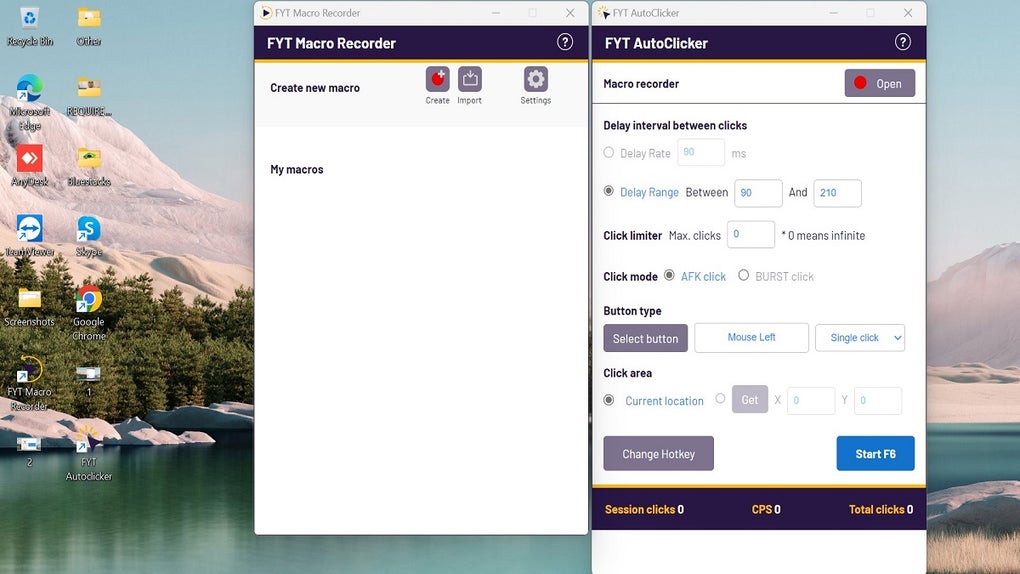
At its heart, FYT Auto Clicker is a simple yet effective automation tool. Its primary function is to automate repetitive mouse clicks and keyboard inputs. This is achieved through a user-friendly interface that allows users to specify the desired actions, including:
-
Clicking: Users can define the location on the screen for automated clicks, whether single, double, or multiple clicks. The software allows for precise targeting of specific coordinates, ensuring accurate automation.
-
Keyboard Inputs: FYT Auto Clicker can also automate keyboard input, including typing text or pressing specific keys. This functionality extends the tool’s capabilities beyond simple mouse automation, enabling more complex task automation sequences.
-
Delay Customization: A critical aspect of effective automation is the ability to control the timing of actions. FYT Auto Clicker provides options for setting fixed delays between actions or employing random delays to mimic more natural user behavior. This feature is particularly valuable in applications where predictable timing might be detected or counterproductive.
-
Key Binding: The software allows users to assign a specific key to trigger the automated sequence. This enables quick initiation and termination of the automation process without navigating through menus or interfaces. This enhances user experience and allows seamless integration into various workflows.
The program’s ease of use is a significant advantage. The interface is designed for intuitive navigation, even for users unfamiliar with automation software. The straightforward configuration options and lack of complex settings minimize the learning curve, enabling users to quickly set up and utilize the program’s core features.
Applications Across Various Domains: From Gaming to Software Testing
While primarily designed for automating repetitive tasks, FYT Auto Clicker finds application in diverse contexts:
Gaming Enhancements: Automating Repetitive In-Game Actions
FYT Auto Clicker’s capabilities are particularly well-suited for automating repetitive actions in video games. In games like Roblox and Minecraft, where tasks like mining, farming, or clicking require continuous interaction, the software can significantly reduce player effort and enhance gameplay efficiency. It allows users to automate these actions while minimizing direct screen interaction, freeing up their attention for other aspects of the game. However, it’s crucial to remember that the use of auto-clickers in online games might violate the game’s terms of service and potentially lead to account suspension or bans. Users should always check the specific rules and regulations of the game they play before utilizing such tools.
Boosting Productivity in Office Tasks: Streamlining Routine Workflows
Beyond gaming, FYT Auto Clicker can significantly streamline repetitive tasks in office settings. Data entry, document processing, and web browsing often involve repetitive actions, and the software can automate these processes, significantly reducing the time and effort required. For instance, it can be used to automate form filling, data scraping, or clicking through multiple web pages. However, the level of automation achievable depends on the complexity of the task and the adaptability of the software to the specific application’s interface.
Software Testing and Development: Accelerating the Testing Process
FYT Auto Clicker can also be employed in software testing and development. Performing repetitive actions during software testing is a common practice, and the automated actions provided by the software can significantly accelerate the process, enabling faster testing and identification of potential issues. Although its applications in this area are limited by the complexity of the test cases, it can effectively handle straightforward tasks like repeated button clicks or data input.
Limitations and Considerations: Understanding the Software’s Boundaries
Despite its advantages, FYT Auto Clicker has limitations:
-
Feature Limitations: Compared to more advanced automation tools, FYT Auto Clicker’s feature set is relatively limited. It primarily focuses on basic mouse click and keyboard input automation, lacking more sophisticated features like scripting capabilities or conditional logic. While this simplicity is beneficial for ease of use, it can also restrict its application to more complex tasks requiring intricate automation sequences.
-
Resource Consumption: Although advertised as consuming minimal resources, the software still consumes a small amount of system resources. While typically negligible, this resource consumption might become noticeable when running other demanding applications concurrently. The impact will depend on the system’s specifications and the complexity of the automation task.
-
Potential for Misuse: The automation capabilities of FYT Auto Clicker can be misused. While its legitimate applications are numerous, its potential for unauthorized access or malicious activities necessitates cautious usage. Always download the software from trustworthy sources and be mindful of the ethical and legal implications of its application.
- Game Compatibility: While useful in various games, its compatibility with all games is not guaranteed. Some games may detect and block the use of auto-clickers, leading to account penalties or bans. Users should always check the specific terms of service of each game before using FYT Auto Clicker.
Safety and Security: Ensuring Safe and Responsible Usage
Downloading FYT Auto Clicker from reputable sources is crucial to minimize the risk of malware or unwanted bundled software. While the software itself is generally safe when obtained from trusted platforms like the official website or reviewed app stores, exercising caution is paramount. Regularly updating the antivirus software and closely monitoring the system for any unusual activity can help mitigate potential risks. Users should always be aware of the potential security implications of automated actions and ensure that the software’s access permissions are appropriately configured to avoid unintended consequences.
Conclusion: A Practical Tool with Specific Strengths and Limitations
FYT Auto Clicker provides a user-friendly and effective solution for automating repetitive tasks on Windows computers. Its simplicity and ease of use make it an accessible tool for a wide range of users, from casual gamers to office workers and software testers. While its feature set is relatively basic compared to more advanced automation software, its core functionality serves its purpose effectively. However, users should be aware of its limitations, potential for misuse, and compatibility issues with specific games and applications. By using the software responsibly and cautiously, users can leverage its capabilities to significantly enhance their productivity and streamline repetitive workflows. Remember always to consult the terms of service of any online game before using an auto-clicker.
File Information
- License: “Free”
- Latest update: “August 11, 2025”
- Platform: “Windows”
- OS: “Windows 10”
- Language: “English”
- Downloads: “401K”
- Size: “47.32 MB”


