
Gadwin PrintScreen is a freeware utility designed for capturing screenshots on Windows systems. Its simplicity and effectiveness have made it a popular choice among users who frequently need to capture images of their screen for various purposes, from documentation to sharing online. This review will delve into its features, ease of use, pros and cons, and compare it to alternative options available in the market.
Core Functionality: Capturing and Managing Screenshots
At its heart, Gadwin PrintScreen offers a straightforward approach to capturing screenshots. The core functionality revolves around customizable hotkeys, allowing users to quickly capture images with a single keystroke. The default hotkey is the standard Print Screen key, but the software allows for extensive customization, letting users assign alternative keyboard shortcuts to suit their workflow and preferences. This flexibility caters to individual needs and avoids potential conflicts with other applications.
Once a screenshot is captured, users have several options for managing and utilizing the image. The software seamlessly integrates with common functionalities such as saving to disk, copying to the clipboard, printing directly to a connected printer, or even sending the image via email. This comprehensive approach makes it a one-stop solution for many users, eliminating the need for multiple applications or tedious manual steps.
The selection options extend beyond a simple full-screen capture. Gadwin PrintScreen provides the ability to capture specific windows or only a selected rectangular area of the screen. This precise control eliminates the need for post-processing cropping or editing in other image manipulation software, significantly streamlining the workflow.
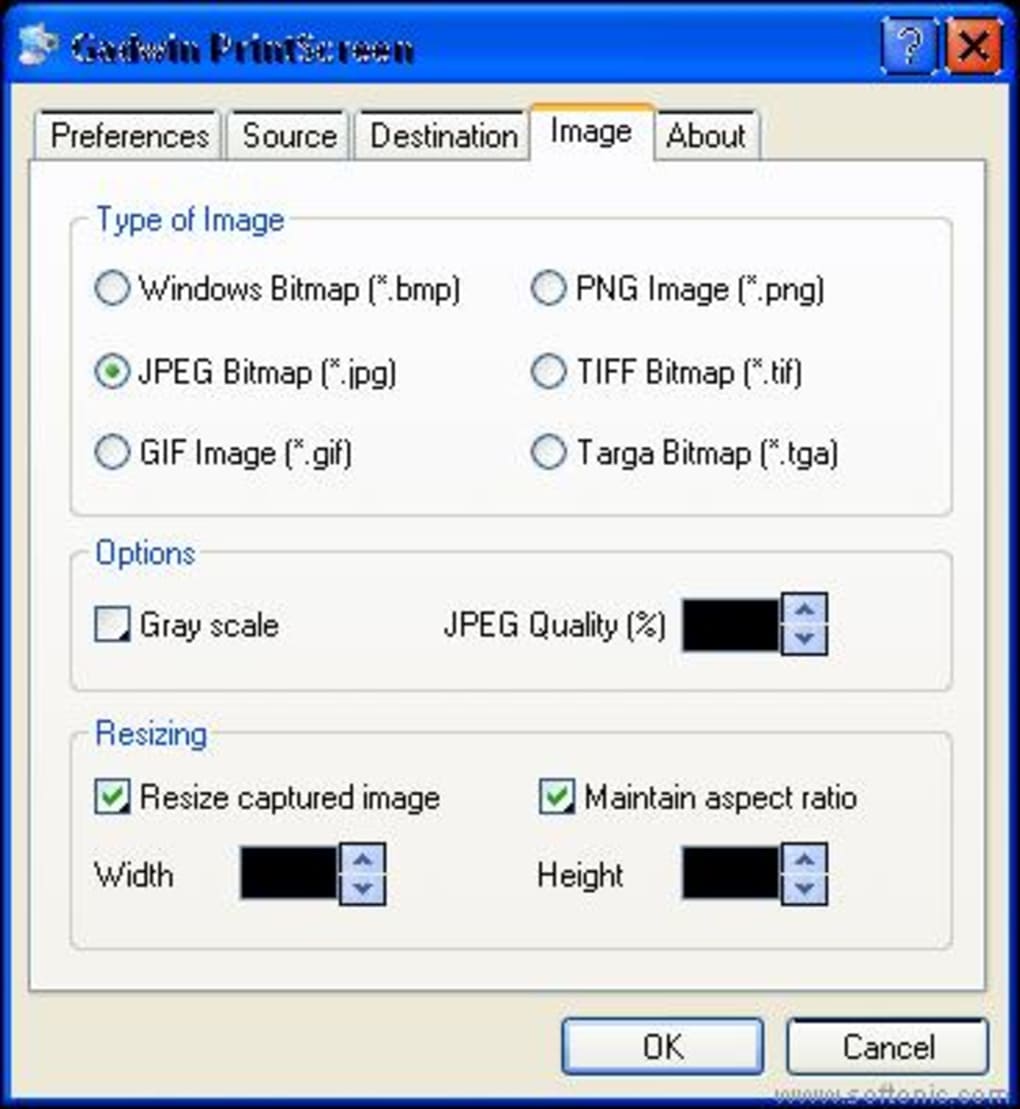
Beyond capturing, the program supports a variety of image formats, including popular options like JPEG, PNG, BMP, GIF, TIFF, and more. This wide array of supported formats ensures compatibility with various applications and platforms, maximizing flexibility for users. Further enhancing its functionality, Gadwin PrintScreen allows for resizing of the captured images directly within the application. This built-in resizing feature is especially useful for quickly adjusting image dimensions for specific applications or online platforms.
User Interface and Ease of Use
Gadwin PrintScreen’s user interface is deliberately minimalist and user-friendly, designed to make capturing and managing screenshots as efficient as possible. Its simplicity is a major advantage for users of all technical skill levels. The intuitive layout eliminates unnecessary complexity, allowing users to focus on the task at hand without being overwhelmed by numerous settings or menus.
The hotkey-centric design is a key element of its user-friendliness. The ability to capture screenshots instantly with a single keystroke minimizes interruptions and enhances workflow efficiency. Users can spend more time on their primary task rather than being diverted to a complex screenshot tool.
The options for saving, copying, printing, and emailing are all easily accessible and clearly labeled, further enhancing the user experience. The program’s intuitive nature makes it suitable for both casual users and those who require frequent screenshot capture for professional purposes.
Advanced Features and Customization
While the core functionality is focused on simple and efficient screenshot capture, Gadwin PrintScreen includes several additional features to enhance the user experience. For example, users can customize the program’s settings extensively to fit their individual needs. This level of customization allows power users to tailor the program’s behavior and functionality to meet their specific requirements.
The ability to define multiple hotkeys provides an extra layer of flexibility. Users can create dedicated hotkeys for different capture modes (full-screen, window, region), enabling faster and more efficient workflows. This can drastically reduce the time spent capturing and managing screenshots, especially for users who frequently take many screenshots.
Comparison with Alternative Screenshot Tools
Gadwin PrintScreen exists in a competitive market filled with both free and paid screenshot tools. Many alternatives offer similar core functionality, such as capturing screenshots and saving them in various formats. However, Gadwin PrintScreen distinguishes itself through a combination of factors.
Its simplicity and ease of use are significant advantages compared to more complex tools. While some advanced screenshot tools offer a vast array of features, they often come with a steeper learning curve. Gadwin PrintScreen’s straightforward design makes it accessible to a broader audience, including those with limited technical expertise.
Moreover, Gadwin PrintScreen’s free availability is a compelling feature. Many competitive tools are either entirely paid software or offer limited functionality in their free versions. Gadwin PrintScreen provides a fully functional, free experience, making it an attractive option for users who may not want to invest in a paid screenshot tool.
Compared to built-in Windows screenshot functionality, Gadwin PrintScreen offers several improvements. The customizable hotkeys, versatile saving options, and various supported image formats surpass the limitations of the basic Windows Print Screen key. It provides a much more versatile and efficient experience for users who frequently take screenshots.
User Reviews and Feedback
While mostly positive, user reviews highlight both strengths and weaknesses of Gadwin PrintScreen. Many praise the software’s simplicity, speed, and ease of use. Users appreciate its straightforward interface, making it quick to learn and use effectively.
However, some criticism exists regarding the lack of advanced editing features within the program itself. Users who need extensive editing capabilities might need to use a separate image editor after capturing the screenshot. This is a limitation compared to some alternative software packages that integrate editing tools directly into their interface.
Furthermore, some older reviews mention issues with customer support, particularly for the paid professional version. While these reviews are not necessarily representative of the current state of the software, they point to a potential area for improvement.
Conclusion
Gadwin PrintScreen offers a powerful and straightforward solution for capturing screenshots on Windows systems. Its simplicity and efficiency make it a strong contender among screenshot tools, especially for those who prioritize ease of use and quick access to core functionality. The customizable hotkeys, diverse saving options, and support for multiple image formats enhance its practicality. While lacking extensive editing capabilities, its free availability and strong core features make it a worthwhile tool for many users. However, potential users should weigh the lack of advanced editing against their specific needs before deciding whether it fits their workflow.
File Information
- License: “Free”
- Latest update: “August 8, 2012”
- Platform: “Windows”
- OS: “Windows 95”
- Language: “English”
- Downloads: “77.2K”
- Size: “4.24 MB”


