
The Gallery - Photo Gallery App is a paid Android application designed for efficient photo and video management. Boasting a user-friendly interface, it aims to simplify the often-overwhelming task of organizing personal visual memories. This review will delve into its features, strengths, weaknesses, and overall user experience, comparing it to similar applications available on the market.
Streamlined Organization and Intuitive User Interface
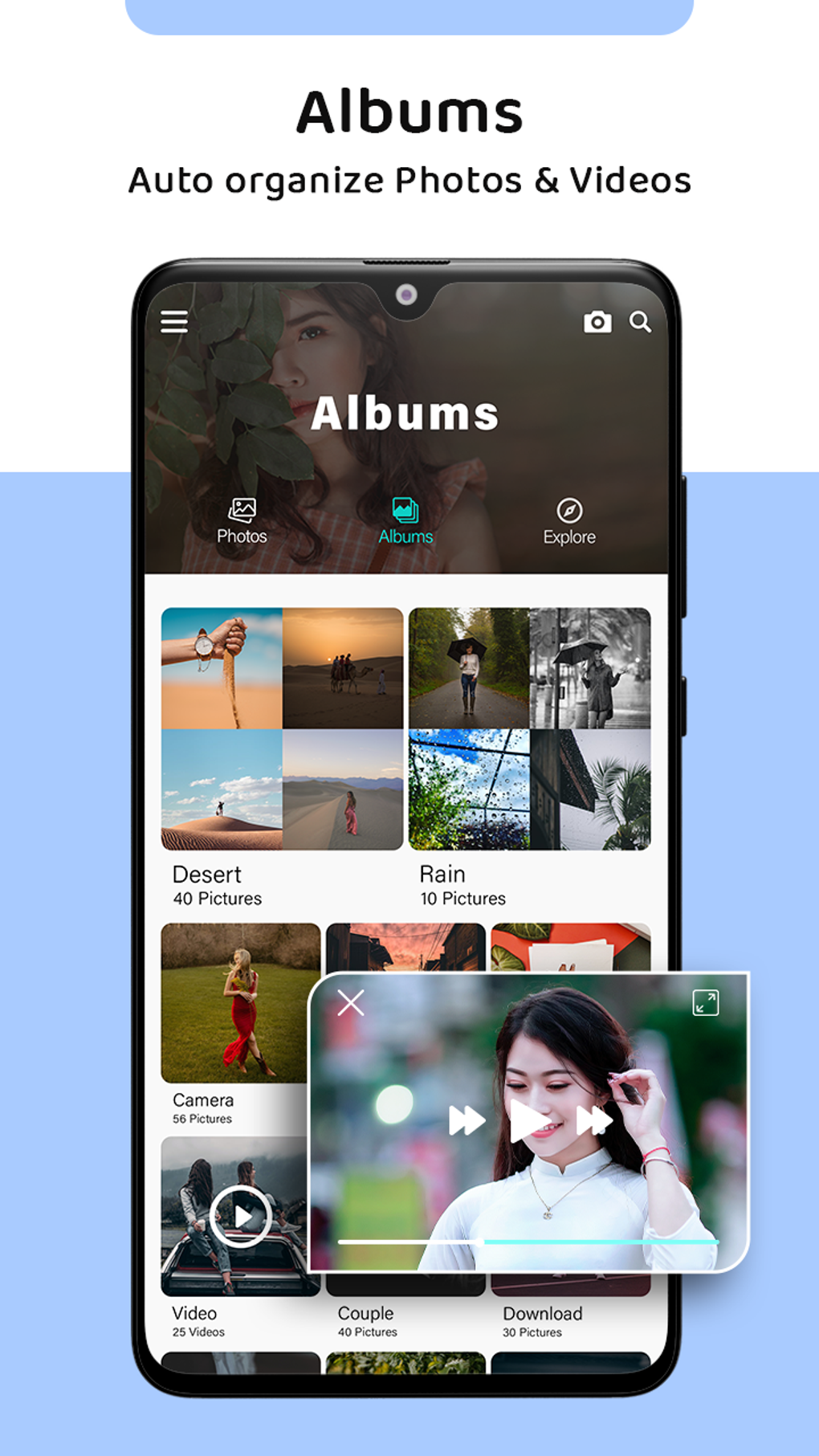
One of the app’s primary selling points is its intuitive design. The Gallery - Photo Gallery App prioritizes ease of use, making it accessible to users of all technical skill levels. Navigating through your photo and video library is a straightforward process. The app allows for quick and efficient categorization of images, enabling users to create albums and organize their content based on various criteria, such as date, location, or even personalized tags. This feature significantly improves the discoverability of specific photos, eliminating the frustration often associated with searching through vast, unorganized collections. The clean and uncluttered interface enhances the overall user experience, preventing information overload and ensuring a smooth browsing experience. Unlike some photo gallery applications that are overloaded with features, this app focuses on core functionality, making the organization process both efficient and enjoyable.
Comprehensive Media Support and Basic Editing Capabilities
Gallery - Photo Gallery App supports a wide range of image and video formats, ensuring compatibility with most devices and file types. This broad support is a significant advantage, allowing users to consolidate their entire visual library within a single application. Furthermore, the app offers basic editing functionalities, including the application of filters and rudimentary photo adjustments. While these editing features may not be as extensive or advanced as those found in dedicated photo editing software, they provide sufficient tools for quick enhancements and minor corrections. This integrated editing functionality is a valuable addition, particularly for users who prefer a streamlined workflow, avoiding the need to switch between different applications for basic image manipulation. The inclusion of basic editing, however, doesn’t compromise the app’s primary function as an organization tool; the editing features are supplementary rather than the central focus.
Comparison with Alternative Photo Gallery Applications
The market is saturated with photo gallery applications, each offering unique features and capabilities. Direct comparisons with alternatives like Motorola Gallery, AI Gallery, and Memoria Photo Gallery highlight both the strengths and weaknesses of Gallery - Photo Gallery App.
Motorola Gallery, for instance, often receives praise for its immersive user interface and smooth performance. However, its organizational capabilities may not be as robust or flexible as those offered by Gallery - Photo Gallery App. AI Gallery, on the other hand, leans heavily on AI-powered features, such as automated tagging and sorting. While this can be convenient, it might lack the granular control over organization that Gallery - Photo Gallery App provides. Memoria Photo Gallery emphasizes a personalized user experience, allowing for extensive customization of the interface and organizational structure. This level of personalization might come at the cost of simplicity, potentially making it less user-friendly for those who prefer a straightforward approach.
The Gallery - Photo Gallery App finds its niche by striking a balance between intuitive design and robust organizational tools. While it might not offer the cutting-edge AI capabilities of some competitors or the deeply personalized customization options of others, its focus on simplicity and efficiency makes it an attractive choice for users who prioritize ease of use and effective organization above all else.
Limitations and Areas for Improvement
Despite its strengths, Gallery - Photo Gallery App is not without its limitations. The most prominent drawback is the lack of advanced editing features. While basic editing capabilities are included, users seeking sophisticated tools for photo manipulation, such as advanced retouching, layer management, or complex adjustments, will likely need to turn to dedicated photo editing applications. This limitation might be a significant drawback for power users who require a comprehensive photo editing workflow integrated into their gallery app. The absence of cloud synchronization is another limitation. While the app effectively organizes local files, it lacks the ability to seamlessly sync photos and videos with cloud storage services like Google Photos or Dropbox. This omission could be a significant drawback for users who rely heavily on cloud storage for backing up their valuable memories.
Furthermore, the paid nature of the application might deter some potential users. While the price point may be justified for the features and user experience it offers, it’s worth considering that many alternative gallery apps are available for free. The lack of a free trial or a demo version prevents users from fully experiencing the app’s capabilities before committing to a purchase. The decision to purchase hinges on a user’s assessment of whether the enhanced organization and basic editing features justify the cost compared to free alternatives.
Conclusion: A Solid Choice for Organized Photo Management
The Gallery - Photo Gallery App presents a compelling proposition for users seeking a user-friendly and efficient way to organize their extensive photo and video collections. Its intuitive interface, comprehensive media support, and basic editing capabilities make it a strong contender in the crowded market of Android photo gallery applications. While the lack of advanced editing features and cloud synchronization might be deterrents for some, the app’s primary focus on streamlined organization and easy navigation makes it a worthwhile investment for those who prioritize simplicity and efficiency in managing their visual memories.
The app’s success lies in its balanced approach. It doesn’t attempt to be everything to everyone, instead focusing on its core competency: providing a clean, effective, and easy-to-use system for organizing large photo and video libraries. For users who value a well-designed interface and straightforward functionality above all else, the Gallery - Photo Gallery App offers a highly satisfactory experience. However, users with more advanced needs, such as extensive editing requirements or a strong reliance on cloud storage, should carefully consider their alternatives before committing to a purchase. Ultimately, the decision to adopt the Gallery - Photo Gallery App rests upon individual priorities and needs, weighing the benefits of simplified organization against the limitations in editing and cloud integration.
File Information
- License: “Full”
- Version: “1.0.4”
- Latest update: “June 27, 2025”
- Platform: “Android”
- OS: “Android 9.0”
- Language: “English”
- Downloads: “67.2K”
- Size: “22.72 MB”
- Download Options: “APK, Google Play”
- Filename: “photos.gallery.galeris_1.0.4.apk”


