
Game Builder is a free, user-friendly simulation software developed by Area 120 that empowers users to create their own video games with minimal coding experience. It’s a revolutionary tool that bridges the gap between creative expression and technical programming, making game development accessible to a broader audience. This in-depth review will explore its features, functionality, and overall effectiveness as a learning tool and game creation platform.
A Gamified Approach to Coding
Unlike traditional coding education, which often involves daunting lines of text and complex syntax, Game Builder utilizes a gamified approach. The software presents programming concepts through interactive activities and a visually appealing, voxel-based environment. This innovative method transforms the often-intimidating process of learning to code into an engaging and enjoyable experience. By conveying complex programming ideas into visual representations, Game Builder effectively lowers the barrier to entry for aspiring game developers, regardless of their prior coding experience. The software’s intuitive interface guides users through the fundamental principles of game development, seamlessly integrating learning with creation. This makes Game Builder an excellent alternative to more traditional and potentially daunting coding tutorials or courses. Competitors such as CodeMonkey and CodinGame exist, but Game Builder differentiates itself through its user-friendly interface and integration of the development process directly into the gaming experience. The resemblance to games like ROBLOX or Minecraft further enhances its appeal to a younger audience and those already familiar with similar game mechanics.
Intuitive Interface and Gameplay Mechanics
From the moment you launch Game Builder, you’re greeted with a vibrant and welcoming home screen that instantly showcases its colorful, voxel-based art style. This immediately creates a positive and engaging first impression. The main menu clearly presents options for starting new projects, accessing the game library, engaging in multiplayer sessions, reviewing credits, and exiting the application. The inclusion of sample games serves as a valuable resource, providing users with tangible examples and inspiration for their own creations. This allows new users to familiarize themselves with the capabilities of the software and provides pre-built projects that can be modified and expanded upon.
Initiating a new project allows users to seamlessly switch between “Build” and “Play” modes. In “Build” mode, users select objects and program their behavior, defining their movement, interactions, and responses to in-game events. Each action or event is accompanied by its corresponding source code, presented in a beginner-friendly manner, with clear variables and comments guiding users through the process. This combination of visual and textual programming allows users to grasp the underlying logic behind the code while manipulating the game elements directly. This duality of learning methods caters to different learning styles, making the process more effective for a larger audience.
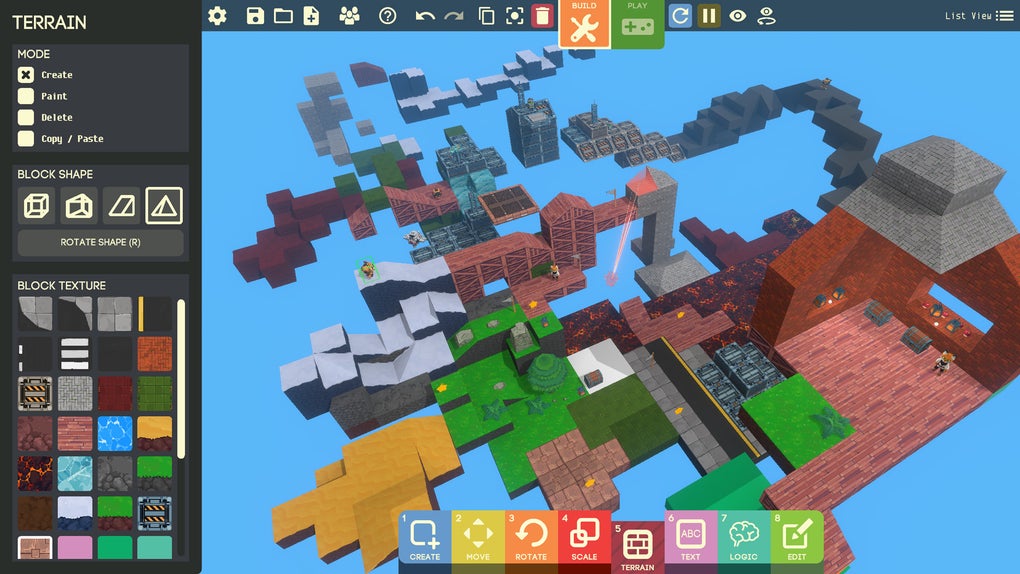
Game Builder offers exceptional flexibility, enabling users to build a variety of game types, including RPGs, casual games, and even first-person shooters. This broad range of possibilities encourages experimentation and creativity, allowing users to translate their unique ideas into playable games. The ability to collaborate with friends in multiplayer building sessions adds a further layer of engagement, fostering teamwork and shared learning experiences. Beyond the core mechanics, users can add personalized touches to their games, such as static background elements and lighting effects, further enhancing the creative potential of the platform.
Advanced Features and Capabilities
While its ease of use caters to beginners, Game Builder also incorporates features that allow for more advanced development. The ability to combine object-based and text-based coding offers a unique blend of visual programming and traditional coding practices. This allows users to gradually transition from visual programming to more traditional coding methods as they gain experience and confidence. This gradual progression helps avoid overwhelming beginners while still providing a path for users to develop more advanced skills.
The inclusion of detailed documentation, tutorials, and sample projects further enhances the learning experience. These resources provide users with the necessary guidance to navigate the software’s features and unlock its full potential. The community aspect of Game Builder, through its multiplayer functionality, also allows for collaboration and the sharing of ideas and knowledge, furthering the learning experience beyond the confines of the software itself.
System Requirements and Potential Limitations
While Game Builder is designed to be accessible, its reliance on the Unity engine means that users with older systems or lower specifications might experience extended loading times or performance issues. This is a common limitation of game development engines, especially when complex 3D environments are involved. The resource-intensive nature of the engine can lead to noticeable lag, particularly during more demanding operations or in projects with intricate details. However, this limitation is largely offset by the software’s overall benefits and ease of use, and it’s important to note that many modern systems should handle Game Builder without significant issues.
Conclusion: A Powerful Tool for Aspiring Game Developers
Game Builder presents a compelling blend of accessibility, functionality, and engaging design. Its innovative gamified approach makes learning to code less daunting and more fun, while its versatile features cater to both beginners and those with some prior programming experience. The ability to create a variety of game types, coupled with the option for multiplayer collaboration, makes Game Builder a powerful tool for aspiring game developers of all skill levels. While system requirements may pose a minor hurdle for some users, the overall benefits significantly outweigh this limitation. Game Builder is a significant step forward in democratizing game development, making it an exciting and accessible hobby for a far wider audience than previously possible. The software effectively combines creative freedom with the structure of learning, resulting in a rewarding and engaging experience for anyone interested in delving into the world of game creation. Its continued development and expansion promise to further enhance its capabilities and establish it as a leading platform for aspiring game developers in the years to come.
File Information
- License: “Free”
- Version: “varies-with-device”
- Latest update: “February 28, 2022”
- Platform: “Windows”
- OS: “Windows 7”
- Language: “English”
- Downloads: “10.9K”


