
Game Vault is a free lifestyle application designed for avid gamers who appreciate meticulous organization and easy access to detailed game information. This comprehensive guide will explore its features, benefits, and limitations, providing a thorough overview for potential users. Built upon the extensive GiantBomb database, Game Vault offers a powerful yet user-friendly experience for managing your ever-growing gaming collection.
Apps: Seamless Integration and Organization
Game Vault excels at simplifying the process of tracking and managing your gaming library. Its integration with GiantBomb’s database ensures access to a wealth of information for a vast catalog of games. This includes comprehensive descriptions, precise release dates, accurate publisher and developer attributions, and high-quality screenshots and videos – all readily available at your fingertips. Gone are the days of scattered notes and fragmented memories; Game Vault consolidates everything into one convenient location.
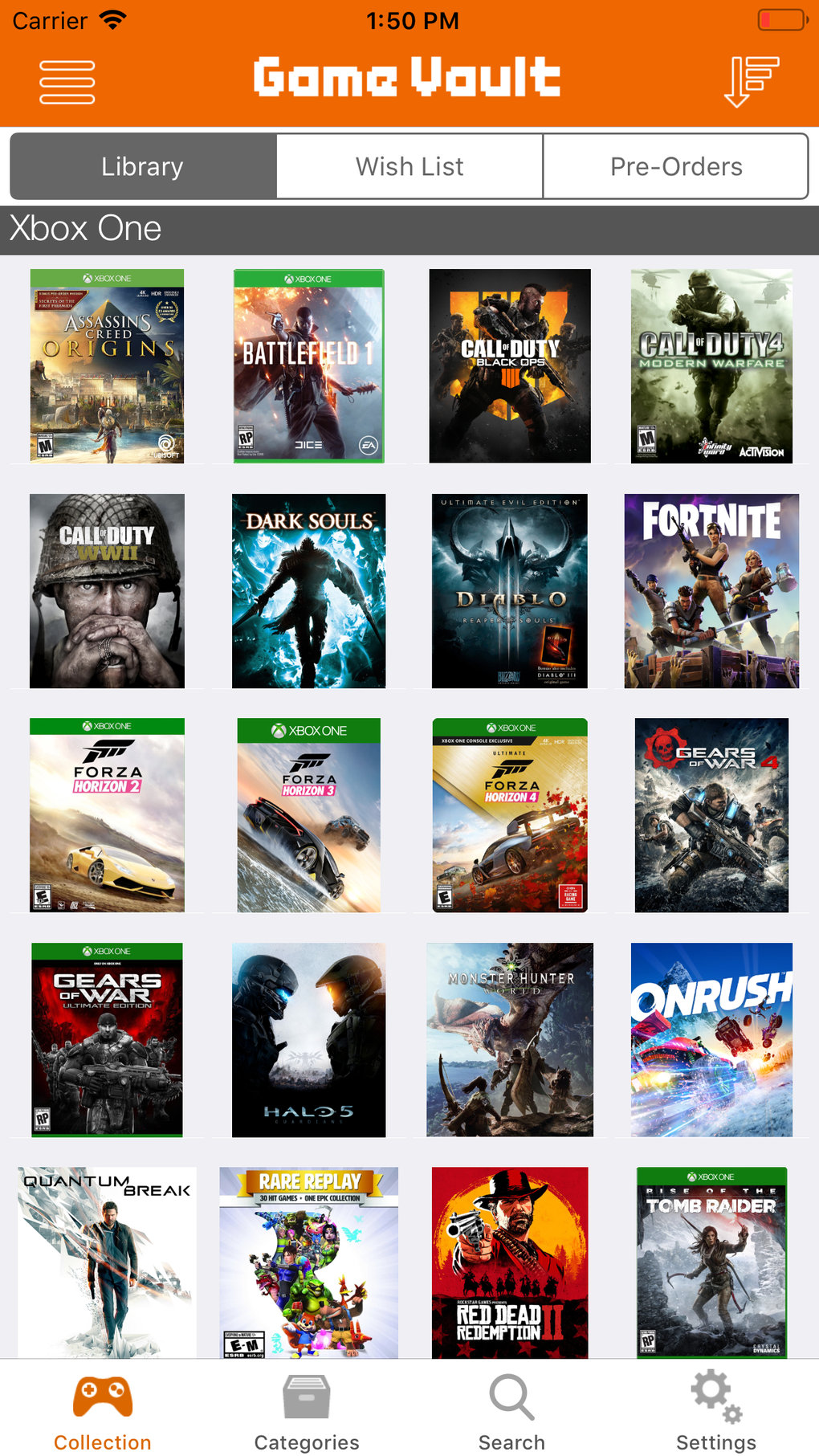
The app’s intuitive design makes navigation effortless. Whether you’re a casual gamer with a small collection or a seasoned enthusiast with multiple platforms and hundreds of titles, Game Vault adapts to your needs. Its multi-collection management system allows you to categorize games into distinct lists—your current library, your coveted wishlist, or games pre-ordered and eagerly anticipated. This sophisticated organizational structure prevents the overwhelming feeling often associated with large collections, maintaining clarity and order.
Furthermore, Game Vault allows for flexible sorting and filtering. Arrange your games alphabetically by title, group them by platform (PlayStation, Xbox, Nintendo Switch, PC, etc.), categorize by genre (RPG, FPS, Strategy, Adventure, etc.), or even sort by publisher or developer. This extensive customization ensures that you always find the specific game you’re looking for quickly and efficiently, regardless of the size of your collection. The ability to rate games and track progress (marking games as “completed,” “in progress,” or “paused”) adds another layer of personalized organization, facilitating a richer gaming experience.
Games: Beyond Simple Cataloging
Game Vault goes beyond basic cataloging; it fosters a deeper engagement with your gaming journey. The detailed information provided for each game, drawn from the GiantBomb database, transforms the app from a mere organizational tool into a comprehensive gaming resource. Imagine effortlessly accessing critical information such as release dates, publisher details, developer insights, and even user reviews (though user reviews are not currently directly integrated into the app itself). This level of detail significantly enhances the user experience, adding a contextual richness that elevates the application beyond a simple game tracker.
The ability to track your gaming progress is particularly valuable. Marking a game as “completed” provides a sense of accomplishment, while tracking “in progress” games keeps you connected to your current gaming projects. This feature contributes to a more mindful and engaging approach to gaming, fostering a stronger connection with your gaming habits and preferences. This feature is invaluable for those who enjoy maintaining a clear picture of their current gaming activities.
News: Staying Up-to-Date in the Dynamic World of Gaming
While not directly integrated as a news feed, Game Vault’s connection to the GiantBomb database provides indirect access to up-to-date information. Since GiantBomb is a reputable source of gaming news and reviews, accessing a game’s page within the app will often lead to relevant, updated content, including potentially recent news regarding updates, expansions, or community discussions.
For Business: Potential Applications for Gaming Professionals
Although not explicitly designed for business use, Game Vault possesses characteristics that could prove beneficial to gaming-related businesses. For example, game reviewers could utilize the app to maintain an organized inventory of games under review. Similarly, individuals involved in the marketing or distribution of games might find the app helpful for tracking their product library. The app’s organizational capabilities and detailed database integration offer a level of structure that could enhance efficiency in various professional contexts within the gaming industry.
iPhone: A Tailored Mobile Experience
Game Vault is specifically optimized for iPhone users, seamlessly integrating with the iOS ecosystem. Its intuitive interface and responsive design ensure a smooth and enjoyable experience on Apple devices. The app leverages the capabilities of the iPhone to provide a high-quality, user-friendly application optimized for touch interaction. The clean design and easy navigation make it a pleasure to use, even during extended sessions.
Lifestyle: More Than Just an App – A Gaming Lifestyle Companion
Game Vault transcends its function as a simple game cataloging application. It becomes a personalized gaming companion, enhancing your overall gaming experience by improving organization, increasing accessibility to information, and fostering a more mindful approach to your gaming habits. Its design promotes engagement and enjoyment. The ability to track your progress, review game details, and maintain a well-organized collection elevates the gaming experience itself.
Game Vault for iPhone: Detailed Specifications
- Price: Free
- Version: 1.4.5 (as of November 22, 2024)
- Operating System: iOS 16.4 and higher
- Language: English
- Downloads: Over 5,700
- Developer: Kevin Gudgeirsson
Game Vault’s Strengths and Weaknesses
Pros:
- GiantBomb Database Integration: Access to a vast library of game information, ensuring accuracy and completeness.
- Flexible Sorting Options: Allows for versatile organization based on various criteria, catering to individual preferences.
- Progress Tracking and Rating: Features enhancing engagement and providing a more holistic gaming experience.
- Intuitive Interface: Easy to navigate and user-friendly design.
- Free to use: No cost associated with the application.
Cons:
- Inability to Manually Add Games: Limits the inclusion of games not present in the GiantBomb database. This is a significant limitation for users with retro games or less mainstream titles.
- Limited Customization: While sorting options are flexible, the lack of manual entry severely restricts customization opportunities beyond the GiantBomb database.
User Reviews: A Voice for the Community
Currently, there are no user reviews available for Game Vault on PhanMemFree.org. This section will be updated as user feedback becomes available. Potential users are encouraged to leave their own opinions and ratings to help others make informed decisions about using the application.
Top Downloads in the Lifestyle Category (PhanMemFree.org - Example)
This section would typically list other popular lifestyle applications from PhanMemFree.org, offering alternatives and related options to Game Vault. [Note: This section requires data from PhanMemFree.org to be accurately populated.]
Conclusion
Game Vault presents a compelling solution for gamers seeking a streamlined and efficient way to manage their collections. While its reliance on the GiantBomb database limits the inclusion of certain titles, its strengths in organization, information access, and intuitive design make it a valuable asset for a wide range of gamers. The potential for future development, including the addition of manual game entry and more customization options, could further enhance its appeal and solidify its position as a leading game management application. If you value detailed game information and seamless organization, Game Vault is certainly worth exploring.
File Information
- License: “Free”
- Version: “1.4.5”
- Latest update: “November 22, 2024”
- Platform: “iPhone”
- OS: “iOS 16.4”
- Language: “English”
- Downloads: “5.7K”


